Best Printer for Labels: 7 Models Worth Buying for Shipping, Retail, and Home Organization
If you print shipping labels, barcodes, price tags, or pantry organization stickers on a regular basis, a dedicated label printer will save you more time than almost any other piece of office gear you own. Below, we break down seven real-world label printers — thermal and inkjet-based — so you can match the right machine to how you actually print.
The Short Answer
If you only read one paragraph, read this one. For high-volume shippers and small businesses printing dozens of labels a day, the Rollo Wireless Shipping Label Printer and the Brother QL-1110NWB are the two machines worth prioritizing — both are built specifically around 4×6 shipping labels and integrate cleanly with major carrier and marketplace software. If your needs lean more toward general-purpose labeling, envelopes, name badges, or barcode stickers for a home office, the Brother QL-800 and DYMO LabelWriter 5XL cover that ground exceptionally well. For anyone who wants something small, colorful, and phone-controlled for pantry jars, cable organization, or small retail tags, the NIIMBOT B1 and Phomemo M220 are worth a look, while the MUNBYN Bluetooth Thermal Printer sits in a useful middle ground between shipping and general office use.
None of these machines are interchangeable, though — a shipping-focused thermal printer built for 4×6 labels will frustrate you if you’re trying to print small 1-inch pantry labels, and a compact Bluetooth label maker won’t keep up with 200 packages a day. The sections below go deep on each model so you can match the printer to the job rather than the other way around.
How We Chose These Label Printers
Label printers look deceptively similar in product photos — most are small rectangular boxes with a paper slot — but the differences that matter show up in daily use: how the printer connects, what label sizes it accepts, how it handles print queues from shipping platforms, and how much a roll of labels costs over time. We evaluated each printer in this roundup against five practical criteria.
Print Technology
Most of the printers here use direct thermal printing, meaning heat-sensitive paper darkens under a print head with no ink or toner involved. This is why thermal label printers can churn out hundreds of shipping labels without ever needing a cartridge change. The tradeoff is that thermal labels fade with prolonged heat or sunlight exposure, so they’re excellent for short-lived shipping labels but less ideal for anything you want to keep looking sharp for years.
Label Size Compatibility
A printer built around 4×6 shipping labels will not comfortably print a 1×2 barcode sticker, and vice versa. We looked closely at each printer’s supported label width range, because this single spec determines whether a machine fits your actual workflow.
Connectivity
USB-only printers are fine at a single desk, but if you’re printing from a phone, a warehouse floor, or multiple computers, Wi-Fi or Bluetooth connectivity changes the experience considerably. We noted which printers support wireless printing and which are tethered to USB.
Software and Carrier Integration
Shipping-focused printers succeed or fail based on how well they play with platforms like Shopify, Etsy, eBay, Amazon Seller Central, ShipStation, PirateShip, and USPS Click-N-Ship. We checked driver support and native integration claims for each model.
Running Cost
Because thermal printers use consumable label rolls instead of ink, the real cost of ownership is in the labels, not the machine. We factored in whether each printer locks you into proprietary rolls or accepts widely available generic labels, since that decision can add up to hundreds of dollars a year for high-volume users. If you’re weighing this against inkjet or laser options more broadly, our breakdown of ink versus toner costs is a useful companion read.
Quick Comparison Table
Here’s how all seven printers stack up on the specs that matter most before you commit to one.
| Printer | Print Type | Connectivity | Best For | Label Width Range |
|---|---|---|---|---|
| Brother QL-800 | Direct thermal | USB | General office & home labeling | 0.3″ – 2.4″ |
| Rollo Wireless | Direct thermal | Wi-Fi, USB | High-volume shipping | Up to 4″ |
| DYMO LabelWriter 5XL | Direct thermal | USB | Oversized shipping & name badge labels | Up to 4″ |
| NIIMBOT B1 | Direct thermal | Bluetooth | Small retail tags, organization | 0.2″ – 1.5″ |
| MUNBYN Bluetooth | Direct thermal | Bluetooth, USB | Small business shipping & barcodes | Up to 4″ |
| Brother QL-1110NWB | Direct thermal | Wi-Fi, Bluetooth, USB | Multi-user shipping stations | Up to 4″ |
| Phomemo M220 | Direct thermal | Bluetooth | Portable retail & pantry labeling | 0.2″ – 2″ |
1. Brother QL-800 High-Speed Professional Printer

The Brother QL-800 has been a staple recommendation in home office and small business setups for years, and it earns that reputation through sheer reliability rather than flashy features. It’s a USB-tethered direct thermal printer that handles Brother’s DK label and tape rolls, and it’s genuinely fast — Brother rates it at up to 93 standard address labels per minute, which is more than enough headroom for most solo sellers and home users.
What sets the QL-800 apart from cheaper thermal printers is its two-color printing capability using specific black-and-red DK tape, which is genuinely handy if you’re color-coding inventory, marking priority shipments, or creating labels that need to stand out visually without a second pass through a printer. It also includes an auto-cutter, so you’re not tearing labels by hand or fumbling with a built-in blade — the printer feeds, prints, and cuts in one motion.
Setup is refreshingly simple: plug in the USB cable, install Brother’s P-touch Editor software, and you’re printing within minutes. The software supports templates for addresses, barcodes, file folder labels, and name badges, and it works with both Windows and Mac. If you’re deciding between this and a laser printer for general office duties, our comparison of best laser printers for home use lays out where each technology makes more sense.
Pros
- Fast print speed for its size and price
- Two-color label printing with DK tape
- Built-in auto-cutter
- Simple plug-and-play USB setup
Cons
- USB only — no wireless printing
- Locked to Brother DK label rolls
- Not built for 4×6 shipping labels
Reliable, fast, and simple — a strong everyday pick for home and office labeling.
Check Price on Amazon2. Rollo Wireless Shipping Label Printer

Rollo has built its entire brand around one job: printing 4×6 shipping labels fast, wirelessly, and without ink. The Wireless model adds Wi-Fi connectivity on top of Rollo’s already-strong reputation, meaning you can print from a laptop across the room, a warehouse floor, or a different room entirely without a tangle of USB cables at the packing station.
The printer is built to work directly with the platforms sellers actually use — Shopify, Etsy, eBay, Amazon, Walmart Marketplace, ShipStation, PirateShip, and USPS, UPS, and FedEx label generators all print cleanly to it without special drivers in most cases. That native compatibility is the single biggest reason Rollo shows up so often in small business shipping setups; you’re not troubleshooting a driver conflict every time you batch-print fifty labels before a shipping cutoff.
Rollo labels also tend to be less expensive than brand-locked alternatives, since the printer accepts widely available generic 4×6 direct thermal labels rather than a single proprietary cartridge system. For sellers scaling past a handful of orders a day, that label-cost flexibility matters more over a year than the printer’s up-front price. If you’re building out a broader home-based shipping and office setup, it’s worth cross-referencing our guide to the best printer for small business to see how a dedicated label printer fits alongside a standard document printer.
Pros
- Wi-Fi printing from any connected device
- Excellent native marketplace and carrier compatibility
- Accepts affordable generic 4×6 label rolls
- Fast, consistent print quality on shipping labels
Cons
- Wi-Fi setup can be finicky on first connection
- No document or photo printing — labels only
- Direct thermal labels fade with heat and sun exposure
The go-to choice for sellers who print shipping labels every single day.
Check Price on Amazon3. DYMO LabelWriter 5XL Label Printer

DYMO has been in the label printer business longer than almost anyone, and the LabelWriter 5XL is its answer to the growth of e-commerce shipping. It prints extra-large labels up to 4×6 inches — big enough for full shipping labels, oversized name badges, and large file labels — while still handling DYMO’s smaller standard address and return-address rolls when you swap the tray.
The 5XL uses DYMO Connect software, which is straightforward if a little more utilitarian-looking than some competitors’, but it gets the job done with built-in templates for shipping, barcodes, and inventory labels. One detail sellers appreciate is that the software can pull address data directly from a spreadsheet or contact list for batch printing, which is a real time-saver if you’re running recurring shipments to the same customers or locations.
Print speed is solid at up to 71 standard labels per minute, and because it’s direct thermal, there’s no ink or toner to budget for — only the roll itself. DYMO-branded rolls are reliable but tend to cost a bit more than generic alternatives, so if you’re printing in high volume, factor that into your ongoing cost comparison. For a wider look at how running costs shake out between printer types, our guide on home printers with the cheapest ink covers the inkjet and laser side of that equation.
Pros
- Prints true 4×6 shipping labels reliably
- Trusted, long-standing brand with wide software support
- Batch printing from spreadsheets and contact lists
- Solid print speed for the price point
Cons
- USB only, no wireless printing
- DYMO-branded rolls cost more than generic thermal labels
- Bulkier footprint than compact Bluetooth models
A dependable, established choice for oversized shipping and address labels.
Check Price on Amazon4. NIIMBOT B1 Label Maker

The NIIMBOT B1 is a smaller, pocketable label maker that connects to a smartphone app over Bluetooth rather than sitting tethered to a desktop computer. It’s built for a different job than the shipping-focused printers above — think pantry jars, cable labeling, storage bins, spice containers, and small retail price tags rather than 4×6 packages.
What makes the B1 stand out is the companion app, which includes hundreds of pre-built templates, icon libraries, and font options so you’re not designing labels from scratch every time. You can create colorful, icon-rich labels for a home office, kitchen, or craft room straight from your phone, then print instantly over Bluetooth without ever touching a computer. For anyone organizing a home workspace or setting up a crafting station, this kind of quick-print convenience is genuinely useful — it pairs well with ideas from our best printer for crafting roundup if labels are just one piece of a larger project setup.
The tradeoff for that portability is scale: the B1 is not designed to push out hundreds of shipping labels a day, and its maximum label width tops out well short of a 4-inch shipping label. Think of it as the label maker for everything around your shipping station rather than the shipping station itself.
Pros
- Compact, portable, battery-powered design
- App-based printing with huge template library
- Great for home, kitchen, and small retail labeling
- No computer required — prints from a phone
Cons
- Not suited to high-volume shipping labels
- Limited maximum label width
- Requires the companion app for most features
A fun, fast way to bring order to a kitchen, closet, or craft room.
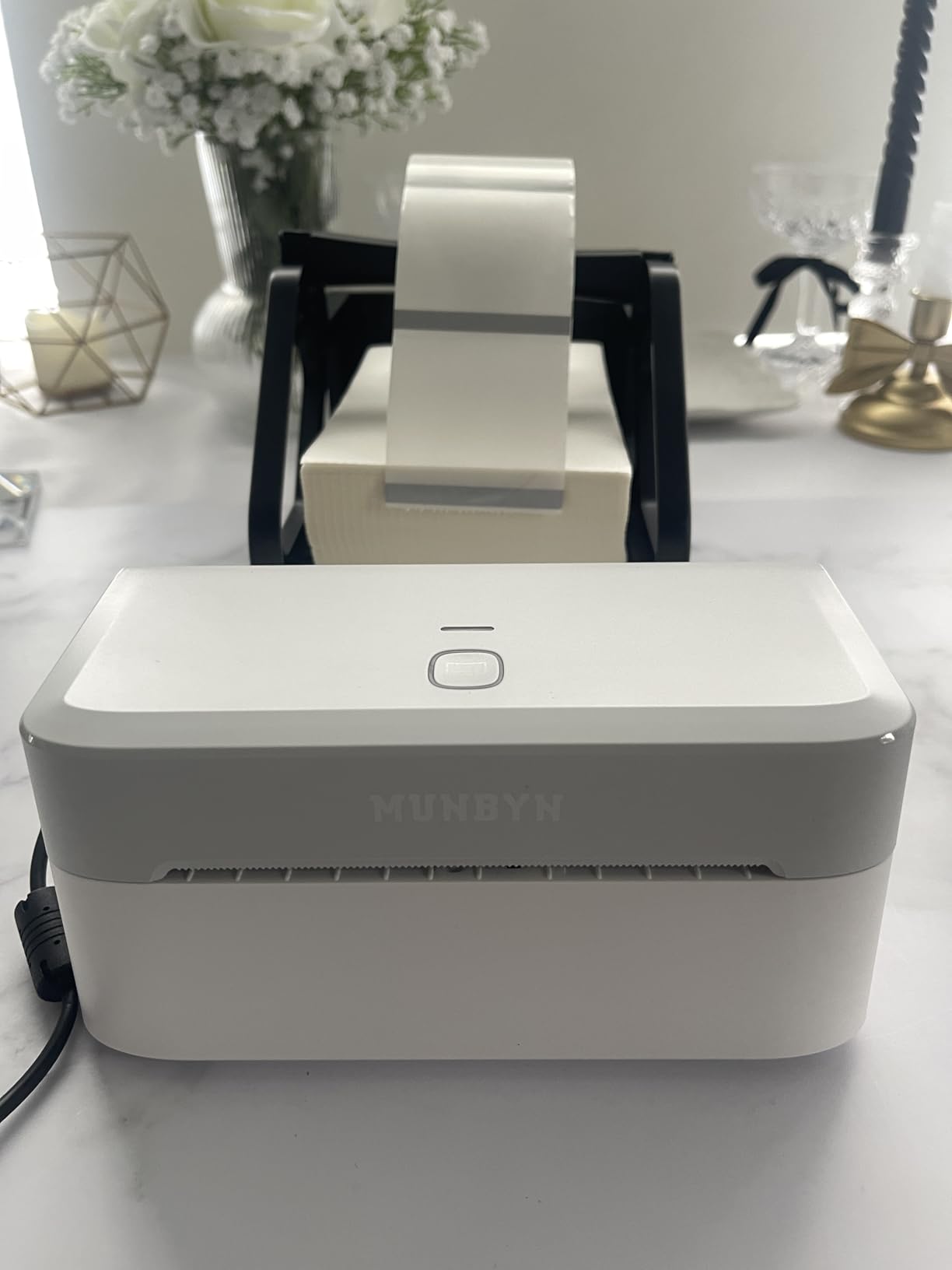
Check Price on Amazon5. MUNBYN Bluetooth Thermal Label Printer

The MUNBYN Bluetooth Thermal Label Printer sits in a useful middle ground: it’s built to handle real 4×6 shipping labels like the Rollo and DYMO above, but it does so at a noticeably lower price point and adds Bluetooth for phone-based printing that neither of those models offers.
That dual connectivity — Bluetooth for phone and tablet printing, plus USB for a more traditional desktop setup — makes it a flexible choice for small sellers who split their workflow between a computer at a desk and a phone while packing orders. It supports the major shipping and marketplace platforms, including Shopify, Etsy, and Amazon, and it prints barcodes cleanly enough for basic inventory and retail tagging as well as shipping.
Build quality is a step below the Brother and DYMO machines in this list — the housing feels lighter and the internals are less obviously built for heavy daily cycling — but for sellers just getting started who want to move off inkjet labels without a big upfront investment, it’s a sensible entry point. If ink cost and printer type comparisons are still on your radar for other printing needs, our inkjet vs. laser printer breakdown is worth a look before you commit to a full home office printer lineup.
Pros
- Genuine 4×6 shipping label support
- Bluetooth and USB connectivity in one unit
- Budget-friendly compared to Rollo and DYMO
- Works with major marketplace and shipping platforms
Cons
- Build quality feels lighter under heavy daily use
- Bluetooth range and stability can vary by device
- Print speed trails the Brother and Rollo models
A flexible, budget-friendly way to print real shipping labels from a phone or PC.
Check Price on Amazon6. Brother QL-1110NWB Label Maker, Shipping Labeller

The Brother QL-1110NWB is the most connectivity-rich printer in this roundup, offering Wi-Fi, Bluetooth, and USB all in a single machine. That matters more than it might sound like on paper: it means a small team can print to the same physical printer from a shared computer, an individual laptop, and a phone, without swapping cables or fighting over who’s plugged in.
This is Brother’s answer to dedicated 4×6 shipping printers like Rollo and DYMO, and it holds its own on that front, with support for oversized shipping labels alongside Brother’s usual DK-series smaller labels for general office use. That versatility — one printer that handles both a full shipping label and a small barcode sticker — is genuinely useful for small businesses that don’t want to run two separate machines for two separate jobs.
The NWB naming isn’t just a spec sheet flourish; the Network, Wi-Fi, and Bluetooth support means this printer fits naturally into a small office or home business where more than one person needs shipping access. If you’re setting up a shared workspace and comparing wireless options more broadly, our guide to the best wireless printer for home covers the same connectivity considerations from the standard document-printing side.
Pros
- Wi-Fi, Bluetooth, and USB in one printer
- Handles both oversized shipping labels and small DK labels
- Good fit for shared, multi-user shipping stations
- Backed by Brother’s reliable driver and software ecosystem
Cons
- Higher price than single-purpose shipping printers
- Initial network setup takes a few extra steps
- Larger footprint than compact Bluetooth-only models
The most flexible option here for shared or growing shipping setups.
Check Price on Amazon7. Phomemo M220 Label Maker

The Phomemo M220 rounds out this list as another compact, Bluetooth-first label maker aimed at retail tagging, pantry organization, and light small-business use rather than high-volume shipping. It’s built around Phomemo’s app, which offers a similarly deep template library to the NIIMBOT B1, along with barcode and price-tag generation tools aimed at small retail sellers.
One area where the M220 distinguishes itself is price tag and retail label creation — the app includes templates specifically built for pricing, SKU codes, and small product tags, which makes it a handy secondary printer for anyone running a small storefront, market booth, or craft business alongside their shipping printer. It’s genuinely pocketable, runs on a rechargeable battery, and connects in seconds over Bluetooth.
As with the NIIMBOT B1, don’t expect it to replace a shipping printer — the label width range and print speed are built around small tags and stickers, not 4×6 packages. But paired with one of the shipping-focused printers above, it rounds out a small business labeling setup nicely. If your labeling needs extend into general home office printing as well, it’s worth browsing our broader best printer for home office guide for the document side of that setup.
Pros
- Excellent for retail price tags and SKU labels
- Compact, battery-powered, and pocketable
- Strong app-based template library
- Fast Bluetooth pairing and printing
Cons
- Not built for 4×6 shipping labels
- Bluetooth-only, no USB fallback on most units
- Smaller label rolls need more frequent replacement
A pocket-sized labeling companion built for retail tags and organization.
Check Price on AmazonThermal vs. Inkjet Labels: Which Should You Actually Use
Every printer in this roundup uses direct thermal printing, and that’s not a coincidence — for labels specifically, thermal technology solves problems that inkjet and laser printing simply weren’t designed for. Understanding the difference helps explain why a dedicated label printer is worth owning even if you already have a standard home printer.
How Direct Thermal Printing Works
Direct thermal printers use a heated print head that reacts with a chemical coating on the label paper itself, darkening it to form text and barcodes. There’s no ink cartridge, no toner, and no ribbon to replace — the “ink” is baked into the paper. That’s why these printers can run for months without a single consumable purchase beyond the label rolls.
Where Thermal Labels Fall Short
The tradeoff is longevity. Thermal labels are sensitive to heat, direct sunlight, and friction, and they’ll gradually fade or darken unevenly over weeks or months of exposure. That’s a non-issue for a shipping label that only needs to be readable for the few days it’s in transit, but it’s a real consideration if you’re labeling something you want to stay legible for years — file folders, archived boxes, or anything stored somewhere warm.
Why It Still Beats Inkjet for Labels
Inkjet-printed labels smear more easily, cost more per label once you factor in cartridge prices, and print noticeably slower for high volumes. If you’re regularly weighing inkjet against other printing needs for your home setup, our comparison of the best ink tank printer for home use is a useful read for document and photo printing — but for pure label output, thermal is almost always the more practical, lower-maintenance choice.
Which Printer Fits Your Use Case
Rather than picking the “best” printer in a vacuum, it helps to match the machine to what you’re actually printing most days. Here’s how we’d sort the seven options above by real-world use case.
High-Volume E-Commerce Shipping
If you’re printing 20, 50, or 200+ shipping labels a day, prioritize the Rollo Wireless or Brother QL-1110NWB. Both are built around true 4×6 labels, integrate directly with the carrier and marketplace tools you’re already using, and are designed for daily heavy-duty cycling without slowing down.
Small Business Just Getting Started
If you’re shipping a smaller, growing volume and want to keep upfront costs down, the MUNBYN Bluetooth Thermal Printer offers real shipping label support at a friendlier price point, with the flexibility to print from a phone while you’re still figuring out your packing workflow.
General Home Office and Document-Adjacent Labeling
If your labeling needs are more varied — return addresses, file folders, name badges, the occasional barcode — the Brother QL-800 or DYMO LabelWriter 5XL are the more sensible picks, since both are designed around a broader range of label types rather than shipping exclusively.
Home Organization, Pantry, and Craft Projects
For labeling that has nothing to do with shipping — spice jars, storage bins, cable management, craft supplies — the NIIMBOT B1 and Phomemo M220 are purpose-built for exactly this, with colorful templates and phone-based printing that make the process genuinely quick.
Retail Price Tags and Small Storefronts
If you’re running a small shop, market booth, or pop-up and need price tags and SKU labels rather than shipping labels, the Phomemo M220’s retail-focused templates give it a slight edge over the more general-purpose NIIMBOT B1.
Related Reading on Printer Insight
Maintenance and Troubleshooting Tips
Label printers are low-maintenance compared to inkjet or laser machines, but a little care goes a long way toward keeping print quality sharp and avoiding jams.
Keep the Print Head Clean
Because direct thermal printers press a heated head directly against the label surface, dust and adhesive residue can build up over time and cause streaky or faded prints. A quick wipe with isopropyl alcohol on a soft cloth every few hundred labels keeps output crisp. The same general cleaning principle applies across printer types — our guide on how to clean printer heads covers the process in more detail if you want a deeper walkthrough.
Store Label Rolls Properly
Thermal label rolls are sensitive to heat and humidity even before they’re printed. Store spare rolls in a cool, dry place away from direct sunlight, and avoid stacking heavy items on top of them, which can cause uneven feeding later. If you’re managing a broader stock of printing consumables at home, our tips on how to store printer cartridges cover similar principles for ink and toner storage.
Fixing Wireless Connection Drops
Wi-Fi and Bluetooth label printers occasionally drop their connection, especially in busy home networks or warehouse environments with lots of competing devices. Restarting the printer, moving it closer to the router, and reconnecting through the manufacturer’s app usually resolves it. If a printer repeatedly goes offline, our troubleshooting guide on why your printer keeps going offline walks through the most common fixes step by step.
When a Printer Stops Responding
If a label printer suddenly stops taking print jobs altogether, the cause is usually a driver conflict, a stuck print queue, or a firmware update that needs to finish installing. Our detailed walkthrough on a printer not responding covers every likely cause and fix in order, from the simplest restart to a full driver reinstall.
General Upkeep Habits
Beyond label-specific care, the same overall upkeep habits that extend the life of any home printer apply here too — keeping firmware updated, avoiding extreme temperature swings, and not letting a printer sit unused for months at a time. Our broader home printer maintenance tips guide is a useful reference if you’re managing more than one printer in your home or office.
Frequently Asked Questions
Do label printers need ink or toner?
No. Every printer in this guide uses direct thermal printing, which relies on heat-sensitive paper rather than ink or toner. The only ongoing cost is the label rolls themselves.
Are thermal shipping labels waterproof?
Most standard direct thermal labels are water-resistant enough to survive light rain or handling during transit, but they’re not fully waterproof. If a package will be exposed to heavy moisture, a clear shipping label pouch adds a layer of protection.
Can I use generic label rolls instead of brand-name ones?
In most cases, yes. Printers like the Rollo and MUNBYN are designed to accept widely available generic 4×6 thermal rolls, which can meaningfully lower your cost per label. Brother and DYMO printers work best with their own branded rolls, though some generic alternatives are compatible.
Will a label printer work with Etsy, Shopify, or eBay?
Yes — the shipping-focused printers in this guide, including the Rollo, MUNBYN, DYMO 5XL, and Brother QL-1110NWB, all support printing directly from major marketplace and shipping platforms without needing special conversion software.
Why do my printed labels fade over time?
Direct thermal labels darken using heat rather than ink, which means they’re also sensitive to ongoing heat and UV exposure after printing. Keeping labeled items out of direct sunlight and away from hot surfaces slows this fading considerably.
What’s the difference between direct thermal and thermal transfer printing?
Direct thermal printers heat the label paper directly, with no ribbon involved — this is what every printer in this guide uses. Thermal transfer printers use a heated ribbon to transfer ink onto the label, producing prints that resist fading much longer, which matters more for long-term industrial or outdoor labeling than shipping.
Can I print small barcode or price tag labels on a shipping-focused printer?
Technically some, like the MUNBYN and Brother QL-1110NWB, can handle smaller label widths in addition to full 4×6 shipping labels. But for consistently small tags and barcodes, a compact printer like the NIIMBOT B1 or Phomemo M220 is purpose-built and easier to work with.
Do I need a computer to use a label printer?
Not necessarily. Bluetooth-connected models like the NIIMBOT B1, Phomemo M220, and MUNBYN Bluetooth printer can print directly from a smartphone app, no computer required. USB-only models like the Brother QL-800 and DYMO 5XL do need a connected computer.
How long does a roll of labels typically last?
This varies by label size and roll length, but a standard 4×6 shipping label roll commonly holds a few hundred labels, while smaller general-purpose rolls can hold significantly more given their reduced label size. Actual counts vary by manufacturer and roll length.
Is a dedicated label printer worth it if I already have a home printer?
If you print labels regularly — even a handful of shipments or organization projects a week — a dedicated thermal label printer saves significant time and running cost compared to using sheet labels in a standard inkjet or laser printer, and it frees up your main printer for documents and photos.
Can these printers print in color?
Most direct thermal label printers, including all seven in this guide, print in black only (with the Brother QL-800 supporting an additional red option via special two-color DK tape). For fully colorful labels, you’d need an inkjet-based label solution instead.
What size labels should I buy for shipping?
4×6 inches is the standard size accepted by USPS, UPS, FedEx, and most marketplace shipping tools, and it’s the size the Rollo, DYMO 5XL, MUNBYN, and Brother QL-1110NWB are all built around.
Final Verdict
There isn’t a single “best” label printer here — there’s a best label printer for what you’re actually doing. If shipping volume is your main concern, the Rollo Wireless or Brother QL-1110NWB will keep pace with a busy packing station. If you want dependable, general-purpose labeling for a home office, the Brother QL-800 and DYMO LabelWriter 5XL are proven performers. And if your labeling life revolves around pantry jars, retail tags, or craft projects rather than shipping, the NIIMBOT B1 and Phomemo M220 are built for exactly that kind of quick, colorful, phone-driven printing.
Whichever direction fits your workflow, moving label printing off your everyday inkjet or laser printer and onto a dedicated thermal machine is one of the more immediately noticeable upgrades you can make to a home office or small business setup.
See Today’s Top Label Printer Picks