Cost of Printer Ink vs. Toner
Two printers can look identical on price tag day one and then cost wildly different amounts to actually own. Here’s the real math behind ink and toner — and which one wins for how you actually print.
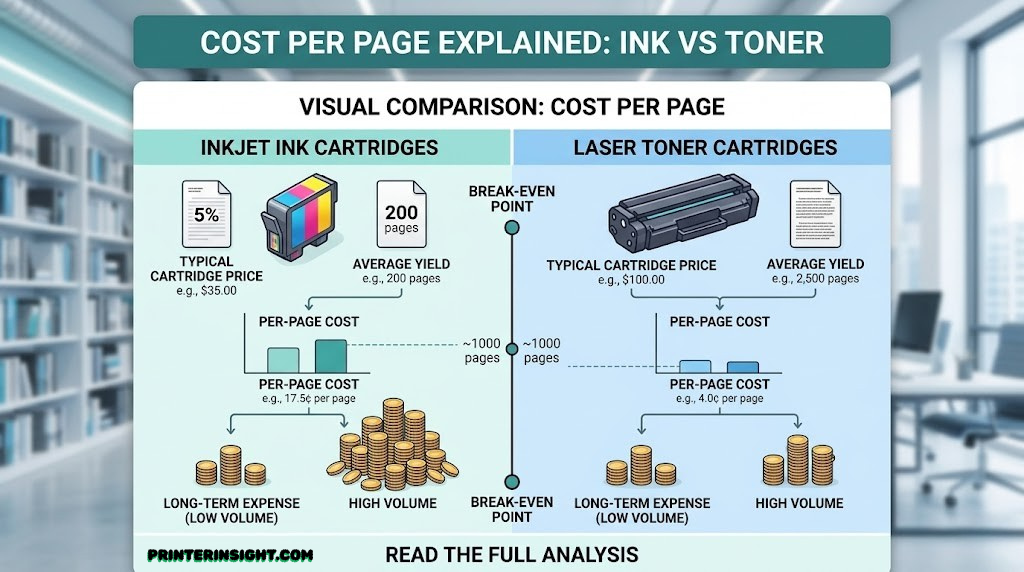
Every printer aisle sells the same quiet lie: a low price tag on the printer itself. The printer is rarely where you actually spend money over its lifetime — the ink or toner you keep feeding it is. And the gap between what people expect to pay and what they actually pay is almost always explained by one decision made on day one: inkjet or laser, cartridge or tank, store-brand or subscription plan.
This guide walks through the real, usable math — not marketing claims — so you can predict what a printer will actually cost you over a year of normal use, not just what it costs to drive home from the store. If you haven’t settled on a printer category yet, our broader inkjet vs. laser printer for home comparison covers the full decision beyond cost alone; this guide goes deep specifically on the dollars.
We’ll cover how ink and toner actually work, the formula for calculating true cost per page, where each technology quietly hides extra costs, and which one makes sense for your specific print volume and content mix.
How Ink and Toner Actually Work
Before the cost math makes sense, it helps to understand why ink and toner are priced so differently in the first place — they’re genuinely different substances doing genuinely different jobs.
Liquid Ink
Inkjet printers fire microscopic droplets of liquid ink through tiny nozzles onto the page, where it’s absorbed into the paper fiber (or sits on a coated surface for glossy photo stock). The print head itself is a precision part — sometimes built into the cartridge, sometimes a permanent part of the printer — and it’s the component most vulnerable to clogging if ink dries out from disuse.
Toner Powder
Laser printers use toner: a fine, dry powder that’s electrostatically charged onto a rotating drum in the shape of the page, then fused permanently onto the paper using heat and pressure. There’s no liquid to dry out, which is why laser printers can sit unused for months and print perfectly the moment you need them.
That structural difference explains almost every cost pattern in this guide. Liquid ink is cheap to manufacture but expensive to package and ships in small volumes relative to its cost; toner is more complex to manufacture but lasts dramatically longer per cartridge, spreading that cost over thousands more pages. Neither is “better” in the abstract — they’re priced for different jobs.
Fixed vs. Replaceable Print Heads
One inkjet design detail matters more for long-term cost than most shoppers realize: whether the print head is built into the cartridge or fixed permanently inside the printer. On printers where each cartridge carries its own tiny print head, a clog usually means a wasted cartridge, but a cheap, simple fix — you just buy a new one and the print head problem goes away with it. On ink tank and many higher-end cartridge printers, the print head is a separate, permanent component, which is more efficient to manufacture and maintain under normal use, but turns a serious clog into a repair issue rather than a quick swap.
Neither approach is automatically better, but it changes how seriously you should take the maintenance habits covered later in this guide. If your printer has a fixed head, treating it well from week one is genuinely cheap insurance against an expensive problem later.
The Real Cost-Per-Page Formula
Cost per page is the single number that cuts through marketing noise, and it’s simple to calculate once you know where to find the inputs:
Manufacturers publish a “page yield” for every cartridge or ink bottle, based on a standardized low-coverage test page (typically 5% ink coverage, roughly what a normal text document uses). Divide the price by that yield and you get a genuine, comparable number.
A few traps to watch for when you do this math yourself:
- XL or high-capacity cartridges almost always have a better cost-per-page than standard cartridges, even though the upfront price is higher — always compare the per-page number, never the sticker price.
- Photo and graphics-heavy pages use far more ink than the 5% coverage standard, so a printer’s official cost-per-page figure can understate real-world photo printing costs by several times over.
- Color pages cost more than black-and-white pages on virtually every printer, since they use multiple ink or toner colors simultaneously — always check black-only and color cost-per-page separately.
A Worked Example
Numbers make this concrete faster than percentages do. Imagine two hypothetical cartridges: Cartridge A costs roughly twice as much as Cartridge B, but is rated to print three times as many pages. On sticker price alone, Cartridge B looks cheaper. Divide each by its page yield, though, and Cartridge A actually costs less per page — by a meaningful margin. That’s the entire trap of shopping by shelf price instead of cost-per-page: the “cheaper” option at checkout is frequently the more expensive one a year into ownership.
The same logic applies one level up, when comparing two different printers rather than two cartridges for the same printer. A printer that costs less upfront but locks you into small, low-yield cartridges can easily cost more over two or three years than a pricier printer paired with high-yield ink. Whenever you’re comparing printers seriously, it’s worth running this math for at least your expected first year of ownership rather than judging by the box alone.
Those figures are general industry ranges, not promises for any specific model — always check the published yield for the exact cartridge or bottle a printer uses before buying, since it varies by model and region. For more on this specifically for inkjets, see our home printer cheapest ink roundup, which ranks current models by real cost-per-page rather than upfront price.
Upfront Printer Cost: Inkjet vs. Laser
The first cost most people compare is also the least important one over the printer’s lifetime: the price on the box. Basic 4-color inkjets are typically the cheapest printers on the shelf, color laser printers sit in the middle, and ink tank or high-end photo cartridge printers often carry the highest sticker price of all — which feels backwards until you remember that an ink tank printer’s higher price buys you a year or more of pre-loaded ink, not just the machine.
| Printer Type | Typical Upfront Cost | What You’re Paying For |
|---|---|---|
| Basic 4-color inkjet | Lowest | Bare-bones hardware, starter cartridges |
| Monochrome laser | Low-to-mid | Fast text printing, long-life toner |
| Color laser | Mid-to-high | Four separate toner cartridges, drum unit |
| Ink tank (supertank) | High | Bottles of ink included, refillable tanks |
What “All-in-One” Adds to the Price
A meaningful chunk of upfront price difference between printers in the same general category often comes down to features that have nothing to do with print technology at all — a scanner bed, an automatic document feeder, a larger paper tray, or a color touchscreen all add to the sticker price independent of whether the printer uses ink or toner. When comparing two printers, it’s worth separating “this costs more because it does more” from “this costs more because the ink or toner system is fundamentally pricier,” since only the second factor affects your ongoing running costs.
If your budget is genuinely fixed at the register and you don’t print enough to make up a tank system’s higher entry cost, a basic inkjet or monochrome laser is a perfectly rational choice. Our best home printers worth buying right now hub covers every category and price point if you want the full landscape before narrowing in on the cost angle specifically.

Browse Home Printers
Compare current inkjet and laser options by upfront price
Shop on Amazon →As an Amazon Associate we earn from qualifying purchases.
Ink Tank Printers: Rewriting the Inkjet Cost Equation
Ink tank — sometimes called “supertank” — printers exist specifically to solve the problem this entire guide is about. Instead of small, individually packaged cartridges, they use large refillable reservoirs filled directly from ink bottles. Because the bottles hold far more ink per dollar than a cartridge does, and because there’s no small-format packaging markup, the cost per page on an ink tank printer is typically a small fraction of what a comparable cartridge inkjet charges — often cheap enough to make printing in color for everyday documents a non-issue rather than something you ration.
The break-even math is straightforward: an ink tank printer costs more on day one, but every print afterward costs so much less that the price difference is usually recovered within the first year for a moderately active household, and every month after that is pure savings. For anyone printing regularly — school projects, photos, color documents — this is usually the better long-term decision even though it looks like the more expensive option in the store.
Finding Your Personal Break-Even Point
The simplest way to know whether an ink tank printer makes sense for you is to estimate your break-even point directly: take the price difference between an ink tank printer and a comparable cartridge model, then divide it by the per-page savings you’d realistically see on your typical mix of color and black-and-white pages. If that number comes out to a few hundred pages — a few months of moderate household printing for most families — the tank system pays for itself quickly and keeps saving afterward. If it comes out to several thousand pages, you may be a light enough printer that the math never quite favors the higher upfront cost.
It’s also worth weighing convenience separately from pure cost. Even households that print just enough to make the math a toss-up often still prefer ink tank printers simply because they stop thinking about running out of ink — a large bottle refill lasts long enough that ink scarcity stops being a recurring household chore.
The catch is that this math only works in your favor if you actually print enough to use the ink before it ages out, and if you’re disciplined about exercising the printer regularly so nozzles don’t clog from disuse. For the full case for and against the category, read are ink tank printers worth it? And if you’ve decided ink tank is the right call, our current best ink tank printer for home picks are a good next stop.

Browse Ink Tank Printers
Supertank models with the lowest cost per page
Shop on Amazon →As an Amazon Associate we earn from qualifying purchases.
Where Laser Printing Actually Saves You Money
Toner’s advantage isn’t that it’s cheaper per cartridge — toner cartridges typically cost more upfront than ink cartridges. It’s that a single toner cartridge lasts so much longer, often printing several thousand pages before it needs replacing, compared to a few hundred for a standard inkjet cartridge. Spread that purchase cost over thousands of pages instead of hundreds, and the per-page math swings heavily in favor of laser, especially for black-and-white text.
This is also where toner’s physical nature helps: because it’s a dry powder fused onto the page rather than liquid soaked into it, there’s no nozzle to clog and no risk of ink drying out between uses. A laser printer that sits idle for a month will print exactly as well as one used every day — something no inkjet printer can promise. For households with unpredictable or bursty printing needs (tax season, a flurry of school forms, then weeks of nothing), that reliability has real value beyond the raw cost-per-page number.
Speed, Duty Cycle, and What They Mean for Cost
Laser printers are also rated for a much higher monthly “duty cycle” — the volume of pages a manufacturer expects the machine to handle reliably each month — than most home inkjets. That matters for cost in an indirect but real way: a printer running comfortably within its duty cycle experiences less mechanical wear and fewer service issues over its lifetime than one constantly pushed near its limit. If you’re shopping for a printer that will realistically handle hundreds of pages a week, checking the duty cycle rating alongside the cost-per-page figure helps avoid buying a machine that’s technically cheap to feed but mechanically over its head.
Speed factors in too, if less directly: a laser printer that finishes a 50-page job in a couple of minutes saves real time compared to an inkjet grinding through the same job, which matters for households or small offices where printing happens in bursts under time pressure.
The trade-off is in what laser can’t do well: photos and rich color graphics, where toner’s flat, layered application can’t match liquid ink’s smooth blending. For a side-by-side breakdown of where each technology wins outright, our best laser printer for home guide covers current monochrome and color laser picks in detail.

Browse Laser Printers
Lowest cost-per-page for high-volume text printing
Shop on Amazon →As an Amazon Associate we earn from qualifying purchases.
Color and Photo Printing: Where Toner Falls Short
Cost-per-page comparisons usually favor laser overall, but that average hides a big asterisk: it’s mostly driven by black-and-white text. The moment you bring photos and rich color graphics into the picture, the math — and the visual results — flip in inkjet’s favor.
Color laser toner is genuinely expensive on a per-page basis when a page uses heavy color coverage, since it draws from all four toner cartridges at once. More importantly, even an expensive color laser printer can’t reproduce smooth photographic gradients the way liquid ink can — toner’s flat, layered application tends to look slightly plasticky on continuous-tone images like portraits and landscapes, regardless of price point. If photo output matters to you at all, this isn’t really a cost question — it’s a “the printer physically can’t do this well” question. Our dedicated best home printer for photos guide goes deep on which inkjet models handle this job best.
How Paper Choice Changes the Cost
Paper type quietly affects ink consumption too. Glossy photo paper has a coating designed to hold more ink on the surface for richer, more saturated color, which generally uses more ink per print than matte paper does for the same image. Matte stock absorbs differently and often prints acceptably with less ink, which is part of why matte prints can look slightly less vibrant straight off the printer — the printer is genuinely depositing less color. If you’re trying to manage costs on a photo-heavy project, printing proofs on matte paper before committing to a final glossy print run is a simple way to catch color issues before spending the extra ink.
Crafters face a similar calculation. Card-making, scrapbooking, and other projects that mix fine detail with rich color tend to use far more ink coverage per page than the standard 5% test used to calculate official cost-per-page figures, which means real-world costs for these projects run noticeably higher than the headline number on the box. If that’s your primary use case, our best printer for crafting guide accounts for that heavier ink usage specifically when ranking printers.

Browse Photo & Craft Printers
Inkjet models built for color depth and skin tones
Shop on Amazon →As an Amazon Associate we earn from qualifying purchases.
High-Volume Office and Student Use: Where Toner Wins
If your printing diet is mostly text — homework, forms, contracts, reading material — toner’s economics are hard to beat. A monochrome laser printer pairs the lowest cost-per-page in this entire guide with print speeds that leave inkjets behind, and a single toner cartridge can outlast months or even a year of moderate household use before needing replacement. That combination of speed, reliability, and low running cost is exactly what a busy home office or a student juggling constant assignment printing actually needs.
Shared Printers and Multiple Users
Cost math shifts again when a single printer is shared across several people — a household with multiple kids in school, or a small office with several employees. Shared use multiplies page volume quickly, which tends to favor laser even more heavily than a single-user comparison would suggest, simply because the cost-per-page gap compounds across far more total pages each month. It also raises the practical importance of a higher duty cycle rating and a larger paper tray, since shared printers run dry on both ink and paper more often than single-user setups.
It’s also worth noting that laser printers tend to have a gentler relationship with disuse. A home office that goes quiet for a week of travel, or a student who doesn’t print anything during a slow week of the semester, won’t come back to a clogged print head — toner simply waits. For households or workspaces built primarily around this kind of usage pattern, our best printer for home office and best printer for students guides both lean heavily toward laser and high-yield inkjet recommendations for exactly this reason.

Browse Office & Student Printers
High-yield, low cost-per-page text printing
Shop on Amazon →As an Amazon Associate we earn from qualifying purchases.
Subscription Ink Plans and Smart Reordering
Several manufacturers now offer subscription-style ink plans — a flat monthly fee that bills based on how many pages you print, rather than how much ink you physically use, with replacement cartridges mailed to you automatically before you run out. For households with predictable, moderate print volumes, these plans can genuinely simplify the cost picture and prevent the classic “out of ink at 11pm before a deadline” scenario. For very light or very heavy printers, though, the flat-fee structure can work against you compared to just buying ink as needed, especially if a plan’s lowest tier still costs more than your actual usage would.
Worth noting: subscription plans are a billing model layered on top of a printer’s underlying technology, not a replacement for the cost fundamentals covered earlier in this guide — an inkjet on a subscription plan is still an inkjet, with the same head-clogging risks if a billing cycle’s allotted pages go unprinted for too long.
Matching a Plan Tier to Your Actual Usage
The practical test for any subscription plan is simple: track your actual monthly page count for a month or two before signing up, then compare that number against the plan’s tiers rather than guessing. Most plans roll unused pages over for a limited time but charge extra once you exceed a tier, so consistently overshooting a low tier often ends up costing more than just choosing the next tier up from the start. And because tiers are usually priced for a print volume, not a print value, a month of mostly cheap text pages and a month of mostly expensive color photo pages cost the same on a flat plan — which can work strongly in your favor or against it depending on what you actually print.
Separately, connected features are quietly becoming one of the more useful cost-saving tools available: Wi-Fi-enabled printers that monitor their own ink or toner levels can alert you — or auto-order replacements — before you’re caught empty-handed and forced into an expensive last-minute purchase at a retail markup. If you’re shopping with this in mind, our best wireless printer for home guide highlights models with the most reliable ink-level reporting, and our how to connect a printer to Wi-Fi walkthrough covers getting those features working in the first place. Mac households specifically monitoring ink levels through Apple’s ecosystem may also want to check our best home printer for Mac picks, which factor in driver-level feature support.
Brand-by-Brand Cost Differences
The cost rules above hold true across the industry, but the gap between brands and even between two models from the same brand can be significant — ink and toner pricing is set per cartridge family, not as a blanket policy, so the “cheapest brand” question doesn’t have one universal answer.
Epson and HP both run major ink tank programs, and while the underlying economics are similar, real-world cost and reliability can differ in the details — our Epson EcoTank vs. HP Smart Tank comparison breaks down those differences directly. Canon’s MegaTank line competes in the same space with its own cost structure worth comparing before you buy. On the cartridge side, HP and Canon are frequently cross-shopped against each other for photo and all-in-one use — see Canon PIXMA vs. HP Envy and our best HP printer for home use roundup for current pricing context.
Brother, meanwhile, has built much of its reputation specifically around low-cost, high-yield laser and inkjet cartridges aimed at home offices, which makes it a natural comparison point against HP’s ecosystem. If Brother is on your shortlist, Brother vs. HP printers for home and our best Brother printer for home guide both dig into how their running costs actually compare in practice, not just on paper.
Ecosystem Lock-In Is a Real Cost Factor
Beyond headline pricing, it’s worth considering how tightly a manufacturer’s ecosystem is locked down. Some printers use firmware that actively restricts non-original cartridges or ties replacement pricing to a specific authorized retailer list, which limits your ability to shop around once you’ve committed to a model. Others are more open to third-party and refilled options. Neither approach is inherently a dealbreaker, but it’s a cost factor worth researching for the specific model you’re considering, not just the brand in general, since policies can differ between product lines even within the same manufacturer.

Browse Replacement Ink & Toner
Compare current cartridge and bottle pricing by brand
Shop on Amazon →As an Amazon Associate we earn from qualifying purchases.
Lowering Your Ink and Toner Costs Starting Today
Whatever printer you already own, a handful of habits noticeably reduce ink and toner spending without requiring a new purchase at all:
- Use draft or economy print mode for anything that isn’t a final document — internal notes, scratch printouts, and rough drafts don’t need full-quality ink coverage.
- Switch to a less ink-hungry font for everyday text printing; some typefaces use noticeably less ink per page than others at the same point size.
- Buy XL or high-yield cartridges whenever the per-page math favors them, which is almost always — the higher sticker price is nearly always offset by the better yield.
- Store spare cartridges correctly — sealed, upright, and away from heat or direct sunlight — so they don’t degrade before you even install them. Full details in our how to store printer cartridges guide.
- Keep up with basic maintenance rather than waiting for a problem — nozzle checks, nozzle cleaning cycles, and periodic light use all extend a printer’s effective lifespan and prevent costly repairs.
Two More Habits Worth Adopting
Two additional habits are easy to overlook but add up over a year of regular printing. First, get in the habit of using print preview before sending anything to the printer — it’s a small extra click that catches stray pages, oversized margins, and accidental color formatting before they waste a sheet and the ink or toner that went with it. Second, if your printer supports double-sided (duplex) printing, using it by default for internal or draft documents effectively cuts paper usage in half, which matters less for ink cost directly but adds up meaningfully on the paper side of your printing budget over a year.
None of these habits require any special skill, and together they typically make a noticeably bigger dent in printing costs than switching brands or chasing the “cheapest” cartridge alone. For a complete, ongoing checklist that covers every printer type in this guide, bookmark our home printer maintenance tips page.
Final Verdict: Matching the Right System to Your Print Volume
There’s no single cheapest printer technology — only the cheapest one for your specific mix of volume and content. Before looking at the table below, it helps to answer three quick questions about your own printing habits: roughly how many pages do you print in an average month, what share of that is color versus plain text, and how predictable is your printing — steady week to week, or bursty with long quiet stretches in between? Those three answers do more to determine your ideal printer than any spec sheet or brand reputation.
Here’s the short version, distilled from everything above:
| Your Situation | Recommended System | Why |
|---|---|---|
| Light, occasional printing | Basic inkjet or compact printer | Lowest entry cost; low volume means tank savings won’t materialize |
| Heavy text/document printing | Monochrome laser | Lowest cost-per-page, no clogging risk from disuse |
| Frequent color or photo printing | Ink tank (supertank) | Dramatically lower cost per color/photo page at volume |
| Occasional, high-end framed prints | High-end cartridge inkjet | Best per-print quality without tank system overhead |
| Mixed office + occasional color | Color laser all-in-one | Balanced cost across text and moderate color use |
If your space or budget calls for something smaller while you weigh these trade-offs, our best compact home printers guide rounds up space-saving options across both ink and toner categories.
Frequently Asked Questions
Is laser printing always cheaper than inkjet?
Not always. Laser is almost always cheaper for black-and-white text printing because toner cartridges last so much longer per dollar. But for photos and rich color graphics, ink tank inkjet printers usually beat laser on both cost and quality, since toner struggles with smooth color gradients and color laser toner is expensive per heavily-covered page.
Why do ink cartridges seem so expensive for so little ink?
Standard ink cartridges are priced to cover packaging, the precision nozzle components in some designs, and the manufacturer’s margin on a small-format consumable, not just the liquid ink itself. That’s exactly why ink tank printers, which refill from larger bottles without that small-package markup, end up so much cheaper per page over time.
What is “page yield” and why does it matter?
Page yield is the manufacturer’s estimate of how many pages a single cartridge or ink bottle can print, based on a standardized test page at roughly 5% ink coverage. Dividing the cartridge price by its page yield gives you a true cost-per-page figure, which is far more useful for comparison shopping than the sticker price alone.
Are XL or high-capacity ink cartridges worth the higher price?
In almost every case, yes. XL cartridges cost more upfront but typically print significantly more pages per cartridge than standard size, which usually works out to a lower cost per page. The only exception is if you print so rarely that ink ages out before you use a full XL cartridge.
Do ink tank printers really save money over cartridge printers?
For households that print regularly, yes — often dramatically. The higher upfront cost of an ink tank printer is typically recovered within the first year or two of moderate use, after which every print costs a small fraction of what a cartridge printer would charge. Light, occasional printers may never fully recoup that higher starting price.
Is toner more expensive than ink to buy upfront?
Per cartridge, yes — toner cartridges generally cost more than ink cartridges at the register. But because a single toner cartridge typically lasts for thousands of pages compared to a few hundred for ink, the cost per page usually ends up much lower for toner on text-heavy printing.
Why does my printer say it’s out of ink when there’s clearly ink left?
Most printers stop printing and trigger a low-ink or empty warning before a cartridge is truly drained, reserving a small safety margin to prevent the print head from running completely dry and being damaged by air. It can feel wasteful, but it’s protecting an expensive component from a failure that would cost far more to fix.
Are third-party or refilled cartridges a good way to cut costs?
They can lower upfront costs, but quality and reliability vary widely between suppliers, and some printers are designed to flag or restrict non-original cartridges. If you go this route, stick to well-reviewed suppliers, watch closely for print quality issues or clogging, and check whether it affects your printer’s warranty before committing to it as a long-term strategy.
Do subscription ink plans actually save money?
For households with predictable, moderate print volumes, subscription plans can simplify costs and prevent running out of ink at a bad time. For very light or very heavy printers, a flat monthly fee can work out worse than simply buying ink as needed, so it’s worth comparing your typical monthly page count against a plan’s tiers before signing up.
How much more does color printing cost compared to black and white?
Color pages cost more on virtually every printer, since they draw from multiple ink or toner colors at once rather than just black. The gap is usually moderate for light color use like a logo or highlighted text, but grows substantially for photo-heavy or fully color-saturated pages, which use far more ink or toner coverage than a standard text page.
Does a more expensive printer always mean cheaper ink or toner in the long run?
Not automatically — a higher price tag can reflect better build quality, more features, or faster print speeds without necessarily meaning lower running costs. Always check the specific cartridge or ink bottle pricing and page yield for a model you’re considering rather than assuming a higher purchase price guarantees cheaper consumables.
The Cheapest Printer Is the One That Matches How You Print
There’s no universal winner between ink and toner — only a better and worse fit for your specific habits. Print mostly text in bulk, and laser will save you real money every month. Print photos, color projects, or anything visually rich on a regular basis, and an ink tank printer will almost always beat both cartridge inkjets and color laser on cost and quality alike. The mistake most people make isn’t picking the “wrong” technology — it’s picking based on the sticker price alone and ignoring the cost-per-page math that actually determines what a printer costs over the years you’ll own it.
Before you buy, run the numbers for your own situation: estimate how many pages you print monthly, how much of that is color versus black and white, and compare real cost-per-page figures rather than shelf price. Five minutes of that math can save you far more than any single discount.
Compare Today’s Best Home Printers →As an Amazon Associate we earn from qualifying purchases.