Are Ink Tank Printers Worth It? The Honest, Comprehensive Answer
Ink tank printers promise to slash your printing costs dramatically — but the higher upfront price, longer break-even window, and real-world trade-offs mean the answer is more nuanced than the ads suggest. We break it all down.
What Is an Ink Tank Printer?
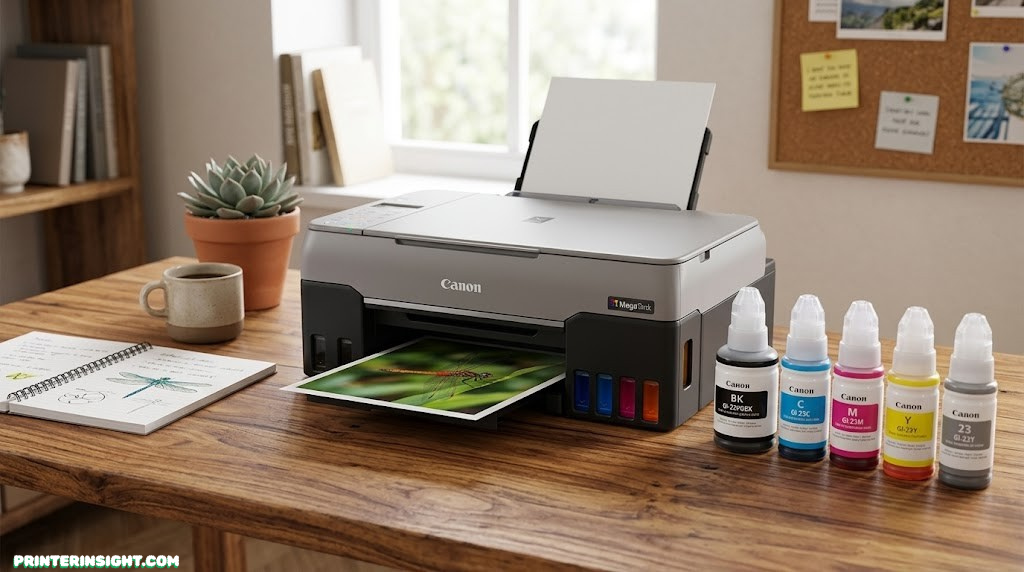
Walk into any electronics store and you’ll find two fundamentally different types of inkjet printers sitting side by side. Traditional inkjets use small, sealed cartridges — snap them in, print until empty, toss them, repeat. Ink tank printers — also called EcoTank, MegaTank, or Smart Tank printers depending on the brand — replace those disposable cartridges with large, refillable reservoirs built directly into the machine.
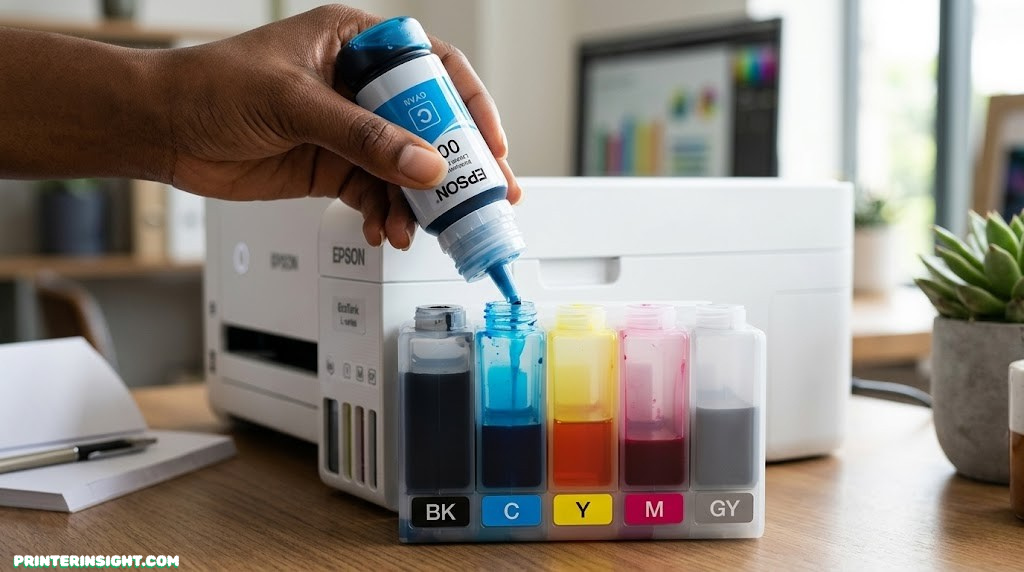
Instead of buying pre-filled cartridges every few months, you purchase bottles of liquid ink and pour them into the tanks yourself. The tanks hold dramatically more ink than any cartridge: a standard bottle set for most models provides enough ink to print several thousand pages. The printer you’re filling today might not need ink again for a year or more.
The concept isn’t new — high-volume commercial printing has always used bulk ink systems. What changed in the last decade is that manufacturers like Epson, Canon, and HP began bringing this approach down to consumer price points and home-friendly sizes. Today, you can pick up a capable ink tank all-in-one for a few hundred dollars, and it will likely cost less to feed per page than almost any cartridge-based alternative.
If you’ve been looking at the best home printers worth buying right now, you’ve probably already seen ink tank options appearing prominently. There’s a reason for that — for the right user, they represent a genuine structural shift in how much printing costs.
The critical question, though, is whether that shift benefits you specifically. That depends on how much you print, what you print, how you value your time, and whether you can stomach a higher initial price in exchange for dramatically lower running costs. The rest of this guide exists to give you a precise, honest answer to that question.
How Ink Tank Systems Work
To understand whether ink tank printers are worth it, you need a basic picture of the engineering behind them — because that engineering is where both the advantages and the limitations come from.
The Tank Architecture
Conventional cartridge inkjets store ink inside the cartridge itself, often alongside the print head. When the cartridge runs dry, you’re disposing of the ink delivery mechanism and often part of the print head. This is the “razor and blade” model: the printer is cheap, the ongoing consumables are expensive.
Ink tank printers separate the ink storage from the print head entirely. Large tanks — often translucent so you can see ink levels — sit either on the side or front of the printer and are connected by fine tubes to a permanent print head assembly. The ink flows from tank to head on demand. When a tank runs low, you unscrew a cap, insert the tip of the corresponding color bottle, and let gravity fill it. No cartridge alignment, no chip resetting — just ink going where it needs to go.
How ink flows from a refill bottle through the tank reservoir to the permanent print head
Why This Matters for Cost
The cartridge model is expensive for a structural reason: you’re paying for manufacturing, packaging, and the ink delivery mechanism every single time the cartridge runs out. Ink tank systems amortize the cost of the delivery mechanism across the full life of the printer. You’re paying for ink, and ink only — and bulk liquid ink is drastically cheaper per milliliter than ink pre-packaged in a sealed cartridge.
A typical black ink cartridge might contain 5–8ml of ink and cost $15–25. A comparable black ink bottle for an EcoTank printer holds 70–140ml and costs $12–18. The math is stark: you’re getting 10–20× more ink for roughly the same price or less.
The Print Head Trade-Off
Because the print head is permanent — it doesn’t get replaced with the ink — it needs to last the life of the printer. Manufacturers build them to do exactly that, but this creates a sensitivity that cartridge users don’t face: if the print head clogs badly enough, the repair cost can approach the cost of a new printer. This is one of the genuine risks of the ink tank model, and we’ll address it directly in the maintenance section.
Quick note on brands: Epson calls their system EcoTank, Canon uses MegaTank (in their PIXMA G-series), and HP offers Smart Tank. All three work on the same principle — large ink reservoirs, bottled refills, permanent print heads — though they differ in features, refill designs, and ink formulations.

Epson EcoTank ET-2803 — Best Entry-Level Ink Tank
Wi-Fi, compact design, and two years’ worth of ink included. Perfect first ink tank printer for home use.
Check Price on Amazon →The Real Cost: Upfront vs. Long-Term
This is the crux of the entire decision. Ink tank printers are not cheap to buy — they cost more upfront than traditional inkjets in the same feature class. But they are radically cheaper to run. Understanding which of those factors matters more for you requires honest math, not marketing claims.
Purchase Price Reality
Entry-level cartridge inkjets start under $100, often well under. Entry-level ink tank printers start around $150–$200 for basic models, with full-featured wireless all-in-ones (print, scan, copy, ADF) running $250–$450. If you compare apples to apples — an ink tank all-in-one with Wi-Fi and scanning versus a cartridge all-in-one with the same features — the price gap narrows, but the ink tank version still costs $100–$200 more in most cases.
Most manufacturers have also moved to including a large initial ink supply in the box — Epson, for instance, bundles enough ink to print roughly 2,500 pages with many EcoTank models. That included ink has a retail replacement value of $50–$80 alone, which closes the cost gap meaningfully at purchase.
The Per-Page Cost Comparison
| Printer Type | Black CPP | Color CPP | Ink Cost / Year (3,000 pages) | Printer Price Range |
|---|---|---|---|---|
| Ink Tank Printer | ~$0.008 | ~$0.015 | ~$24–45 | $150–$450 |
| Cartridge Inkjet | ~$0.06 | ~$0.12 | ~$180–360 | $60–$250 |
| Laser Printer (Mono) | ~$0.025 | N/A (mono) | ~$75 (text only) | $120–$350 |
| Color Laser | ~$0.025 | ~$0.08 | ~$75–240 | $200–$600 |
CPP = cost per page. Estimates based on typical ISO yields and current retail pricing. Mixed-use print volume assumed for color CPP.
At 3,000 pages per year — a fairly typical volume for an active home printer — a cartridge inkjet user spends $180–$360 on ink alone annually. An ink tank printer user spends $24–45 for the same output. That’s a difference of roughly $150–$315 per year in ink costs. Even if the ink tank printer cost $250 more to buy, it pays for itself in ink savings within a single year of regular printing.
The Hidden Cost Nobody Advertises
What the math above doesn’t capture is the cost of not being able to print. A traditional inkjet running dry on a Sunday night before a Monday deadline pushes you to print at a copy shop or buy expensive XL cartridges at a local store at a premium. Ink tank printer owners rarely face this situation — you can see through the translucent tanks when ink is getting low, and a refill bottle purchased in advance keeps you ready for weeks.
There’s also the psychological cost of ink anxiety — the nagging awareness that every page printed depletes an expensive, soon-to-expire resource. Ink tank printers essentially eliminate that friction. Once refilled, you can print freely without rationing. For people who print photos, school projects, or work documents at home, that mental freedom has genuine value.
For a deeper analysis of running costs across printer types, see our guide on the real cost of printer ink vs. toner — it includes cartridge depreciation rates and real-world cost scenarios that go beyond ISO yields.
What About Ink Expiration?
Bottled ink for ink tank printers does have a shelf life — typically two to three years after opening, or longer if stored in a cool, dark location. For very light users, there’s a real possibility that you’ll fill your tanks and find some ink has thickened or changed before you use it all. This is a legitimate concern for people who print fewer than 500–1,000 pages per year — though in practice, most current ink formulations are robust enough that mild disuse doesn’t cause dramatic problems.
Light user caution: If you print fewer than 100 pages a month, calculate your annual ink usage carefully before assuming an ink tank printer will save you money. Very light users may see the ink savings eroded by higher upfront costs and potential waste from partial bottles.
Print Quality: What to Really Expect
Marketing materials for ink tank printers tend to emphasize cost, not quality. That’s telling. The honest answer on print quality is more nuanced than either “ink tanks produce professional results” or “cartridge printers are superior.”
Text Documents
For everyday text printing — letters, reports, forms, homework — mid-range ink tank printers produce output that is functionally indistinguishable from cartridge inkjet output. Black text is crisp, line weights are consistent, and the difference between an ink tank print and a cartridge print is not something most users will notice on a standard page.
Where ink tank text output can fall marginally short is at very high resolution or when printing extremely fine print (sub-7pt type). The dye-based inks used in most consumer ink tank models don’t achieve quite the microscopic dot precision of certain cartridge systems. For 99% of home and small office printing, this distinction is entirely academic.
Photo Printing
This is where ink tank printers show more variation. Entry-level models (like the Epson ET-2803) produce decent photo prints — good enough for 4×6 snapshots and Instagram-worthy shots — but may show slightly less vibrancy and tonal range compared to a dedicated photo inkjet using pigment or six-color ink systems.
Mid-to-upper-range ink tank models, particularly those with five or six ink colors rather than four, produce genuinely excellent photo output. If photo quality is a priority, check whether the specific model you’re considering has a dedicated photo or gray ink. Check out our dedicated guide to the best printers for photos at home for models optimized specifically for image output.
Approximate performance scores across key print categories (higher = better). Speed is where laser printers dominate.
Graphics and Color Documents
Ink tank printers shine for color-rich document printing — marketing materials, brochures, colored charts, and presentations. The dye-based ink systems produce vivid, saturated colors that outperform most mono or color laser options and match or exceed cartridge inkjet output at comparable price points. If your home or small office printing regularly involves color graphics, this is a genuine strength of the ink tank format.
Print Speed
Most ink tank printers are slower than equivalent laser printers — especially on the first page out. Print speeds for consumer ink tank models typically run 5–12 pages per minute for black text and 3–8 ppm for color. For occasional home printing, these speeds are entirely adequate. For users who regularly print large multi-page documents and need them fast, a laser printer has a structural advantage here.

Canon PIXMA G3270 MegaTank — Best Mid-Range Value
Wireless all-in-one with up to 6,000 black / 7,700 color pages per bottle set. Excellent everyday quality.
Check Price on Amazon →Full Pros & Cons Breakdown
No printer type is universally superior, and ink tank printers are no exception. Here is an unfiltered look at the real advantages and genuine drawbacks based on long-term real-world use.
✓ ADVANTAGES
- Dramatically lower cost per page
- Less frequent ink replenishment
- Visible ink levels — no surprises
- Bundled ink covers months of use
- Excellent color vibrancy
- No cartridge waste / landfill contribution
- No proprietary DRM chip issues
- Ink savings often exceed upfront premium
- Great for high-volume home printing
- Modern refill bottles are clean and easy
✗ DISADVANTAGES
- Higher upfront purchase price
- Slower print speeds vs. laser
- Print head clogging if unused
- Ink can expire before use (light users)
- Fewer ultra-low-cost entry options
- Print head repair can be costly
- Photo quality below dedicated photo printers
- Less ideal for very sporadic printing
- Some models lack ADF scanning
- Ink formulations vary by brand/model
The Pros in Context
The running cost advantage is the headline benefit and it’s real. But the environmental benefit deserves more attention than it typically receives. Inkjet cartridges are among the most wasteful consumables in consumer electronics — most end up in landfill, and the recycling programs offered by manufacturers have low participation rates. Ink tank printers generate a fraction of that waste. A single set of refill bottles replaces dozens of cartridges.
The visibility of ink levels is also underrated. When you can see your black ink is at 30%, you order a bottle. There’s no guessing, no chip errors, no mid-document failure. That reliability has practical value in a home or office environment.
The Cons in Context
The print head clogging issue is real but manageable. Modern ink tank printers have automated cleaning cycles that run on a schedule, and most users who print at least once a week never experience clogging problems. The risk rises for printers stored for weeks without use — particularly in warm, dry environments. Good maintenance habits that prevent inkjet printer drying are especially important here.
The upfront price concern is the most frequently cited barrier. It’s legitimate for light users, but for anyone printing more than 1,500–2,000 pages per year, the math strongly favors absorbing the premium upfront.
Ink Tank vs. Traditional Cartridge Inkjet
If you’re choosing between an ink tank printer and a standard cartridge inkjet, the decision comes down to your print volume and how long you plan to keep the printer.
| Factor | Ink Tank Printer | Cartridge Inkjet | Winner |
|---|---|---|---|
| Upfront Price | $150–$450 | $60–$200 | Cartridge |
| Cost Per Page | ~$0.01–0.015 | ~$0.06–0.12 | Ink Tank |
| Pages Per Refill | 6,000–7,500+ | 200–500 | Ink Tank |
| Ink Level Visibility | Translucent tanks | Estimated (chip) | Ink Tank |
| Photo Quality | Good–Very Good | Good–Excellent | Slight Edge: Cartridge |
| Text Quality | Very Good | Very Good | Tie |
| Ink Waste / Environment | Very Low | High (plastic waste) | Ink Tank |
| Clog Risk if Unused | Moderate | Low–Moderate | Cartridge (slight) |
| Long-Term Cost (3 yrs) | Very Low | High | Ink Tank |
The story the table tells is consistent: if your printer usage spans more than a year and covers more than a few hundred pages, the ink tank printer wins decisively on total cost of ownership. The only genuine edge for cartridge printers is the lower entry cost and slightly better photo performance in some cases. For a dedicated look at how these systems compare at the brand level, see the Epson EcoTank vs. HP Smart Tank comparison.
Also worth noting: the cartridge inkjet market has several “trap” printers — machines sold at $49–$79 that require cartridges costing $30–40 each, refilling every 200 pages. These represent the worst possible total cost of ownership, and they’re the most common alternative that ink tank printers directly replace. If you’re currently in this category, the argument for switching to an ink tank printer is overwhelming.
Ink Tank vs. Laser Printer
Comparing ink tank printers to laser printers is more nuanced because they serve partly different needs. The best laser printer for home use and the best ink tank printer for home use are both excellent products — they’re just optimized for different usage patterns.
| Factor | Ink Tank Printer | Laser Printer | Winner |
|---|---|---|---|
| Text Print Speed | 5–12 ppm | 20–35 ppm | Laser |
| First Page Out | 20–30 sec warm-up | 8–15 sec warm-up | Laser |
| Color Output | Excellent | Good (color laser) / N/A (mono) | Ink Tank |
| Photo Capability | Good–Very Good | Poor–Mediocre | Ink Tank |
| Upfront Cost | $150–$450 | $120–$600+ | Comparable |
| Running Cost | Very Low | Low–Moderate | Ink Tank (slight) |
| No-Use Risk | Clogging possible | None | Laser |
| Paper Versatility | High | Moderate | Ink Tank |
| Machine Footprint | Compact | Larger | Ink Tank |
Laser printers win on speed and reliability for text-heavy, high-volume document printing. They don’t dry out when unused, they handle large jobs faster, and monochrome laser printers offer excellent text sharpness at low per-page costs.
But ink tank printers win on color quality, photo output, paper flexibility, and compact form factor. They also tend to be cheaper to run for mixed-use printing that includes both documents and color content. For most home users who print a variety of content — documents, school projects, occasional photos, shipping labels — the ink tank printer is the more versatile, better-value choice. See our inkjet vs. laser printer comparison for home use for a full deep-dive on this debate.
The scenario where laser genuinely wins is the home office user who prints exclusively text documents at high volume (50+ pages per session), never prints photos, and might go weeks without printing. For everyone else, the ink tank’s advantages are hard to argue with.
Also worth considering: if you work primarily on macOS, there are specific compatibility considerations — our guide on the best home printers for Mac covers which ink tank models pair best with Apple devices.

HP Smart Tank 7001 — Best for Wireless All-in-One
AirPrint, HP Smart app, scan/copy/fax, and HP’s cleanest refill system. Great for Mac and iPhone users.
Check Price on Amazon →Who Should Buy an Ink Tank Printer?
The most honest way to answer the “worth it?” question is to map it to specific user types. Here’s a clear-eyed breakdown.
✓ Great Fit For:
- Families with school-age children
- Home workers printing daily
- Small business owners
- Students printing weekly
- Crafters and creative makers
- Anyone printing 100+ pages/month
- Environmentally conscious buyers
- People tired of ink anxiety
✗ May Not Be the Best Fit:
- Sporadic printers (monthly or less)
- Those needing fast high-volume text
- Users wanting the cheapest upfront cost
- Dedicated professional photo printing
- Printing on specialty papers only
- Users in very dry/hot environments
Families and Students
This is the single most natural use case for ink tank printers, and it’s why models like the Epson EcoTank have become staples in family homes. School-age children generate enormous amounts of printing — homework, projects, poster boards, presentations — at irregular intervals. The ink tank model handles this perfectly: always ready, always affordable, always visible on ink levels.
For students in college or high school, the best printer for students often comes down to an ink tank model for exactly these reasons. The semester before finals is exactly when you don’t want to be running to the store for overpriced cartridges.
Home Office Workers
Remote workers and hybrid employees who regularly print contracts, documents, forms, and presentations are another natural fit. The per-page savings compound quickly with daily use, and the reliability of knowing you have thousands of pages’ worth of ink on hand matters when printing deadlines are real. Check out our recommendations for the best printers for home offices if this describes you.
Crafters and Creative Users
If you print iron-on transfers, sticker sheets, waterslide paper, cardstock designs, or any kind of DIY creative output, an ink tank printer’s low per-page cost and vibrant color output make it compelling. The best printers for crafting frequently include ink tank options precisely because high-color, high-volume creative printing is where the economics work best.
Top Ink Tank Models Worth Considering
Rather than a full review of every model, here’s a practical snapshot of the strongest options across price tiers to help you find your entry point. For comprehensive picks in each category, see our dedicated guide to the best ink tank printers for home use.
| Model | Brand | Price Range | Best For | Key Feature | Pages/Set |
|---|---|---|---|---|---|
| EcoTank ET-2803 | Epson | $150–$180 | Budget home use | Compact, Wi-Fi, 2 yrs ink included | 4,500 blk / 7,500 color |
| PIXMA G3270 | Canon | $200–$230 | All-round family | Print/scan/copy, wireless | 6,000 blk / 7,700 color |
| Smart Tank 5101 | HP | $180–$210 | HP ecosystem users | Instant Ink compatible, HP Smart app | 6,000 blk / 8,000 color |
| EcoTank ET-4850 | Epson | $280–$330 | Home office ADF | ADF scanner, fax, voice-activated | 7,500 blk / 6,000 color |
| EcoTank ET-5850 | Epson | $400–$450 | High-volume home office | 50-sheet ADF, fastest speeds | 7,500 blk / 6,000 color |
| PIXMA G7020 | Canon | $350–$400 | Business all-in-one | ADF, fax, 2-sided scan, Ethernet | 6,000 blk / 7,700 color |
Which Brand to Choose?
Epson EcoTank has the deepest lineup and longest track record in the refillable ink tank segment. If you want the widest range of options and the most established ecosystem, Epson is the default recommendation. Canon MegaTank offers strong performance and often excellent value at the mid-range. HP Smart Tank is the best choice for users already embedded in the HP ecosystem, particularly those with iPhones or Apple devices.
For a head-to-head breakdown of the two market leaders, the Epson EcoTank vs. HP Smart Tank comparison covers their differences in depth. And if you’re interested in how HP compares across its broader lineup, our guide to the best HP printers for home use is a useful starting point.
Brand strengths at a glance — all three are solid; the best choice depends on your ecosystem and use case
Epson EcoTank ET-4850 — Best Home Office All-in-One
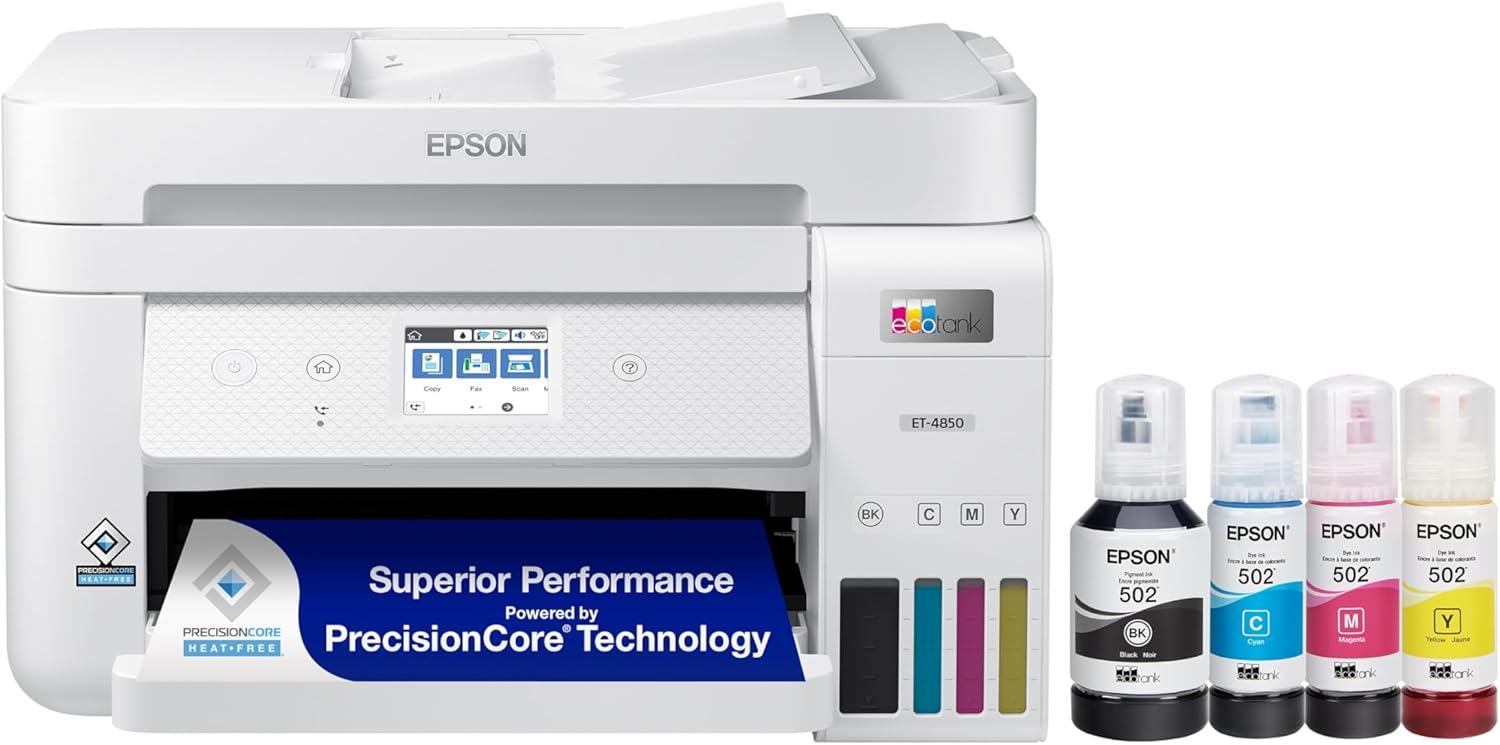
ADF scanning, voice assistant support, fax capability, and the EcoTank low-cost refill system in one powerful package.
Check Price on Amazon →Calculating Your Break-Even Point
The single most important number in the ink tank printer decision is the break-even point — the number of pages at which the ink savings offset the higher upfront purchase price.
The Basic Formula
The calculation is straightforward:
Break-Even Pages = (Ink Tank Price – Cartridge Printer Price) ÷ (Cartridge CPP – Ink Tank CPP)
For example: ($280 – $100) ÷ ($0.08 – $0.01) = $180 ÷ $0.07 ≈ 2,571 pages
At typical usage rates, 2,571 pages represents about 8–12 months of active home printing for a family, or 12–18 months for a single person or couple. After that break-even point, every page you print is saving you money compared to if you had bought a cartridge printer.
After the break-even point (around 2,500 pages), every additional page printed saves money vs. a cartridge inkjet. The savings compound over time.
What If You Print More or Less?
| Monthly Print Volume | Annual Pages | Break-Even Reached In | 3-Year Ink Savings |
|---|---|---|---|
| 50 pages/month | 600 pages | ~4–5 years | ~$120 |
| 150 pages/month | 1,800 pages | ~18 months | ~$360 |
| 300 pages/month | 3,600 pages | ~9 months | ~$720 |
| 500 pages/month | 6,000 pages | ~5–6 months | ~$1,200+ |
At 50 pages per month, you’re looking at a 4–5 year payback period, which may or may not align with how long you plan to keep the printer. At 300+ pages per month — entirely typical for a busy family home or small business — the ink tank pays for itself within the first year and generates substantial savings every year after that.
Maintenance & Long-Term Care
An ink tank printer’s permanent print head is both its economic asset and its most sensitive component. Understanding what care it requires will help you avoid the one scenario that can turn an ink tank printer from an asset into a liability: a severely clogged print head that requires professional servicing or replacement.
Preventing Clogging
Print heads clog when ink dries in the nozzles. The primary prevention is simple: print something — anything — at least once a week. A test page, a document, even a color nozzle check. This keeps ink flowing through all nozzles and prevents the microscopic channels from drying out.
If you know you won’t be printing for an extended period — say, during a month-long vacation — run a head cleaning cycle before you leave and ideally store the printer in a sealed plastic bag or in a cool, low-humidity environment. Our full guide on how to prevent inkjet printer drying out has a step-by-step protocol for extended storage.
Running Head Cleaning Cycles
All major ink tank printers include automated head cleaning through their software or control panel. If you notice streaks, missing colors, or uneven output, a cleaning cycle usually resolves it. Be aware that cleaning cycles consume ink — don’t run multiple cycles back to back without printing a test page in between to assess improvement.
For persistent clogs, a manual deep clean using distilled water and print head cleaning solution can often resolve what software cycles cannot. We cover this process thoroughly in the guide on how to clean printer heads — follow those steps before assuming the print head needs replacement.
A simple maintenance rhythm keeps ink tank printers running reliably for years with minimal issues
How Long Do Ink Tank Printers Last?
With reasonable care, an ink tank printer should last 5–8 years or more. Epson rates many of its EcoTank print heads for 30,000+ pages of reliable output. Canon and HP similarly build their tank-based print heads for long service lives. The actual limiting factor is more often the motor mechanism and feed rollers than the print head itself.
Ink Storage Best Practices
Opened ink bottles should be capped tightly and stored upright in a cool, dry location — not in direct sunlight, not in a hot garage or shed. Most opened bottles remain usable for 12–24 months if stored properly. Unopened bottles typically have a shelf life of two or more years. For comprehensive storage guidance applicable to both ink and cartridges, see our guide on how to store printer cartridges and ink properly. And for a broader set of regular maintenance habits, our home printer maintenance guide covers the full routine.

Epson EcoTank 502 Ink Bottle Set — Best-Value Refill Pack
Official Epson replacement ink for ET-2760, ET-3760, ET-4760, and more. Yields 6,000+ pages per set.
Check Price on Amazon →The Final Verdict: Are Ink Tank Printers Worth It?
For the majority of people who print with any regularity, ink tank printers are not just worth it — they are the objectively better financial and practical choice over a two-to-three year horizon. The math is clear, the quality is real, and the convenience of abundant, cheap ink fundamentally changes your relationship with your printer.
The case for ink tank printers is strongest when:
- You print at least 100–150 pages per month
- Your printing mix includes both documents and color content
- You plan to keep the printer for two or more years
- You want to avoid the cartridge replacement cycle entirely
- Environmental considerations matter to your purchasing decisions
The case weakens — though rarely reverses entirely — when you print fewer than 50 pages per month, when your use is purely text at high volume (where laser printers compete better on speed), or when your upfront budget is strictly constrained below $150.
If you’re ready to buy, the Epson EcoTank line remains the most recommended starting point for most home users. Our guide to the best ink tank printers for home use has current top picks across every budget and use case. If you want to compare how ink tanks stack up against the full printer market — including wireless options and compact models — our master list of the best home printers worth buying right now covers everything. And for those specifically looking for the lowest possible ongoing ink costs across all printer types, the guide to home printers with the cheapest ink is exactly what you need.
Ink tank printers represent a genuine structural shift in what home printing costs. They arrived quietly, became dominant in the value conversation quickly, and — for most users — they make keeping a printer at home financially sensible for the first time in a long time. They are worth it.
Frequently Asked Questions
-
Are ink tank printers cheaper to run than regular inkjet printers?
Yes — significantly. A typical inkjet cartridge costs around 5–10 cents per page in ink alone, while ink tank printers typically cost 0.5–1.5 cents per page. Over thousands of pages, the savings can exceed the printer’s purchase price many times over.
-
How long does the ink last in an ink tank printer?
Most ink tank printers can print 6,000–7,500 black pages and 6,000–7,500 color pages per refill set, depending on the model. Some higher-capacity bottles and newer models last even longer. At 150 pages/month, a single fill can last over three years.
-
Can ink tank printers print photos?
Yes, though quality varies by model. Mid-range ink tank printers produce decent photo prints — good for snapshots and everyday use. For dedicated high-quality photo output, six-color ink tank models or specialized photo inkjet systems deliver better tonal range and vibrancy.
-
Do ink tank printers dry out if not used?
They are more resistant to drying than cartridge-based inkjets, but prolonged disuse can still cause clogging. Printing at least once a week or running a head cleaning cycle periodically prevents most issues. Storing the printer in a sealed bag during extended breaks also helps.
-
What is the upfront cost of an ink tank printer?
Entry-level ink tank printers start around $150–$200, while full-featured all-in-ones with Wi-Fi, scanning, and ADF run $250–$450. Premium models with faster speeds can exceed $500. Most include enough bundled ink for 2,000–4,500 pages.
-
Are ink tank printers good for home use?
They are excellent for home users who print regularly — especially documents, school projects, and occasional photos. Light users who print only a few pages a month may find the upfront cost harder to justify over a short horizon.
-
How do ink tank printers compare to laser printers?
Ink tanks beat laser printers on upfront cost and color quality. Laser printers win on speed, sharp high-volume text output, and no drying-out risk. For mixed home use with both documents and color content, ink tanks are usually the better overall value.
-
What brands make ink tank printers?
Epson EcoTank, Canon MegaTank (PIXMA G-series), and HP Smart Tank are the three major consumer lines. Epson has the widest model range and the longest track record in refillable ink systems at the consumer level.
-
Is it messy to refill ink tank printers?
Modern ink tank printers use nozzle-tip bottles that pour cleanly into tank openings with no squeezing required. Spills are rare when following instructions. Early models had messier designs, but current generation bottles are clean and straightforward to use.
-
What is the break-even point for an ink tank printer?
Most users hit the break-even point — where running cost savings offset the higher upfront price — between 1,500 and 3,000 printed pages, depending on the model and comparison printer. At 150 pages/month, this typically takes 10–20 months.
-
Can I use third-party ink in my ink tank printer?
Technically yes, but manufacturers warn this may void warranties and can cause print head issues. Compatible inks vary widely in quality — some cause color shifts or clogging. For most users, sticking with OEM ink bottles is the lower-risk choice.
-
Which ink tank printer is best for high-volume printing?
The Epson EcoTank ET-5850 and Canon PIXMA G7020 are top picks for high-volume home and small office use. Both feature fast print speeds, large tank capacities, ADF scanning, and business-grade reliability.
Ready to Stop Overpaying for Ink?
Ink tank printers are one of the few technology purchases where the math genuinely favors the buyer — once you pass the break-even point, every page you print is money in your pocket. If you print with any regularity, the switch is worth making.
Start with our curated recommendations for the best ink tank printers at every price point:
Browse Top-Rated Ink Tank Printers on Amazon →