Best Printer for Small Business: 6 Models That Actually Hold Up Under Daily Use
A practical, hands-on comparison of the printers small business owners actually rely on — covering laser, inkjet, supertank, and label printing — so you can stop guessing and start printing.
Why Your Printer Choice Matters More Than You Think
Most small business owners don’t think much about their printer until it breaks down in the middle of an invoice run, or until the ink cartridge that cost more than the printer itself runs dry two weeks after you replaced it. A printer is one of those pieces of equipment that quietly supports everything else — shipping labels, client contracts, tax paperwork, marketing flyers, packing slips — and when it fails, it doesn’t just slow you down, it stalls whatever process depends on it.
The mistake a lot of new business owners make is buying whatever printer is cheapest at the store, the same way they might for a home office. But a business printer has different demands: higher monthly volume, multiple users on the network, faster first-page-out times, and lower long-term running costs. A machine built for occasional home use will choke on business-level workloads within a year, while a purpose-built business printer can run for five or more years without major issues.
This guide walks through six printers that cover the range of small business needs — from a compact monochrome laser for a home-based consultancy, to a high-volume color inkjet for a retail storefront, to a dedicated label printer for e-commerce shipping. If you’re also weighing whether a printer for a home office setup makes more sense than a dedicated business model, our best all-in-one printer for home roundup covers that angle separately.
Short on time? This is our top overall pick for most small businesses — reliable, fast, and easy on running costs.
Check Price on AmazonHow We Chose These Printers
We didn’t just pull a list of best-sellers. Each printer here was evaluated against criteria that actually matter to a business owner running a lean operation, not a corporate IT department with a service contract:
- Duty cycle and recommended monthly volume — can it handle real business output without premature wear?
- Cost per page — toner and ink pricing over a 12-month period, not just the sticker price of the printer.
- Wireless and network reliability — does it hold a Wi-Fi connection, and can multiple employees print from it without setup headaches?
- Print speed — pages per minute under real conditions, not just the marketing number on the box.
- Footprint — many small businesses operate out of tight home offices or shared retail space, so physical size matters.
- Mobile and cloud printing — support for phone and tablet printing, since a growing share of business owners aren’t tethered to a desktop.
We also leaned on long-term ownership patterns rather than just first-week impressions, since a printer’s real test comes six months in, after the “new machine” honeymoon period wears off. If you want a broader look at what makes a printer worth buying at all, our best home printers worth buying right now guide breaks down the same evaluation framework for personal use.
Quick Picks at a Glance
If you already know roughly what kind of printer you need, here’s the fast version. Each card jumps to the full review further down the page.
Full Comparison Table
Here’s how all six printers stack up side by side on the specs that matter most for business use.
| Printer | Type | Print Speed | Duplex | Best For | Running Cost |
|---|---|---|---|---|---|
| Brother MFC-L2820DW | Mono Laser AIO | Up to 36 ppm | Automatic | General office documents | Low |
| Canon imageCLASS MF465dw II | Mono Laser AIO | Up to 40 ppm | Automatic | Higher-volume offices | Low |
| Brother HL-L3270CDW | Color Laser | Up to 25 ppm | Automatic | Color documents on a budget | Moderate |
| HP OfficeJet Pro 9125e | Color Inkjet AIO | Up to 22 ppm | Automatic | Marketing materials, mixed color/mono | Moderate (lower with Instant Ink) |
| MUNBYN Bluetooth Thermal | Label Printer | Fast label output | N/A | Shipping & e-commerce labels | Very Low (no ink) |
| Epson EcoTank Pro ET-5150 | Color Supertank AIO | Up to 25 ppm | Automatic | High-volume mixed printing | Very Low |
Not sure whether laser or inkjet fits your workflow better? Jump to our laser vs. inkjet breakdown further down, or read the dedicated comparison at inkjet vs. laser printer for home for more context on how the technology differs.
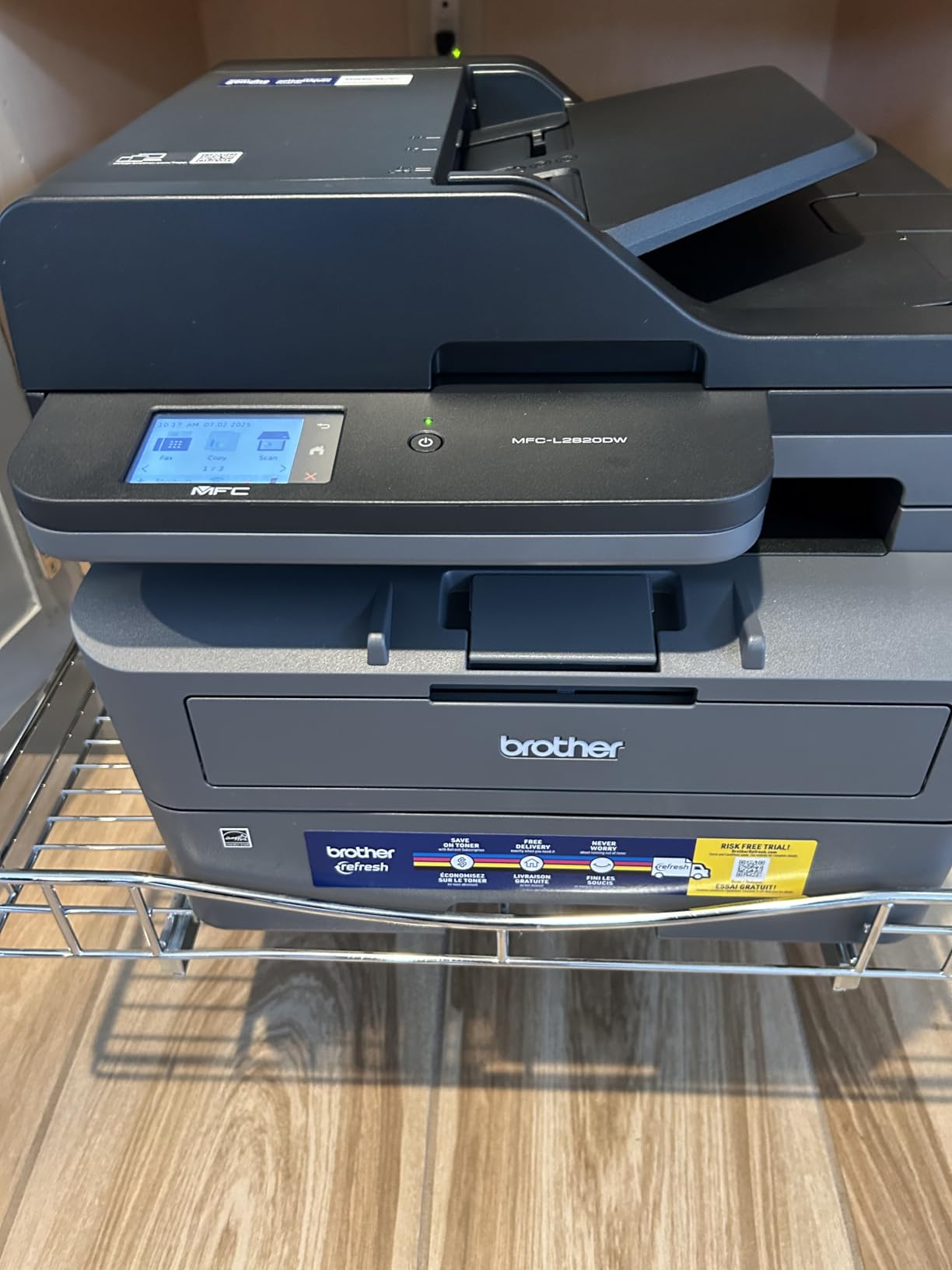
1. Brother MFC-L2820DW — Best Overall Small Business Printer

Brother MFC-L2820DW Wireless Compact Monochrome All-in-One Laser Printer
If you print mostly text documents — invoices, contracts, shipping paperwork, tax forms — this is the printer that will give you the least amount of trouble for the longest amount of time. It’s a monochrome laser all-in-one, meaning it prints, scans, copies, and faxes, all from a footprint small enough to sit on a corner desk.
What makes this printer stand out for small business use isn’t a flashy feature — it’s consistency. Toner cartridges last for thousands of pages, first-page-out time is fast because laser printers don’t need to warm up ink like inkjets do, and the automatic duplexer means you’re not manually flipping paper for two-sided documents. For a solo operator or a two-to-five person office, this is close to a “set it up once and forget about it” machine.
Wireless setup is straightforward through the Brother mobile app, and once connected, it holds the Wi-Fi connection reliably — a detail that sounds minor until you’ve dealt with a printer that drops off the network every other day. If you’re setting this up for the first time, our guide on how to connect a printer to Wi-Fi walks through the process step by step.
Pros
- Very low cost per page for text-heavy printing
- Fast, reliable wireless connection
- Compact footprint fits tight office spaces
- Automatic duplex printing built in
Cons
- Monochrome only — no color printing
- Scan quality is basic, not photo-grade
Best balance of speed, reliability, and low running cost for everyday business printing.
Check Price on Amazon2. Canon imageCLASS MF465dw II — Best for Higher-Volume Offices

Canon imageCLASS MF465dw II Monochrome Wireless Duplex Laser Printer
If your team is bigger, or your print volume runs high enough that the Brother above starts to feel slow, the Canon MF465dw II steps things up with a faster engine and a larger recommended monthly duty cycle.
This is the printer we’d point a small office of five to fifteen people toward, especially one that shares a single machine for everyone’s document output. The paper tray capacity is generous enough that you’re not refilling it daily, and the automatic document feeder on the scanner speeds up multi-page scan-to-email jobs considerably compared to single-sheet scanning.
Canon’s toner cartridges for this model are priced competitively, and because the print engine is built for higher-duty environments, you avoid the premature component wear that happens when a “light duty” printer is pushed past its intended volume. For businesses debating between brands, our Brother vs. HP printers comparison and Canon PIXMA vs. HP Envy breakdown offer useful brand-level context, even though those specific models are consumer-oriented rather than business laser printers.
Pros
- Higher recommended monthly duty cycle than most compact lasers
- Fast automatic document feeder for scanning
- Competitive toner pricing per page
- Strong build quality for shared-office use
Cons
- Larger footprint than compact desktop lasers
- Setup menu is less intuitive than Brother’s app
A stronger engine for offices that print more than a couple hundred pages a week.
Check Price on Amazon3. Brother HL-L3270CDW — Best Budget Color Laser

Brother HL-L3270CDW Compact Wireless Digital Color Printer
Color laser printers used to be a luxury reserved for larger offices, but this model brings color laser printing down to a price point that makes sense for a small business that only occasionally needs color — think branded proposals, colored charts, or the occasional presentation handout.
The tradeoff with color laser is that toner costs more upfront than monochrome, but because laser toner doesn’t dry out the way inkjet cartridges do, this printer is a smart pick for a business that prints in bursts rather than daily. You can leave it idle for two weeks and it’ll print the same quality page it did on day one — something inkjet printers genuinely struggle with, as covered in our guide on how to prevent an inkjet printer from drying out.
Print quality on text is sharp, and color output is more than acceptable for internal documents and client-facing materials that don’t need photo-level fidelity. If your business leans more toward marketing collateral with photos and graphics, though, you’ll get better results from an inkjet like the HP OfficeJet Pro below.
Pros
- No ink drying out between uses — ideal for occasional color printing
- Sharp text output even in color mode
- Compact enough for a desktop setup
- Affordable entry point into color laser
Cons
- Color toner costs more than monochrome equivalents
- Photo printing quality is average at best
Occasional color printing without the ink-drying headaches of inkjet.
Check Price on Amazon4. HP OfficeJet Pro 9125e — Best for Marketing & Mixed Color Printing

HP OfficeJet Pro 9125e Wireless All-in-One Color Inkjet Printer
This is the machine for a business that lives and dies by its marketing output — flyers, brochures, product mockups, and client-facing color documents that need to actually look sharp, not just readable.
HP’s PageWide-style inkjet engine on this model handles color photos and graphics noticeably better than either color laser option on this list, and it does so at a print speed that doesn’t feel like a step backward from laser. Combined with HP’s Instant Ink subscription, the typical ink-cost concern that scares people away from inkjet largely disappears, since the subscription price is based on pages printed rather than cartridge replacement.
It’s also a genuinely capable all-in-one — scanning, copying, and faxing are all handled well, and the automatic document feeder makes multi-page scanning fast. If you’re weighing this against an HP printer for general home office use rather than business marketing, our best HP printer for home use guide covers that use case separately, and our best printer for home office roundup is worth a look if you’re comparing across brands.
Pros
- Excellent color and photo output quality
- Fast for an inkjet, competitive with entry laser speeds
- Instant Ink subscription lowers effective cost per page
- Full all-in-one functionality with reliable ADF scanning
Cons
- Ink can dry out if the printer sits unused for long stretches
- Running cost is higher without the Instant Ink plan
The pick for businesses where print quality on color materials genuinely matters.
Check Price on Amazon5. MUNBYN Bluetooth Thermal Label Printer — Best for Shipping & E-Commerce

MUNBYN Bluetooth Thermal Label Printer
If your small business ships physical products — whether through an online store, a marketplace like Etsy or Amazon, or local delivery — a dedicated label printer earns its keep almost immediately.
This is a thermal printer, which means there’s no ink or toner to buy, replace, or dry out. It prints using heat-sensitive label rolls, which cuts your per-label cost dramatically compared to printing shipping labels on a regular inkjet or laser printer and cutting them by hand. Bluetooth and USB connectivity mean it pairs easily with shipping platforms like ShipStation, Shopify, PirateShip, and most major carrier label systems.
Print speed is fast enough to keep up with batch label printing during a busy shipping day, and the compact size means it doesn’t compete for desk space the way a full-size all-in-one would. This isn’t a printer that replaces your document printer — it’s a specialized tool that runs alongside one, and for any business shipping more than a handful of packages a week, it pays for itself quickly in saved label costs and time.
Pros
- No ink or toner — significantly lower cost per label
- Fast, reliable for high-volume shipping days
- Compact and easy to fit next to a packing station
- Integrates with major shipping and e-commerce platforms
Cons
- Only prints labels — not a general document printer
- Requires specific thermal label rolls
A dedicated shipping-label workhorse that pays for itself in saved label costs.
Check Price on Amazon6. Epson EcoTank Pro ET-5150 — Best for High-Volume Printing

Epson EcoTank Pro ET-5150 Wireless Color All-in-One Supertank Printer
For a business that prints a genuinely high volume of pages every month — whether that’s client documents, color reports, or marketing materials — the math on traditional ink cartridges stops making sense. That’s exactly the problem this printer is built to solve.
Instead of small, expensive ink cartridges, the EcoTank Pro ET-5150 uses large refillable ink tanks that you top off from bottles. The upfront cost of the printer is higher than a comparable cartridge-based inkjet, but the cost per page drops so significantly that most businesses printing a moderate-to-high volume recoup that difference within the first year. If you’re weighing whether the supertank approach is worth it over a traditional cartridge printer, our guide on whether ink tank printers are worth it goes into more detail, and our Epson EcoTank vs. HP Smart Tank comparison is useful if you’re cross-shopping supertank brands.
Beyond the ink savings, this is a genuinely full-featured business printer — automatic duplex printing, a fast automatic document feeder for scanning, and print speeds that hold up well against comparable laser models. It’s also one of the better picks if your business handles a mix of black-and-white paperwork and color marketing output, since it doesn’t force you to choose between the two the way a mono laser does. For businesses that print a heavier volume specifically, our cheapest ink home printer guide covers similar cost-per-page thinking from a household angle.
Pros
- Extremely low long-term cost per page
- Handles both high-volume mono and color printing well
- Automatic duplex and fast document feeder scanning
- Large ink tanks reduce how often you need to refill
Cons
- Higher upfront purchase price than cartridge inkjets
- Larger footprint due to the ink tank housing
The long-term value pick for businesses that print heavy volumes of mixed content.
Check Price on AmazonLaser vs. Inkjet for Business Use
This is the single most common question small business owners ask when shopping for a printer, and the honest answer is: it depends entirely on what you’re printing and how often.
Choose Laser If…
- You print mostly text documents — invoices, contracts, reports, forms
- Your printer sits idle for days at a time between uses
- You want the lowest possible cost per page for black-and-white output
- Print speed and reliability matter more than photo-quality color
Choose Inkjet (or Supertank) If…
- You regularly print color marketing materials, photos, or graphics
- You print frequently enough to keep the ink from drying out
- You need one machine that handles both text and rich color equally well
- Upfront cost matters more than the printer needing supertank ink
Many small businesses end up owning two printers for exactly this reason — a monochrome laser for daily document output, and a color inkjet or supertank machine reserved for marketing and client-facing materials. It’s a more efficient split than trying to make one printer do everything, and it usually costs less overall than buying a single high-end color laser. For a deeper technical breakdown, our full inkjet vs. laser printer comparison is a useful companion read, even though it’s framed around home use — the underlying tradeoffs are identical for a small office.
Understanding Cost Per Page (The Number That Actually Matters)
The purchase price of a printer is almost irrelevant compared to what it costs you to actually run it over a year. A $150 inkjet that burns through a $40 cartridge every three weeks will cost you more in twelve months than a $300 laser printer that needs one $60 toner cartridge for the same period. This is the calculation most first-time buyers skip, and it’s the one that determines whether your printer purchase was actually a good decision.
To calculate a realistic cost per page, take the price of a replacement cartridge or toner and divide it by the manufacturer’s rated page yield — the number of pages that cartridge is designed to print before running dry. Multiply that by your expected monthly page volume, and you’ll have a real monthly running cost you can compare across models. It’s a more useful number than almost anything else on the spec sheet, and it’s the reason a printer with a higher upfront cost, like the EcoTank Pro or a laser AIO, often ends up being the cheaper option over an 18-24 month window. Our dedicated breakdown on the cost of printer ink vs. toner walks through the math in more detail if you want to run your own numbers against your monthly print volume.
Features Small Businesses Should Actually Prioritize
Printer spec sheets are full of features that sound impressive but rarely matter for day-to-day business use, and a few genuinely important ones that get buried underneath the marketing language. Here’s what’s actually worth paying attention to.
Automatic Duplex Printing
If you print two-sided documents regularly — and most contracts, reports, and internal paperwork are two-sided — automatic duplex saves a meaningful amount of time compared to manually flipping pages. Every printer on this list includes it, and it’s worth treating as a non-negotiable feature for any business printer purchase going forward.
Network and Multi-User Support
If more than one person will use the printer, make sure it supports proper network printing rather than relying on a single USB connection to one computer. Wireless printers with built-in Ethernet ports give you the most flexibility, letting you hardwire the printer for a stable connection while still allowing wireless printing from phones and laptops.
Automatic Document Feeder (ADF)
If your business scans or copies multi-page documents with any regularity, an ADF is worth prioritizing over a flatbed-only scanner. It turns a ten-minute scanning job into a two-minute one, which adds up meaningfully over a busy week.
Mobile and Cloud Printing
Support for AirPrint, Google Cloud Print alternatives, and manufacturer apps means you’re not tied to a single desktop computer to print. This matters more than it used to, since a growing number of small business owners run significant parts of their operation from a phone or tablet.
If you’re specifically shopping for reliable wireless performance across the board, our best wireless printer guide covers the connectivity side of things in more depth, and if desk space is tight, our best compact printers roundup is worth a look for footprint-conscious picks.
Setup & Maintenance Tips for Business Printers
Getting more life and reliability out of a business printer usually comes down to a handful of habits rather than any single trick. A few worth building into your routine:
- Keep firmware updated. Manufacturers regularly patch wireless connectivity bugs, and an outdated printer is far more likely to randomly drop off the network. If your printer keeps disconnecting, our guide on why your printer keeps going offline covers the most common causes.
- Print something at least weekly if you own an inkjet. This keeps the print heads clear and prevents the clogging that leads to streaky, faded output.
- Store spare cartridges and toner properly. Heat and direct sunlight degrade both ink and toner faster than normal shelf life would suggest — our guide on how to store printer cartridges has the specifics.
- Clean print heads periodically, not reactively. Waiting until you notice streaking means you’ve already lost some print quality. A monthly check takes two minutes and heads off bigger problems — see our how to clean printer heads walkthrough.
- Build a basic maintenance checklist for whoever manages the office equipment, even if that’s just you. Our broader printer maintenance tips guide is a good starting template.
And if you ever hit the frustrating situation where the printer simply won’t respond to a print job at all, our step-by-step guide on fixing a printer that’s not responding walks through every common cause in order, which is usually faster than guessing.
Which Printer Fits Which Kind of Business
Rather than repeating specs, here’s a practical breakdown by business type, since that’s usually a faster way to land on the right pick than comparing feature lists in the abstract. Most business owners don’t actually need to weigh every spec on every printer — they need to know which category of printer matches how their business operates day to day, and then pick the strongest option within that category.
Solo Consultants & Home-Based Businesses
The Brother MFC-L2820DW is the obvious pick — low cost, small footprint, and more than enough capability for occasional invoicing, contracts, and printed reference material. It’s also a strong option if you’re comparing it against consumer-grade home printers, which you can explore further in our best Brother printer for home roundup.
Small Offices With Multiple Employees
The Canon imageCLASS MF465dw II handles shared, higher-volume printing better than a compact desktop laser, especially once you have five or more people relying on the same machine throughout the day.
Retail, Marketing, or Client-Facing Businesses
The HP OfficeJet Pro 9125e or the Epson EcoTank Pro ET-5150 both make sense here, depending on volume. Lower monthly print volume with a need for strong color quality favors the HP; consistently high volume favors the EcoTank Pro for its lower long-term running cost.
E-Commerce & Shipping-Heavy Businesses
The MUNBYN thermal label printer is close to mandatory once you’re shipping regularly — it should sit alongside whichever document printer you choose, not replace it.
Businesses on a Tight Startup Budget
The Brother HL-L3270CDW gives you occasional color capability without the ongoing cost concerns of inkjet, making it a reasonable middle ground if you can’t yet justify two separate printers.
If your team is also equipping individual workstations rather than a single shared machine, our guides on the best printer for students, best home printer for Mac, and best printer for Chromebook are useful for picking individual desktop units that pair well with a shared office printer.
Common Printer Buying Mistakes Small Businesses Make
After watching enough small business owners go through the printer-buying process, a handful of mistakes show up again and again. Avoiding these will save you money and frustration far more reliably than chasing the newest model on the shelf.
Buying a Home Printer for a Business Workload
Consumer-grade printers are built around light, occasional use — a few dozen pages a week, not a few hundred. Pushing a home printer past its intended duty cycle leads to premature part failure, jamming, and print quality that degrades faster than it should. If you’re consistently printing more than a couple hundred pages a week, a business-rated printer isn’t a luxury, it’s the more economical choice in the long run.
Ignoring the Real Cost of Cartridges
It’s easy to be drawn in by a low sticker price on an inkjet printer without checking what replacement cartridges cost, or how many pages they’re actually rated for. Some manufacturers deliberately price printers low and recover the margin on ink, which can mean you’re paying more per page than a pricier printer with cheaper consumables. Always check cost per page before comparing purchase prices in isolation.
Underestimating Network Requirements
A printer that works fine for a single desktop connection can become a bottleneck the moment a second or third employee needs to print from their own laptop. Confirm a printer supports proper multi-user wireless or network printing before buying, rather than discovering the limitation after the fact.
Skipping Duplex Printing to Save Money
Non-duplex printers are usually cheaper upfront, but manual double-sided printing costs real time — time that adds up considerably over months of regular use. For any business printing double-sided documents with any frequency, automatic duplex should be treated as a baseline requirement, not an optional upgrade.
Overlooking Support for Mobile Printing
As more business owners manage day-to-day operations from a phone, a printer without solid mobile app support becomes an unnecessary inconvenience. Confirm that a model supports direct printing from iOS and Android before assuming every modern printer handles this equally well — some manufacturer apps are considerably more reliable than others.
Avoiding these mistakes usually comes down to spending an extra fifteen minutes researching cost per page and duty cycle before buying, rather than relying on the sticker price alone. It’s a small amount of upfront effort that pays off across years of ownership.
Frequently Asked Questions
What’s the best type of printer for a small business on a tight budget?
A monochrome laser printer like the Brother MFC-L2820DW is usually the smartest budget choice. The upfront cost is reasonable, and the low cost per page keeps ongoing expenses down, which matters more over time than the initial purchase price.
Do I need a color printer for my business?
Only if you regularly produce color materials — marketing collateral, client presentations, or product visuals. If most of your output is text-based paperwork, a monochrome laser will save you money without any real downside.
How many pages per month can these printers realistically handle?
The laser printers on this list are rated for a few thousand pages a month without issue, while the inkjet and supertank models vary more depending on ink or tank capacity. If you’re printing more than a couple thousand pages monthly, lean toward laser or the EcoTank Pro for cost efficiency.
Is a supertank printer worth the higher upfront cost?
For businesses with moderate to high print volume, yes — the savings on ink typically offset the higher purchase price within the first year. For very light, occasional printing, a standard cartridge inkjet may actually be cheaper overall.
Can multiple employees print to the same printer wirelessly?
Yes, all of the printers reviewed here support wireless network printing, allowing multiple devices to send print jobs to the same machine without needing a direct USB connection.
Do I need a separate label printer if I already have an all-in-one?
If you ship physical products regularly, yes. A dedicated thermal label printer like the MUNBYN is significantly cheaper per label than printing on a standard printer and cutting labels by hand, and it saves considerable time on busy shipping days.
How long do toner cartridges typically last compared to ink cartridges?
Toner cartridges generally last far longer per cartridge than ink cartridges, often printing several thousand pages before needing replacement, compared to a few hundred pages from a typical ink cartridge. This is the main reason laser printers are cheaper to run for high text volume.
What causes a business printer to keep disconnecting from Wi-Fi?
Outdated firmware, router interference, or the printer’s power-saving mode dropping the wireless connection are the most common culprits. Keeping firmware updated and disabling aggressive sleep settings usually resolves it.
Should I buy an inkjet if my business doesn’t print daily?
Generally, no. Inkjet printers that sit unused for extended periods are prone to clogged print heads and dried-out ink. If your printing is infrequent, a laser printer is a more forgiving option since toner doesn’t dry out the same way.
Can these printers scan directly to email or cloud storage?
Yes, the all-in-one models on this list support scan-to-email and scan-to-cloud functionality through their respective manufacturer apps, which is useful for digitizing paperwork without needing a separate computer connection.
What’s the difference between a business printer and a home printer?
Business printers are generally built with higher-rated duty cycles, faster print speeds, and lower cost-per-page running costs, since they’re designed to handle sustained daily use rather than occasional printing.
Do I need to replace my printer if it keeps jamming?
Not necessarily — frequent jams are often caused by using the wrong paper weight, an overfilled tray, or worn feed rollers, all of which are fixable. Persistent jamming despite proper maintenance is a stronger sign it’s time for a replacement.
Final Verdict: Which Printer Should Your Business Actually Buy
If you only take one recommendation from this guide, make it this: match the printer to how you actually print, not to the printer that looks the most impressive on paper. For the majority of small businesses handling standard document workflows, the Brother MFC-L2820DW remains the safest, most cost-effective choice — reliable, fast, and cheap to run for years.
If your work leans more heavily into color materials or client-facing marketing, the HP OfficeJet Pro 9125e or the Epson EcoTank Pro ET-5150 will serve you better, depending on your monthly volume. And if your business ships products, don’t skip the MUNBYN label printer — it’s one of the highest-value, lowest-cost additions you can make to a small operation.
Ready to upgrade your business’s printing setup? Start with our top overall pick.
Check Price on Amazon