Best Ink Tank Printer for Home: 5 Models Worth Actually Buying
We dug into running costs, print quality, setup, and day-to-day usability to find the ink tank printers that genuinely earn a spot on a home desk — not just the ones with the loudest marketing.
Why This Guide
If you have ever stared down a “low ink” warning light and braced yourself for a $30 cartridge replacement, you already understand why ink tank printers have taken over so much of the home printing conversation. Instead of small disposable cartridges, these machines use refillable reservoirs that you top off with ink bottles, and a single fill set can often last a household a year or two of normal printing. That shift changes the entire math of owning a printer: the device itself usually costs more upfront, but the cost of every page that comes out of it drops dramatically.
The catch is that “ink tank” has become a crowded category, and not every model handles the basics — print speed, scanning, double-sided printing, mobile app support — equally well. We compared five of the most relevant home models on the market right now, weighed their strengths against real household needs, and built this guide around the kinds of questions people actually ask before buying: which one is cheapest to run, which one handles photos best, and which one will not frustrate the least tech-savvy person in the house. If you want the broader picture first, our roundup of the best home printers worth buying right now covers laser models and standard inkjets too.
We also tried to keep this guide honest about trade-offs rather than crowning a single “best” printer and moving on. A printer that is perfect for a household that mostly scans report cards and prints boarding passes is the wrong choice for a household running a small craft business out of a spare bedroom, and a printer tuned for heavy document output is overkill for someone who prints twice a month. So instead of one verdict, you will find five, each tied to a specific kind of household, plus the comparison tables and decision tools further down to help you confirm the match before you spend the money.

The Short Answer: 5 Best Ink Tank Printers for Home Use
If you only have a minute, here is the condensed version. Every model below uses refillable ink tanks, prints in color, and includes a flatbed scanner and copier, so the differences come down to speed, paper handling, software, and what kind of printing you do most.
| Rank | Model | Best For | Standout Strength |
|---|---|---|---|
| 1 | Epson EcoTank ET-2800 | Best Overall Value | Low entry price, dependable performance, simple day-to-day use |
| 2 | Canon MegaTank G3270 | Best for Color & Photos | Richer color graphics and vibrant borderless photo prints |
| 3 | Epson EcoTank ET-2850 | Best for Double-Sided Printing | Automatic two-sided printing that saves paper by default |
| 4 | HP Smart Tank 5101 | Best User-Friendly App | The simplest mobile-first setup and ongoing phone-app control |
| 5 | Epson EcoTank ET-3850 | Best for Home Offices | Adds a fast automatic document feeder for multi-page jobs |
Each of these earned its spot for a different reason, and the right one for your house probably depends on whether you print mostly homework and forms, mostly photos and crafts, or mostly multi-page documents for a home office. We will walk through exactly why each model made the list, then help you match a printer to your specific situation in the comparison and decision sections further down.
Why Ink Tank Printers Make Sense for Home Use
Cartridge-based inkjet printers have a business model that works against the people buying them: the printer is cheap, and the ink is not. A standard inkjet cartridge often holds a tiny fraction of the ink that comes in a refill bottle, and replacing four small cartridges every few months adds up fast for any household that prints homework, tax documents, shipping labels, or the occasional family photo. Ink tank printers flip that arrangement. You pay more for the printer itself, but the included ink usually lasts a year or two of normal use, and refill bottles cost a small fraction of what equivalent cartridges would.
The savings are not marginal. Across the models in this guide, manufacturers estimate that a full set of replacement ink bottles can replace anywhere from 80 to 90 individual cartridges’ worth of printing. Even accounting for marketing optimism, real-world testing from independent reviewers consistently puts the cost per page for these printers at well under a cent for black text and a few cents for color graphics, which is a different universe from cartridge pricing. If you are trying to decide whether the higher upfront price is worth it, our breakdown of whether ink tank printers are worth it walks through the payback math in more detail.
Ink tank printers are not the only alternative to standard inkjets, though. Laser printers also avoid the cartridge treadmill, trading wet ink for toner powder that does not dry out and tends to produce crisper black text. They are usually the better choice for a household that prints almost exclusively black-and-white documents in high volume, while ink tank printers pull ahead the moment color photos, glossy crafts, or occasional borderless prints enter the picture. We compare the two approaches directly in inkjet vs. laser printer for home, and if black-and-white speed and toner economics matter more to you than color flexibility, it is worth reading our best laser printer for home guide before committing to a tank model.
For most households, though, an ink tank printer hits the sweet spot: it handles color reasonably well, it is dramatically cheaper to feed over time than a cartridge printer, and modern models have closed most of the speed and reliability gaps that used to make tank printers feel like a compromise.
There is also a practical side benefit that rarely makes it into the spec sheet: fewer trips to the store. A cartridge printer has a way of running dry at the worst possible moment, usually the night before a school project is due, and replacement cartridges are not always in stock at the nearest pharmacy or office supply shop. Ink tank printers largely remove that anxiety. Because the tanks hold so much ink to begin with, you typically know well in advance that a refill is coming, with most printers showing a visible ink level through a small window on the tank itself rather than relying on a vague low-ink warning light. That visibility alone changes how people interact with their printer day to day; it stops feeling like a ticking clock and starts feeling like an appliance you can simply rely on.
How We Chose These Printers
We did not just rank printers by ink tank size. We weighed five practical criteria that actually show up in day-to-day use:
- Cost per page. How far does a set of ink bottles realistically stretch, and what does a replacement bottle cost relative to the pages it produces?
- Print quality. Is black text crisp enough for everyday documents, and does color output hold up for school projects, craft work, or casual photos?
- Paper handling and footprint. Does the printer support double-sided printing or a document feeder, and how much desk space does it actually need? If counter space is tight, our best compact home printers guide is a useful companion read.
- Connectivity and software. Setting up Wi-Fi and printing from a phone should not require a manual. We weighed how smooth each manufacturer’s app and wireless setup actually feels, and if a reliable wireless connection is your top priority, see our dedicated best wireless printer for home picks.
- Reliability over time. Ink tank printers live on a desk for years, not months, so we leaned on long-term owner feedback and professional lab testing rather than first-week impressions alone.
No single printer wins on every axis, which is exactly why this list has five entries instead of one. The rankings below reflect which household need each model serves best, not a single overall “winner.”
We also tried to separate marketing claims from what actually holds up once a printer has been running for months rather than days. Manufacturer page-yield numbers, for example, are measured under controlled lab conditions that rarely match how a real household prints, with its mix of light text pages, the occasional heavy color graphic, and long stretches where the printer just sits idle. Where independent lab data or large samples of verified owner feedback were available, we leaned on those over the headline numbers printed on the box.
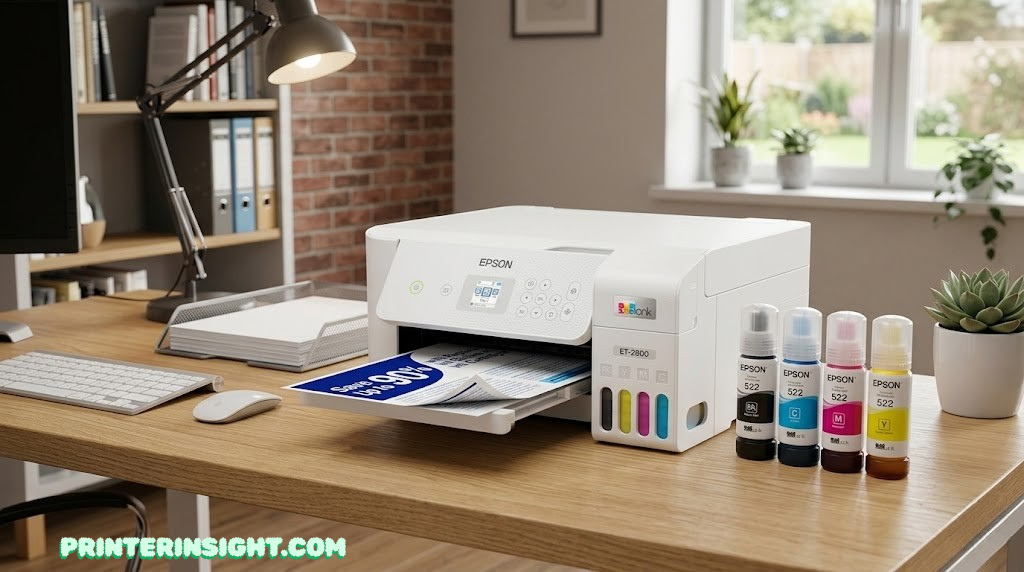
Epson EcoTank ET-2800
The ET-2800 is the printer we point to most often when someone just wants a reliable home printer without overthinking the decision. It strips the EcoTank lineup down to the essentials — print, scan, copy, and refillable tanks — without an automatic document feeder or duplex printing, and that simplicity is exactly why it tends to be the most affordable entry point into the ink tank category.
What makes the ET-2800 worth recommending is not any single standout feature, it is how little there is to complain about. Epson’s Micro Piezo print engine produces sharp, readable black text and color graphics that look fine for school assignments, recipes, and the occasional flyer or craft project. Print speed sits around 10 pages per minute for black text and roughly half that for color, which will not impress anyone, but is perfectly workable for a household printing a few dozen pages a week rather than running a small office.
Setup leans on Epson’s Smart Panel app, which walks you through connecting to Wi-Fi and registering the printer for hands-free voice printing if you use a smart speaker. The control panel itself is basic — a small color LCD rather than a touchscreen — but for a printer this size, that keeps the unit compact enough to tuck onto a side table or shelf. A single set of starter ink bottles is rated for roughly 4,500 black pages and 7,500 color pages, and Epson estimates that is equivalent to dozens of standard ink cartridges, which is the entire reason this category exists in the first place.
Pros
- Lowest typical entry price in Epson’s EcoTank lineup
- Very low ongoing cost per page for both black and color
- Compact footprint that fits tight desk spaces
- Simple, dependable performance with minimal fuss
Cons
- No automatic duplex printing
- No automatic document feeder for multi-page scans
- Print speeds are modest compared to laser alternatives
| Spec | Epson EcoTank ET-2800 |
|---|---|
| Functions | Print, scan, copy |
| Print speed | Up to 10 ppm black / 5 ppm color |
| Max resolution | 5760 x 1440 dpi |
| Connectivity | Wi-Fi, USB 2.0, AirPrint, Mopria, Epson Smart Panel |
| Paper tray | 100-sheet single tray |
| Duplex / ADF | Manual duplex only, no ADF |
| Display | 1.44″ color LCD |
If keeping ink costs as close to zero as possible is the entire goal, this is also a good moment to check our dedicated guide to the home printer with the cheapest ink, which digs even further into long-term cost comparisons across brands.
In practice, the households that end up happiest with the ET-2800 are the ones that were close to buying a basic cartridge printer anyway. A retired couple printing the occasional recipe and boarding pass, a renter who just needs something for tax forms and the odd school flyer, or anyone setting up a printer for a small home office desk where it will not see daily heavy use — all of these are good fits. Where it starts to feel limiting is in a household with two or three kids generating a steady stream of double-sided worksheets, since the lack of automatic duplex means someone has to babysit the print job and flip pages by hand.

Best Overall Value · Compact · Cartridge-free
Check Price on AmazonCanon MegaTank G3270
Canon’s MegaTank line uses a hybrid ink setup — pigment-based black ink for sharp text alongside dye-based color ink — and that combination is exactly why the G3270 tends to produce richer, more saturated color output than its closest Epson competitors. If your household prints a lot of school projects with graphics, craft templates, greeting cards, or casual photos, the difference is noticeable.
Print speed lands around 11 pages per minute for black and 6 for color, slightly ahead of the Epson models in this guide, and the G3270 supports borderless photo printing up to letter size, a feature that is genuinely handy if you want to print a quick 8.5 x 11 photo or poster without trimming white margins afterward. The flip side is that this model prints single-sided only, with no automatic duplex option, so it is not the best fit for a household that prints long double-sided reports regularly.
Canon backs the G3270 with up to two years of included ink, rated for roughly 6,000 black pages and 7,700 color pages from the starter bottles, and the printer’s transparent tank windows make it easy to glance at remaining ink without opening any covers. Setup runs through the Canon PRINT app, which is straightforward, and the printer also supports AirPrint and Mopria for Android devices, so it plays nicely with mixed-device households.
Pros
- Noticeably richer, more vibrant color output
- Borderless photo printing up to letter size
- Generous two years of included ink
- Slightly faster print speeds than comparable Epson models
Cons
- No automatic or manual duplex printing
- No automatic document feeder
- Photo quality is good for casual use, not dedicated photo-printer territory
| Spec | Canon MegaTank G3270 |
|---|---|
| Functions | Print, scan, copy |
| Print speed | Up to 11 ipm black / 6 ipm color |
| Max resolution | 4800 x 1200 dpi |
| Connectivity | Wi-Fi 802.11ac, Wireless Direct, USB, AirPrint, Mopria, Canon PRINT app |
| Paper tray | 100-sheet rear tray |
| Duplex / ADF | Single-sided only, no ADF |
| Display | 1.35″ LCD |
If photo quality specifically is your priority over general document printing, it is worth comparing this pick against our broader best printer for photos at home guide, and if you are torn between Canon and HP rather than Epson, our Canon PIXMA vs. HP Envy comparison covers that matchup directly.
This is the printer we point hobbyists toward most often. If your household is making greeting cards, printing reference sheets for a craft project, putting together a photo-heavy school presentation, or just wants snapshots that look noticeably better than what a budget printer produces, the G3270’s color advantage is easy to see on paper, literally. The single-sided limitation matters less here than it would for a document-heavy household, since most photo and craft printing is single-sided by nature anyway.

Best for Color & Photos · Borderless Printing
Check Price on AmazonEpson EcoTank ET-2850
The ET-2850 sits directly between the ET-2800 and the ET-3850 in Epson’s lineup, and the single feature that justifies stepping up from the entry-level model is automatic two-sided printing. For a household that regularly prints multi-page school assignments, forms, or reports, that one addition saves a meaningful amount of paper over time without requiring you to flip pages manually.
Everything else about the ET-2850 feels very close to the ET-2800: the same general print engine, a similar 100-sheet paper tray, a flatbed scanner rather than a document feeder, and Epson’s familiar Smart Panel app for wireless setup and mobile printing. Print speed is essentially identical at roughly 10.5 pages per minute for black text, and the ink yield is comparable too, with starter bottles rated for around 7,500 black pages and 6,000 color pages.
Independent lab testing has generally found the ET-2850’s text quality to be merely adequate rather than exceptional, and color graphics print well enough for everyday use without standing out. Photo printing on glossy paper is a relative weak point, falling toward the lower end of what inkjets in this price range can manage. None of that makes it a bad printer; it simply means the ET-2850’s reason for existing is the duplex feature, not a leap in output quality over its sibling.
Pros
- Automatic two-sided printing built in
- Very low running costs, in line with other EcoTank models
- Compact, easy-to-place design
- Dedicated copy button for quick scan-to-copy jobs
Cons
- No automatic document feeder
- Text quality is good, not great, compared to pricier models
- Photo printing lags behind the Canon MegaTank G3270
| Spec | Epson EcoTank ET-2850 |
|---|---|
| Functions | Print, scan, copy, automatic duplex |
| Print speed | Up to 10.5 ppm black |
| Connectivity | Wi-Fi, AirPrint, Mopria, Epson Smart Panel |
| Paper tray | 100-sheet single tray |
| Duplex / ADF | Automatic duplex, no ADF |
| Weight | About 12 lbs |
The household that benefits most from the ET-2850 is the one with school-age kids who routinely print multi-page assignments, packets, or study guides. Teachers increasingly expect double-sided submissions, and doing that by hand on a single-sided printer is exactly the kind of small daily friction that makes people regret a printer purchase. Paying a bit more for the ET-2850 over the ET-2800 buys back that convenience without jumping all the way up to a home-office-grade machine.

Best for Double-Sided Printing · Auto Duplex
Check Price on AmazonHP Smart Tank 5101
HP took a different angle with the Smart Tank 5101: instead of competing primarily on ink yield or paper handling, it leans hard into software. The HP Smart app handles Wi-Fi setup, ink-level tracking, print job management, and even AI-assisted formatting features, and the experience of getting this printer online tends to be the smoothest of any model in this guide, especially for anyone who finds router and printer setup intimidating.
On the hardware side, the 5101 prints at up to 12 pages per minute in black and 5 in color, putting it among the faster black-text printers in this lineup, with a 1200 x 1200 dpi black resolution and up to 4800 x 1200 dpi for color when connected directly by USB. It supports Wi-Fi, Bluetooth, AirPrint, and Mopria, plus a flatbed scanner with a dedicated ID-copy mode that is genuinely convenient for scanning licenses or insurance cards. It does not include an automatic document feeder, and duplex printing here is a manual, flip-the-page-yourself affair rather than a fully automatic feature.
Where the 5101 earns its keep is the ink situation: HP ships it with enough ink for an estimated 7,000 to 8,000 pages, sometimes marketed as two to three years of typical home use, and a full replacement set of bottles runs a relatively small amount compared to what the equivalent cartridge volume would cost. If you have already narrowed things down to HP versus Epson, our Epson EcoTank vs. HP Smart Tank comparison breaks the two ecosystems down side by side, and our best HP printer for home use guide covers the rest of HP’s home lineup if the 5101 is not quite the right fit.
This is the printer we recommend to households where more than one person will be setting up devices to print from, or where the person handling the initial setup is not particularly comfortable with technology. Walking through the HP Smart app once, connecting the printer to the home Wi-Fi network, and adding family members’ phones takes a few minutes and rarely requires troubleshooting, which is not something we can say with the same confidence about every printer in this guide.
Pros
- The easiest mobile-first setup of any printer here
- Fast black text printing at up to 12 ppm
- Handy ID-copy mode for scanning cards
- Long-lasting included ink, roughly 7,000–8,000 pages
Cons
- No automatic duplex printing, manual only
- No automatic document feeder
- Color resolution drops over Wi-Fi versus a direct USB connection
| Spec | HP Smart Tank 5101 |
|---|---|
| Functions | Print, scan, copy, ID copy mode |
| Print speed | Up to 12 ppm black / 5 ppm color |
| Max resolution | 1200 x 1200 dpi black, 4800 x 1200 dpi color (USB) |
| Connectivity | Wi-Fi, Bluetooth, AirPrint, Mopria, HP Smart app |
| Paper tray | 100-sheet tray |
| Duplex / ADF | Manual duplex only, no ADF |
| Display | 1.2″ monochrome LCD |

Best User-Friendly App · Easiest Setup
Check Price on AmazonEpson EcoTank ET-3850
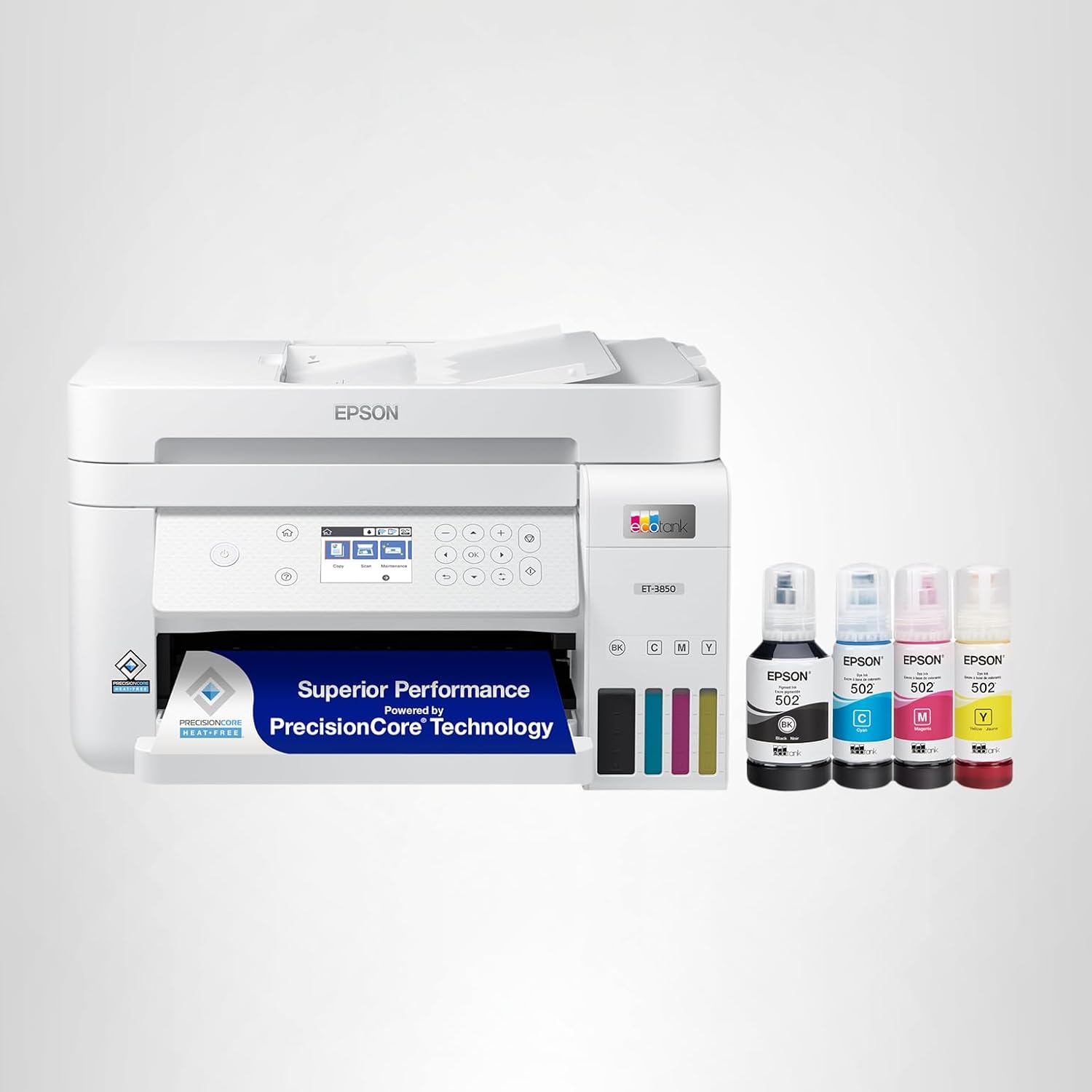
The ET-3850 is the model to reach for the moment a single household member starts working from home regularly. It carries the same EcoTank cost advantages as the rest of the lineup, but adds the two features that turn a casual home printer into something closer to a small home-office workhorse: a 30-page automatic document feeder and an Ethernet port alongside Wi-Fi.
That document feeder matters more than it might sound. Scanning or copying a multi-page contract, a stack of receipts, or a packet of school forms one sheet at a time on a flatbed gets old quickly, and the ET-3850’s feeder handles roughly 30 pages at a stretch at around 5 pages per minute. Pair that with a larger 250-sheet main paper tray, automatic two-sided printing, and PrecisionCore pigment-based black ink for noticeably crisper text, and this model is clearly built for someone printing and scanning more than a typical casual household.
The trade-off is size and price: the ET-3850 is a larger, heavier unit than the other EcoTank models here, and it costs more upfront. For a household with a dedicated home-office desk rather than a shared kitchen-counter printer, that trade is usually worth it. Connectivity also steps up with a 2.4-inch color touchscreen and an Ethernet port in addition to Wi-Fi, which is genuinely useful if you want a more stable wired connection for a printer that several people in the house rely on. If a home office is the primary use case, it is worth a quick look at our best printer for home office guide as well, since it weighs this model against non-tank alternatives too.
Think of the ET-3850 as the printer you buy once you have outgrown a basic home printer rather than the one you start with. If you are scanning multi-page contracts for a side business, copying packets for a homeschool curriculum, or simply printing enough volume that babysitting a flatbed scanner one page at a time has become a genuine time cost, the document feeder alone tends to justify the higher price within the first few uses.
Pros
- Automatic document feeder handles up to 30 pages at once
- Larger 250-sheet paper tray for fewer refills
- Ethernet plus Wi-Fi for a more stable office connection
- Sharper pigment-based black text
Cons
- Largest, heaviest model in this lineup
- Highest typical price point of the five
- Some reports of a flimsier ADF cover under heavy use
| Spec | Epson EcoTank ET-3850 |
|---|---|
| Functions | Print, scan, copy, ADF, automatic duplex |
| Paper tray | 250-sheet main tray |
| ADF capacity | Up to 30 pages, ~5 ppm scan speed |
| Connectivity | Wi-Fi, Ethernet, AirPrint, Mopria, Epson Smart Panel |
| Display | 2.4″ color touchscreen |
| Weight | About 14.8 lbs |
Best for Home Offices · ADF + Ethernet
Check Price on AmazonFull Spec Comparison: All 5 Ink Tank Printers
Here is every model lined up against the specs that actually affect daily use. Use this table to cross-check whatever matters most in your situation, whether that is duplex printing, document feeding, or raw print speed.
| Model | Black / Color Speed | Duplex | ADF | Paper Tray | Connectivity | Display |
|---|---|---|---|---|---|---|
| Epson ET-2800 | 10 ppm / 5 ppm | Manual | No | 100 sheets | Wi-Fi, USB | 1.44″ LCD |
| Canon G3270 | 11 ppm / 6 ppm | None | No | 100 sheets | Wi-Fi, USB | 1.35″ LCD |
| Epson ET-2850 | 10.5 ppm / — | Automatic | No | 100 sheets | Wi-Fi | Color LCD |
| HP Smart Tank 5101 | 12 ppm / 5 ppm | Manual | No | 100 sheets | Wi-Fi, Bluetooth | 1.2″ LCD |
| Epson ET-3850 | 10 ppm / 5 ppm | Automatic | Yes, 30 pages | 250 sheets | Wi-Fi, Ethernet | 2.4″ touchscreen |
A few patterns stand out once everything is side by side. The two Epson EcoTank models that include duplex printing (the ET-2850 and ET-3850) are also the only ones in this group that handle double-sided jobs automatically, which is worth weighing heavily if your printing involves a lot of multi-page documents. The Canon MegaTank, meanwhile, is the only model without any duplex option at all, but it makes up for that with the strongest color and photo output of the five.
It also helps to think about which row of that table actually maps to a problem you have today, rather than one you might have someday. An automatic document feeder is wasted on a household that scans maybe one document a month, just as borderless photo printing is wasted on a household that never prints photos at all. Pick the row that solves a real, current annoyance, and treat everything else as a nice-to-have rather than a deciding factor.
The safest all-around pick if you are not sure which features you actually need yet.
Check Price on AmazonInk Tank vs. Cartridge Printers: The Real Cost Comparison
The headline pitch for ink tank printers is always the same: cheaper ink. But it helps to see the actual numbers rather than take that on faith. Independent lab testing on these exact models has measured black text costs in the range of 0.3 to 0.5 cents per page, and color graphics costs somewhere between roughly 0.6 and 2.7 cents per page depending on the model and how much ink coverage a given print uses. Compare that to a typical cartridge-based home inkjet, where color pages routinely cost 15 to 30 cents or more once you account for how quickly small cartridges run dry, and the gap becomes obvious within the first few months of ownership.
| Printer Type | Typical Cost per Black Page | Typical Cost per Color Page | Refill Frequency |
|---|---|---|---|
| Ink tank printer | ~0.3–0.5¢ | ~0.6–2.7¢ | Every 1–2 years for average households |
| Cartridge inkjet printer | ~3–6¢ | ~15–30¢+ | Every 1–3 months for average households |
The upfront price difference matters too, of course. An ink tank printer typically costs more out of the box than a comparable cartridge model, sometimes by $50 to $150. But because cartridge replacement costs accumulate so quickly, most households recover that difference within the first year of moderate printing, and every page after that is essentially running at a fraction of the cost. If you want the deeper version of this math, including how it compares to laser toner, our cost of printer ink vs. toner guide lays out the full picture across all three printer types.
One nuance worth flagging: these savings only materialize if you actually print enough to need refills before the printer itself wears out or becomes obsolete. If your household prints a handful of pages a month, the cost-per-page advantage matters less, and a basic cartridge printer or even a print-from-the-pharmacy approach might genuinely be more practical. Ink tank printers earn their keep with regular, ongoing use, not occasional emergencies.
To put real numbers on it: a household printing around 100 pages a month, split roughly 70 percent black text and 30 percent color, would spend somewhere in the neighborhood of $4 to $8 a year on ink with most of the printers in this guide. The same volume on a typical cartridge inkjet, even a relatively efficient one, often runs $60 to $120 a year once you account for how quickly color cartridges in particular get used up. Multiply that gap across three or four years of ownership, and the higher sticker price on an ink tank printer starts to look less like a premium and more like a deposit you get back with interest.
Which Ink Tank Printer Should You Buy?
Specs and scorecards are useful, but most people really just want to know “which one fits my situation.” Here is how we would match each household type to a specific model:
- Tightest budget, simplest needs: the Epson EcoTank ET-2800. It does the basics well and costs the least to buy and to run.
- Frequent photo printing or craft projects: the Canon MegaTank G3270, for its richer color and borderless photo support.
- Households that print a lot of double-sided homework or paperwork: the Epson EcoTank ET-2850, for automatic duplex without paying for a full home-office printer.
- Anyone intimidated by printer setup, or families sharing one printer across multiple phones: the HP Smart Tank 5101, thanks to the HP Smart app experience.
- A genuine home office with multi-page scanning and higher print volume: the Epson EcoTank ET-3850, for the document feeder, larger tray, and wired Ethernet option.
A few more specific situations are worth calling out directly. If you are buying for a student’s desk, our best printer for students guide weighs portability and cost against the models here. If the printer’s main job is going to be vinyl stickers, iron-on transfers, or sublimation projects, take a look at our best printer for crafting picks before you commit, since craft printing has its own quirks around ink type and paper handling. And if your household runs primarily on Mac hardware, our best home printer for Mac guide flags any driver or software quirks worth knowing about ahead of time, since all five printers here work with macOS but the app experience varies.
If none of the five categories above feels like an exact match, default to thinking about volume and color first. Low volume and mostly text favors the ET-2800. High volume and mostly text favors the ET-3850 or ET-2850. Anything involving regular color or photo output favors the Canon G3270. And if the deciding factor is really just “I do not want to think about this printer ever again after setup,” the HP Smart Tank 5101 is the one built around that exact promise.
Setting Up and Maintaining Your Ink Tank Printer
Ink tank printers are mostly low-maintenance, but a handful of habits make a real difference in how long they last and how well they perform. Getting the Wi-Fi connection right at the start avoids most day-to-day frustration; if you run into trouble pairing your printer with your home network, our step-by-step how to connect a printer to Wi-Fi guide covers the most common sticking points across Epson, Canon, and HP apps alike.
The biggest long-term risk with any inkjet, tank-based or not, is letting it sit unused for long stretches. Ink can dry out in the print head nozzles if the printer goes weeks or months without a print job, which leads to streaky or missing colors. Running a quick test page every week or two, even just a one-line document, keeps ink flowing through the nozzles and avoids most of these issues. Our guide on how to prevent an inkjet printer from drying out goes deeper into the settings and habits that help.
If you do notice streaky text, faded colors, or banding in printed pages, most of these printers include a built-in nozzle-cleaning utility accessible through the printer’s app or control panel, and running it once usually resolves minor clogs. We have a full walkthrough on how to clean printer heads if the built-in utility alone does not fix it. On the storage side, if you are switching between an old cartridge printer and a new ink tank model, or you have spare cartridges sitting around for a backup device, our guide to how to store printer cartridges covers how to keep them usable for as long as possible.
Beyond that, the maintenance list is short: keep the printer somewhere reasonably dust-free, use the manufacturer’s recommended ink rather than generic refill bottles if you want to stay within warranty terms, and register the printer when prompted, since most of these models include multi-year warranties that are easy to forget about otherwise. Our broader home printer maintenance tips guide rounds up the rest of the small habits that keep any home printer running longer.
It is also worth setting expectations early with anyone else in the house who will use the printer. A surprising share of “broken printer” calls turn out to be a paper jam from overloading the tray, a Wi-Fi password that changed after a router reset, or ink that genuinely just ran low and needs a refill. None of those are defects, and walking through the basics once when the printer is new usually saves a frustrating troubleshooting session a few months down the line.
Epson vs. Canon vs. HP: How the Brands Actually Differ
Three of the five printers in this guide are Epson EcoTank models, and that is not an accident. Epson effectively created the mainstream ink tank category and still offers the widest range of sizes and feature tiers, from the bare-bones ET-2800 up through office-grade models. The trade-off is that Epson’s software and control panels tend to feel more utilitarian than flashy.
Canon’s MegaTank line leans into print quality, particularly for color and photos, thanks to its hybrid pigment-and-dye ink system, but the lineup currently has fewer paper-handling features like duplex printing across its lower-tier models. HP entered the ink tank space more recently than Epson or Canon, and it shows in the software experience: the HP Smart app is genuinely the most polished setup and management tool of the three, even if HP’s tank hardware itself is not always the most feature-dense at a given price point.
Brother is worth a mention too, even though it does not appear in this particular five-printer list. Brother’s ink tank and laser lineups are strong on reliability and tend to undercut Epson and HP on price for comparable specs, which makes them worth cross-shopping. Our Brother vs. HP printers for home comparison and our dedicated best Brother printer for home guide both cover that side of the market if you want to widen the search beyond Epson, Canon, and HP.
None of this means one brand is objectively better than the others across the board. It means each brand made different trade-offs when designing its tank lineup, and those trade-offs line up with different households. Epson optimized for breadth and low running costs, Canon optimized for color fidelity, and HP optimized for ease of use. Once you know which of those three things matters most to you, the brand choice mostly makes itself.
Common Mistakes to Avoid When Buying an Ink Tank Printer
A handful of avoidable mistakes show up again and again in printer buying decisions, and most of them are easy to sidestep once you know to look for them.
Buying based on print speed alone. None of the printers in this guide are fast in any absolute sense; they top out well under what a budget laser printer can do. If raw speed for high black-and-white volume is the priority, an ink tank printer is the wrong category entirely, and it is worth reading our best laser printer for home guide instead.
Ignoring duplex and ADF needs until after purchase. It is easy to assume “most printers can do that” and find out otherwise once the box is open. Three of the five models here have no automatic duplex at all, and only one includes a document feeder. Confirm this specific pair of features before buying if either matters to you, rather than assuming it is standard.
Underestimating how much desk space a printer needs once it is unfolded. Printers measure differently in the box than they do mid-print, once paper trays and output trays extend outward. A model that looks compact in a product photo can need significantly more depth on a desk than expected.
Assuming all “ink tank” printers are equally cheap to run. Cost per page varies more between these five models than the marketing suggests, particularly for color printing, where the gap between the cheapest and most expensive model in this guide is several times over. If cost per page is the deciding factor, check the specific numbers in the cost breakdown section above rather than assuming the category name guarantees savings.
Skipping the warranty registration. Most of these printers include a two-year limited warranty that requires registration within a set window after purchase. It takes a few minutes and is easy to forget, but it can make a real difference if something goes wrong with the unit later.
FAQs About Ink Tank Printers for Home Use
What’s the difference between an ink tank printer and a regular inkjet printer?
A regular inkjet printer uses small, disposable cartridges that you replace whole once they run dry. An ink tank printer uses larger, refillable reservoirs that you top off with ink bottles, which hold far more ink per dollar and keep the cost of each printed page much lower over time.
Are ink tank printers really cheaper to run long-term?
Yes, for most households that print regularly. The printer itself usually costs more upfront, but replacement ink bottles cost a small fraction of what the equivalent volume of cartridges would, so the savings show up within the first year or so of normal use.
Which ink tank printer is best for printing photos at home?
The Canon MegaTank G3270 is the strongest pick here thanks to its hybrid pigment-and-dye ink system, which produces richer color and supports borderless photo printing up to letter size.
Do ink tank printers support double-sided printing?
It depends on the model. In this lineup, the Epson EcoTank ET-2850 and ET-3850 both support automatic two-sided printing, while the ET-2800 and HP Smart Tank 5101 only offer manual duplexing, and the Canon MegaTank G3270 does not support duplex printing at all.
How often do you need to refill the ink tanks?
For an average household, the included ink in most of these printers lasts roughly one to two years before a refill is needed, depending on how much you print and how much of that printing is color versus black text.
Can ink tank printers dry out if not used often?
Yes, like any inkjet printer, the print head nozzles can dry out if the printer sits unused for weeks at a time. Printing a quick test page every week or two keeps ink flowing and helps prevent clogs.
Do these printers work with both Mac and Windows?
All five models support macOS and Windows through their respective manufacturer apps and AirPrint or Mopria mobile printing standards, though the smoothness of setup varies slightly by brand.
Which ink tank printer is best for a home office with heavy printing?
The Epson EcoTank ET-3850 is the clear choice for a home office. Its automatic document feeder, larger 250-sheet paper tray, and Ethernet connectivity are all built for higher and more frequent print and scan volume.
Is the HP Smart Tank app easier to use than Epson’s or Canon’s?
Most reviewers and everyday users find the HP Smart app to be the most polished and beginner-friendly of the three, particularly for Wi-Fi setup and ongoing print management from a phone.
How long does the included ink last compared to cartridges?
Manufacturers typically estimate that a single set of included ink bottles is equivalent to 80 to 90 standard ink cartridges, which is why these printers can go a year or more without needing a refill under normal home use.
Do ink tank printers need special paper?
No. All five printers in this guide work fine with standard plain paper for everyday documents, and they accept glossy or photo paper when you specifically want better results for pictures or borderless prints.
Which model offers the best value for occasional home use?
The Epson EcoTank ET-2800 remains the best value pick for lighter, occasional use. It has the lowest typical price among ink tank printers and keeps running costs minimal even if you only print a handful of pages each week.
The Right Ink Tank Printer Comes Down to How You Actually Print
All five of these printers solve the same core problem: getting you off the cartridge treadmill and onto dramatically cheaper ink. From there, the right pick is really about matching the printer to your household’s habits. Want the safest, most affordable starting point? Go with the Epson EcoTank ET-2800. Printing a lot of photos or color graphics? The Canon MegaTank G3270 earns its place. Need double-sided printing without stepping up to a full home-office machine? The Epson EcoTank ET-2850 handles that cleanly. Want the easiest possible setup experience for a less tech-comfortable household? The HP Smart Tank 5101 is built for exactly that. And if a home office is generating real print and scan volume, the Epson EcoTank ET-3850 is worth the extra investment.
Whichever one fits your situation, the underlying math stays the same: a slightly higher price today in exchange for ink that costs pennies instead of dollars for years to come.
Compare Ink Tank Printers on Amazon