Printer Insight ✦ Buying Guide
Best Compact Home Printers: Small Footprint, Big Performance
Seven space-saving machines tested and ranked — from portable inkjets to laser all-in-ones — so you can print more without giving up counter space.
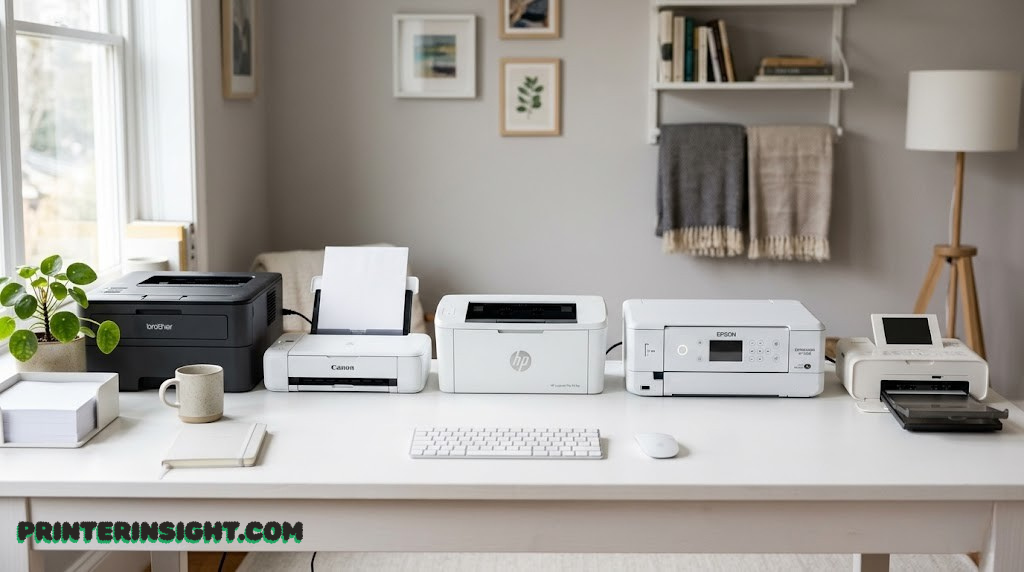
Modern compact printers have shrunk to notebook-sized proportions without sacrificing features like scanning, copying, or wireless connectivity.
Why Choose a Compact Home Printer?
The average home workspace has gotten smaller, and the average household printer has simply refused to keep up — until recently. Walk into any home office supply aisle and you’ll still find hulking all-in-one machines with footprints large enough to swallow a laptop. But the category of compact home printers has quietly matured into something genuinely impressive: machines that slide into a desk drawer, perch on a shelf bracket, or stow in a carry-on bag, while still handling documents, photos, and multi-function tasks without a second thought.
There are several reasons why a compact printer might be the smartest purchase you make for your home setup. Perhaps your desk is already claimed by a monitor, keyboard, and the stray pile of papers that seems to regenerate no matter how often you clear it. Perhaps you rent a small apartment and every square centimeter of counter space has a competing use. Or perhaps you work from multiple locations and need a printer that actually travels with you rather than anchoring you to one address.
Whatever your motivation, the compact printer market has expanded dramatically. Today you can choose between monochrome laser machines that produce crisp professional documents in seconds, portable inkjet models with built-in batteries, traditional color inkjet all-in-ones with surprisingly small footprints, and hybrid options that pack an automatic document feeder into a body barely larger than a hardback book.
💡 Quick Insight
If you’re unsure whether inkjet or laser is right for your compact setup, our in-depth inkjet vs. laser printer guide breaks down the real cost and performance differences for home users. It’s worth a read before committing.
In the sections that follow, we’ve put seven of the most compelling compact printers through their paces and examined them from every meaningful angle: physical dimensions, print quality, running costs, connectivity, and the kind of day-to-day usability that rarely gets mentioned in spec sheets. By the end of this guide, you’ll know exactly which compact machine fits your space, your workflow, and your budget.
One note on scope: “compact” means different things to different manufacturers, so we’ve anchored our definition to printers that are genuinely, measurably smaller than the category average — not just models where the marketing team decided “small” was a good word to put on the box. Every machine here earns its place on a real footprint basis.
Top Picks at a Glance
Before we go deep on each machine, here’s the fast version — a snapshot of which printer wins which category so you can jump straight to the review that matters most to your situation.
Best for Documents
HP LaserJet MFP M140w
Smallest laser MFP footprint on the market. Flawless for office-style text printing.
Best for Travel
Epson WorkForce WF-110
Battery-powered, ultra-light, and fits in a travel bag. Nothing else comes close for on-the-go printing.
Best Value
Canon PIXMA TS6420a
Sleek, narrow, affordable, and handles color beautifully. A quiet overachiever.
Best Portable Inkjet
Canon PIXMA TR150
Folds flat for drawer storage. Ideal for mobile professionals who still need print quality.
Best All-in-One
Brother MFC-J1010DW
Compact square design with a real ADF — a rare combination in a small-footprint machine.
Best for Photos
HP Envy 6155e
Low-profile, shelf-friendly design with excellent color reproduction and HP+ subscription perks.
Now let’s get into the details. Each review covers specs, real-world performance, running costs, pros and cons, and a clear verdict so you can make a confident decision. If you’re also considering models outside this list, our broader best home printers buying guide covers the full spectrum.
1. HP LaserJet MFP M140w
HP LaserJet MFP M140w
Monochrome Laser All-in-One Smallest Laser MFP“The smallest multi-function laser printer in its class.”
There’s a strong argument to be made that the HP LaserJet MFP M140w is the most important compact printer on this list. While inkjet all-in-ones have been shrinking for years, laser multi-function printers have stubbornly refused to get small — until this one. HP managed to cram a full flatbed scanner, duplex printing, Wi-Fi, and a genuine laser print engine into a footprint that genuinely startles people the first time they see it in person.
The M140w measures in as the smallest machine in its multi-function laser class, and that claim isn’t marketing spin — no competing laser MFP at a comparable price point comes close to matching its physical dimensions. It’s designed for the home user who values speed and document quality over color output, and it delivers on both counts with a consistency that inkjet machines rarely match.
Print Quality and Speed
Laser printing means sharp, dry-immediately text at 20 pages per minute — quick enough that you’re never drumming your fingers waiting for a document. The monochrome output is exactly what you’d expect from a well-tuned laser engine: precise edges, consistent density, and zero smearing. For contracts, reports, school assignments, or anything that lives in the “professional document” category, the M140w is noticeably crisper than any inkjet in this roundup.
The flatbed scanner performs admirably up to 1200 dpi, which is more than sufficient for digitizing paperwork, receipts, or the occasional book page. Copy quality mirrors the print quality: text stays clean and readable even at reduced scales.
Running Costs
This is where laser printers earn their long-term loyalty. Toner cartridges produce a significantly lower cost-per-page than inkjet equivalents, particularly for text-heavy printing. The M140w uses the HP 141A/141X toner series, and high-yield versions bring the cost-per-page well below what you’d pay feeding ink cartridges through even the most economical inkjet. If you print more than a hundred pages a month, the math favors laser over time. For a fuller picture, our ink vs. toner cost breakdown lays out exactly when laser becomes more economical.
One caveat: if your printing is infrequent — say, fewer than fifteen pages a week — toner can sit unused for months without the head-clogging problems that plague inkjets. That’s a genuine advantage for sporadic home printers.
✓ Pros
- Smallest laser MFP footprint available
- Fast, crisp monochrome output
- No dry-out risk between print jobs
- Auto-duplex saves paper
- Low long-term running costs
- Reliable wireless connectivity
✗ Cons
- No color printing whatsoever
- No photo capability
- No ADF (flatbed only)
- Larger upfront cost vs. entry inkjets
The M140w is the unambiguous choice if your home printing is document-centric and you want laser reliability in the smallest possible package. If color or photos ever enter the equation, look elsewhere — but for pure monochrome document work, nothing compact beats it.

2. Canon PIXMA TR150
Canon PIXMA TR150
Portable Mobile Inkjet Best Portable“Folds down flat enough to slip into a desk drawer.”
The Canon PIXMA TR150 occupies a unique position in the compact printer landscape: it’s not just small, it’s genuinely portable in a way that no other printer on this list can claim. When the paper tray is folded down, the TR150 has a profile thin enough to disappear into a standard desk drawer — a party trick that never stops being impressive, especially when you pull it back out and have it printing color documents within seconds.
Canon designed the TR150 for mobile professionals — consultants, real estate agents, field technicians, sales reps — who need a real printer at client sites rather than relying on shared office equipment or last-minute print shops. It’s a battery-optional machine: the base model connects via USB or Wi-Fi, while a separately purchased battery pack turns it into a fully cordless printing station.
Build and Portability
The TR150 is physically different from every other printer in this roundup. Its design is fundamentally about foldability: the paper output tray and input tray both collapse flush with the body, transforming a fully capable inkjet into something resembling a thick hardcover book. Weight is kept low enough that traveling with it doesn’t feel absurd — this is a machine you’ll actually take with you rather than just stow in a closet.
Wireless connectivity via Wi-Fi and Bluetooth means you can send print jobs from a smartphone without fishing around for a USB cable. The companion Canon PRINT Inkjet/SELPHY app makes mobile printing genuinely painless, and AirPrint and Mopria support mean iOS and Android users are equally covered.
Print Quality
For a portable machine, the TR150’s output quality is genuinely respectable. Text documents print sharp and clean at normal settings. Color reproduction on plain paper is good rather than exceptional — the 4-ink system (black, cyan, magenta, yellow) covers the spectrum adequately for presentations and reports, though it won’t satisfy anyone expecting photo-lab-level imagery from plain office paper.
For photo output on dedicated photo paper, the TR150 performs noticeably better, producing smooth color gradients and skin tones that are pleasant rather than clinical. It won’t rival a dedicated photo printer — for serious photo needs, see our guide to the best home photo printers — but for the occasional family photo or presentation graphic printed on the road, the TR150 is more than competent.
✓ Pros
- Folds completely flat for storage and travel
- Optional battery for fully wireless operation
- Excellent mobile app connectivity
- Solid color print quality for a portable machine
- AirPrint and Mopria support
✗ Cons
- Print-only (no scan or copy)
- Battery sold separately adds cost
- Ink cartridges cost more than high-volume alternatives
- Slower output than home-based machines
Pro Tip
If your TR150 cartridges are sitting idle between trips, follow our guidance on storing printer cartridges properly to prevent drying — a real concern for any inkjet that sees intermittent use.
The TR150 is the clear winner for anyone who genuinely needs to print while away from home. Its drawer-flat design and optional battery make it unlike any other machine in this segment. Just know that you’re paying a portability premium, and the absence of scan/copy limits its home versatility.

3. Epson Expression Home XP-3200
Epson Expression Home XP-3200
Color Inkjet All-in-One‘Traditional “Small-in-One” scanning with a tiny footprint.’
Epson coined the “Small-in-One” marketing term, and the XP-3200 is the purest expression of that concept. It’s a traditional home all-in-one — print, scan, copy, the classic trifecta — squeezed into a body that takes up genuinely less desk real estate than most competing machines. If you need a full-feature inkjet that doesn’t dominate your workspace, the XP-3200 is one of the tidiest options available.
The design is clean and understated: a simple rectangular form with a flip-up scanner lid, a front-loading paper tray, and a modest control panel with a 1.44-inch monochrome display. There’s nothing flashy about the exterior, which is exactly the point — it’s meant to disappear into the background of your desk rather than demand attention.
Features and Connectivity
Beyond the core print-scan-copy functionality, the XP-3200 supports both Wi-Fi and direct Wi-Fi connectivity, meaning you can print from mobile devices without a router in the loop. Epson’s companion app handles mobile jobs cleanly, and the printer supports Apple AirPrint and Google Cloud Print for device-agnostic wireless printing.
The flatbed scanner tops out at 1200 dpi — more than enough for document archiving, scanning old photographs, or digitizing receipts. There’s no automatic document feeder, so multi-page scan jobs require manual page placement, which is one area where the Brother MFC-J1010DW (reviewed below) has a meaningful advantage.
Print Quality
The XP-3200 uses Epson’s CLARIA ink formulation, which produces vivid, accurate color on both plain paper and dedicated photo media. Text output is crisp at standard settings, and color documents — think graphics-heavy reports or school projects — look sharp and well-saturated. Photo output on Epson premium photo paper is genuinely attractive, with smooth color gradients and good shadow detail.
Where the XP-3200 shows its budget positioning is ink running costs. The individual cartridge system means you replace only the color that runs out, which is economical in theory, but high-yield replacements aren’t always readily available everywhere. For more cost-focused alternatives in the color inkjet space, our guide to home printers with the cheapest ink covers the options systematically.
✓ Pros
- Full print-scan-copy in a tiny footprint
- Vivid CLARIA ink color quality
- Good photo output on photo paper
- Simple, clean design
- Individual cartridges reduce waste
✗ Cons
- No ADF for multi-page scanning
- Small display limits usability
- Cartridge costs add up for heavy users
- Slower than laser for text documents
A dependable, compact all-in-one that punches above its size in color quality. Best suited for light-to-moderate home users who value compactness and color performance equally. Heavy scanners or multi-page document users should consider the Brother MFC-J1010DW instead.

4. HP Envy 6155e
HP Envy 6155e
Color Inkjet All-in-One Best for Photos“A flat, low-profile design that neatly slides onto shelves.”
HP’s Envy line has always been the design-conscious end of their consumer printer range, and the 6155e upholds that tradition with a low-profile, shelf-friendly silhouette that looks at home in a living space rather than just a home office. The machine has a notably flat profile compared to boxy competitors — it’s designed to tuck under shelves, slide into media units, or live on a desk without announcing itself as “the printer area.”
Beyond aesthetics, the 6155e is a capable color all-in-one that benefits from HP’s Instant Ink subscription program. When enrolled in Instant Ink, HP monitors your ink levels remotely and ships replacement cartridges before you run out, pricing the service per page rather than per cartridge. For users with predictable monthly print volumes, this can meaningfully reduce per-page costs. Those who’d rather own their ink outright can simply skip the subscription and buy standard cartridges.
Design and Build
The 6155e’s flat form factor isn’t just visual — it has engineering consequences. The paper path is designed to accommodate the low profile, which means the machine runs quieter than many competing inkjets. The front panel retracts flush with the body when not in use, contributing to the clean lines. Build quality feels solid rather than plasticky, which you notice when you open and close the scanner lid repeatedly over months of use.
Touchscreen control is provided by a small color display — a genuine usability improvement over the monochrome button displays on budget machines. Navigating the scan, copy, and connectivity settings is more intuitive as a result, which matters when family members of varying technical confidence need to use the machine.
Photo and Color Performance
The 6155e is among the better photo printers in the compact category. Its thermal inkjet system handles color gradients smoothly, and output on HP Advanced Photo Paper is genuinely gallery-quality for casual home printing. Skin tones are natural rather than oversaturated, which is the failure mode of many budget color printers. For users who regularly print photos from family events, the 6155e deserves its position near the top of the compact rankings.
If photography is your primary printing focus, also consider our dedicated guide to the best home photo printers, which includes dedicated photo-specialty models alongside all-in-ones like the 6155e.
✓ Pros
- Sleek low-profile design suits any space
- Excellent color and photo quality
- Instant Ink subscription keeps you stocked
- Color touchscreen panel
- Strong mobile and wireless connectivity
✗ Cons
- HP+ activation required for some features
- No ADF limits scan productivity
- Ink costs are high without a subscription
- Print speeds are modest
The 6155e is the most aesthetically considered machine in this roundup and one of the best performers on photo output. If you want a compact printer that earns its place in a living space rather than just tolerating it, and if Instant Ink’s economics make sense for your monthly volume, the 6155e is an excellent choice.

5. Brother MFC-J1010DW
Brother MFC-J1010DW
Color Inkjet All-in-One Best All-in-One“Compact, square design that includes an automatic document feeder.”
The Brother MFC-J1010DW does something that sounds simple but turns out to be genuinely rare in the compact printer segment: it fits an automatic document feeder into a compact, square-profile body. An ADF means you can load a stack of pages and walk away while the scanner works through them — a feature that sounds incremental until the first time you need to digitize a multi-page contract or scan a month’s worth of receipts, at which point it becomes indispensable.
Brother has a long-standing reputation for building reliable, practical printers without unnecessary flourishes — an approach that suits the home office user who values function over form. The MFC-J1010DW is the direct expression of that philosophy: no touchscreen theatrics, no subscription ink traps, just a capable compact all-in-one that works consistently. For anyone comparing Brother and HP in the home space, our Brother vs. HP comparison guide addresses the key differences in depth.
ADF Advantage
The 20-page automatic document feeder is the machine’s defining feature, and it works well. Document throughput is smooth with minimal misfeed incidents, and the scanner produces clean, properly exposed digital copies of text documents. Fax capability is also included — increasingly irrelevant for most home users, but genuinely useful for those who still deal with fax-dependent institutions.
The square form factor is practical as well as distinctive. The machine sits stably on any flat surface, and the square footprint actually tiles better in small spaces than rectangular machines of equivalent capacity, particularly if you’re placing it in a corner or on a shelf.
Print Performance
The J1010DW’s inkjet engine produces solid color and text output across both plain and photo media. Text is sharp and well-defined at standard settings, and color documents have good saturation without the over-brightening that cheaper inkjets sometimes produce. Auto-duplex printing is available, which saves paper on longer documents and is a feature you’ll use more than you expect.
Ink costs are reasonable for a Brother machine, and high-yield cartridge options help extend the interval between replacements. For more on managing ink costs for compact home printers, our best Brother home printers roundup has cartridge-cost breakdowns for the full Brother lineup.
✓ Pros
- ADF enables hands-free multi-page scanning
- Compact square form fits awkward spaces well
- Auto-duplex printing standard
- Fax capability included
- No proprietary ink subscription
- Reliable, low-maintenance operation
✗ Cons
- No touchscreen — basic LCD control panel
- Photo quality behind HP Envy 6155e
- Slightly taller than flatbed-only alternatives
- ADF height adds to overall footprint
The MFC-J1010DW is the practical choice for anyone who regularly needs to scan multi-page documents. The ADF is a genuine productivity differentiator that no other machine on this list provides in a compact form. If your use case involves more than occasional single-page scanning, this is your printer.
6. Epson WorkForce WF-110
Epson WorkForce WF-110
Portable Mobile Inkjet Best for Travel“Ultra-lightweight travel printer with a built-in battery.”
The Epson WorkForce WF-110 is the most committed travel printer in this roundup and the only machine here that ships with a built-in rechargeable battery as a standard feature rather than an optional add-on. This distinction matters enormously for on-the-go professionals: you don’t need to plan around power outlets, you don’t need to carry an extra accessory, and you don’t arrive at a client site only to discover the battery you ordered is still in a warehouse somewhere.
The WF-110 is small enough to fit in a laptop bag compartment and light enough that you won’t notice it on a morning commute. The built-in battery provides enough capacity for a meaningful session of mobile printing before needing a recharge, and the machine can also be powered via USB — useful in airport lounges where power outlets are scarce but USB charging points are everywhere.
Battery and Connectivity
The integrated rechargeable Li-ion battery is the WF-110’s headline feature, and it performs reliably in real-world use. Typical yield on a full charge is in the range of 100 pages under normal operating conditions, though heavy photo printing or aggressive color use will reduce that figure. Recharging via the included power adapter takes a few hours.
Wireless connectivity covers Wi-Fi and Bluetooth, and the Epson iPrint app handles mobile print jobs from both iOS and Android cleanly. AirPrint support means iPhone users can print directly from their camera roll or email without installing anything. The WF-110 also supports Epson Connect, which adds email printing capability — useful for sending print jobs ahead of a meeting.
Output Quality
For a printer this small and mobile, the WF-110’s output quality is impressive. Text documents print sharp and well-defined at standard settings, with no visible banding or density issues on plain office paper. Color output is vivid and reasonably accurate — Epson’s CLARIA inks do their job even in a portable form factor.
Photo output on photo paper is the WF-110’s strongest performance area. The 5760 x 1440 dpi maximum resolution translates to genuinely smooth gradients and fine detail on properly coated media, which is a pleasant surprise from a machine you can carry in a laptop bag. It won’t replace a dedicated photo printer for serious work, but for client-facing printing or travel photography it’s more than adequate.
For travelers who also need to digitize documents on the road, consider pairing the WF-110 with a compact scanner — our guide to best wireless home printers includes some combination options worth exploring.
✓ Pros
- Built-in battery — no add-on required
- Ultra-portable, fits in laptop bags
- Strong wireless and app ecosystem
- Impressive print quality for a portable machine
- USB power option for airport use
✗ Cons
- Print-only (no scan or copy)
- Ink cartridges are small format (higher per-page cost)
- Battery recharge takes several hours
- Slower print speed than desk-bound machines
The WF-110 is the definitive answer for professionals who print away from their desks on a regular basis. The built-in battery is a genuine differentiator, and the output quality is better than the category usually delivers. Trade-offs are the absence of scan/copy and higher ink costs per page — acceptable compromises for the core mobile use case.

7. Canon PIXMA TS6420a
Canon PIXMA TS6420a
Color Inkjet All-in-One Best Value“Sleek, modern aesthetic with a highly narrow layout.”
The Canon PIXMA TS6420a takes a different approach to compactness than most machines in this roundup: rather than simply shrinking overall dimensions, Canon has focused specifically on the machine’s width — producing one of the narrowest-profile home all-in-ones you can buy. The result is a printer that fits into spots on a desk or shelf where a conventional square all-in-one simply wouldn’t go.
Beyond the form factor, the TS6420a represents Canon’s expertise in consumer inkjet printing distilled into a compact package. The 5-ink system is notably more sophisticated than the 4-ink arrangements found in most budget all-in-ones, and the print quality reflects that investment. This is a machine that takes photo output seriously while still excelling at everyday document printing — and doing both in a body that doesn’t announce itself as “the printer.”
5-Ink Color System
The TS6420a uses Canon’s 5-ink hybrid system: black and grey pigment inks paired with cyan, magenta, and yellow dye inks. This combination is specifically designed to improve photo output — the grey ink in particular smooths out gradients and shadow detail in a way that 4-ink systems can’t replicate. On Canon Photo Paper Plus Glossy II, the output genuinely rivals photo lab prints for smaller format sizes.
Text documents benefit from the pigment-based black ink, which produces sharper, more water-resistant text than dye-only systems. The combination means the TS6420a isn’t compromising between document and photo performance — it does both well, which is unusual at its price point.
Usability and Connectivity
The 3-inch color touchscreen is a genuine quality-of-life improvement over the monochrome displays on competing machines. Navigating copy settings, scan destinations, or wireless configuration feels intuitive rather than like a puzzle. Canon’s PRINT app on both iOS and Android is one of the better printer companion apps available, handling everything from remote print jobs to direct card-to-print workflows for photographers.
Compatibility with Canon’s Auto Sheet Feeder and the ability to print on a variety of specialty media — labels, envelopes, disc labels — expands the TS6420a’s utility beyond what the form factor might suggest. Students who need to print on a variety of media types, in particular, will find this flexibility useful. Our best printers for students guide places the TS6420a in good company if that’s your context. If you also work on a Mac, we’ve found it worth reading our Mac-compatible home printer guide to verify driver compatibility before purchasing.
✓ Pros
- 5-ink system for superior photo output
- Narrow profile fits tighter spaces
- Excellent color touchscreen
- Strong value at its price point
- Versatile media compatibility
- Good Canon app ecosystem
✗ Cons
- No ADF for bulk scanning
- 5 separate cartridges to manage
- Individual cartridges cost more than XL alternatives
Comparison Note
If you’re torn between Canon and HP in this price range, our Canon PIXMA vs. HP Envy comparison breaks down exactly where each manufacturer’s approach diverges, including color accuracy, running costs, and app ecosystem quality.
The TS6420a is the best all-around value in this roundup. The 5-ink system delivers photo quality that outpunches its class, the narrow profile opens up placement options, and the touchscreen makes daily use comfortable. If you can only pick one compact all-in-one and you want it to do everything well, this is the machine.

Full Comparison Table
Seven printers, side by side. Use this table to quickly spot the machine that matches your specific requirements — whether that’s an ADF, built-in battery, laser technology, or a narrow profile.
| Printer | Type | Functions | ADF | Battery | Duplex | Best For |
|---|---|---|---|---|---|---|
| HP LaserJet MFP M140w | Mono Laser | Print, Scan, Copy | No | No | Yes | Document-heavy homes |
| Canon PIXMA TR150 | Color Inkjet | Print only | No | Optional | No | Mobile professionals |
| Epson Expression XP-3200 | Color Inkjet | Print, Scan, Copy | No | No | No | Light home all-in-one use |
| HP Envy 6155e | Color Inkjet | Print, Scan, Copy | No | No | No | Photo printing, design homes |
| Brother MFC-J1010DW | Color Inkjet | Print, Scan, Copy, Fax | Yes (20p) | No | Yes | Multi-page scanning |
| Epson WorkForce WF-110 | Color Inkjet | Print only | No | Built-in | No | Travel and remote work |
| Canon PIXMA TS6420a | Color Inkjet | Print, Scan, Copy | No | No | No | Best overall value |
ℹ️ Note on Ink Tank Alternatives
None of the seven printers in this guide use an ink tank (EcoTank/MegaTank) system. If ultra-low ink running costs are your primary concern and you can accept a slightly larger footprint, our best ink tank printer guide covers the leading options, and our ink tank worth it analysis helps you decide whether the economics make sense for your volume.
How to Choose the Right Compact Home Printer
Buying a compact printer isn’t simply about finding the smallest machine — it’s about finding the smallest machine that doesn’t compromise on the things that matter for your specific situation. Here are the key variables to evaluate before you add one to your cart.
1. Define “Compact” for Your Space
Manufacturers use “compact” loosely. Before shopping, measure the actual space you have available — width, depth, and height including any clearance needed for the scanner lid or paper tray. Some machines are narrow but tall; others are wide but very flat. The HP Envy 6155e prioritizes a flat, low-height profile for under-shelf placement; the Canon PIXMA TS6420a prioritizes a narrow width for tight shelving; the Epson WorkForce WF-110 prioritizes total volume for travel. Know which dimension constraint matters most for your space.
2. Print Technology: Inkjet vs. Laser
Laser wins on speed, document quality, and the ability to sit unused for weeks without head-clogging. Inkjet wins on color quality, photo printing, and (usually) lower upfront cost. For compact home printers, only one laser option appears in this roundup — the HP LaserJet MFP M140w — because compact laser MFPs are genuinely rare. If color is a non-issue and you print primarily text documents, laser is the stronger long-term choice. Our complete inkjet vs. laser breakdown covers the cost and performance calculus in detail.
3. Do You Need Scanning?
If scanning is part of your workflow at all — digitizing receipts, archiving documents, copying papers — prioritize a machine with a flatbed scanner. Four of the seven printers in this guide include scanning: the HP LaserJet MFP M140w, Epson XP-3200, HP Envy 6155e, and Canon TS6420a, plus the Brother MFC-J1010DW. If you regularly scan multi-page documents, only the Brother provides the ADF that makes that practical at volume.
4. Do You Need to Print on the Go?
If portability is the goal, the Canon PIXMA TR150 and Epson WorkForce WF-110 are your two serious options. The Epson’s built-in battery is the decisive advantage for true cordless operation; the Canon’s fold-flat design is the decisive advantage for desk drawer storage and airline overhead bins. Choose based on which scenario you face more often.
5. Running Costs and Ink
The upfront price of a printer is often less than half of what you’ll spend on ink over its lifetime. Evaluate cost-per-page for your expected monthly volume before committing. High-yield cartridge availability varies significantly by model — some compact printers only offer standard-capacity cartridges, which drives per-page costs up. For compact inkjets, check whether XL or high-yield options are available for all colors before buying. Our detailed guide to home printers with the cheapest ink identifies where the real savings live.
⚠️ Maintenance Note
Compact inkjets are particularly susceptible to print head clogging if left unused for extended periods — the ink in fine nozzles dries and blocks output. If you print infrequently, run a test page weekly. For detailed prevention strategies, see our guide on preventing inkjet printers from drying out. And if clogging does occur, our print head cleaning guide walks through the recovery process.
6. Connectivity Requirements
All seven machines in this guide support Wi-Fi, which is the baseline expectation for any modern home printer. Most also support mobile printing via dedicated apps (HP Smart, Epson iPrint, Canon PRINT, Brother iPrint&Scan), and several support AirPrint and Mopria for natively app-free mobile printing. If you need to print from a Mac specifically, our best home printers for Mac guide verifies compatibility and driver quality. For general wireless setup guidance, our printer Wi-Fi connection walkthrough handles the most common scenarios step by step.
7. Home Office vs. Pure Home Use
Home office users typically need more robust performance: faster print speeds, ADF for document scanning, duplex printing to manage paper costs, and reliability over sustained use. The Brother MFC-J1010DW and HP LaserJet MFP M140w serve this profile best among compact machines. For pure home use — occasional documents, school projects, and personal photos — the Canon TS6420a and HP Envy 6155e offer a better balance of quality and simplicity. Our best home office printer guide goes deeper on the productivity-oriented machines.
Inkjet vs. Laser: The Compact Printer Perspective
The inkjet vs. laser debate looks different when the context is compact home printers. In full-size home printers, the choice is fairly open — plenty of excellent options exist on both sides. But in the compact segment, the balance shifts significantly toward inkjet, for a simple reason: genuinely compact laser printers are rare, and genuinely compact laser all-in-ones are even rarer. The HP LaserJet MFP M140w is essentially a category of one at its size and price point.
When Laser Wins (Even in a Compact Context)
If your printing is exclusively documents — reports, contracts, essays, forms, correspondence — and color is never part of the equation, the M140w’s laser engine has meaningful advantages. Prints emerge dry and smudge-proof immediately. Speed is noticeably faster than any inkjet in this roundup. Toner doesn’t dry out between print sessions, so a printer that sits unused for two weeks produces perfect output on the next page without any head-cleaning cycle. Long-term running costs favor laser once monthly volume crosses into the hundreds of pages.
When Inkjet Wins in the Compact Space
Color output, photo printing, and the existence of genuinely portable options all favor inkjet in the compact segment. If you need to print anything in color — even occasionally — inkjet is your only realistic compact option. If you need a machine you can take with you, inkjet is your only option. If you value a very low physical profile or folding-flat portability, inkjet is your only option. The six inkjet machines in this roundup cover a wide range of specialized use cases that laser simply can’t address at compact dimensions.
| Factor | Laser (Compact) | Inkjet (Compact) |
|---|---|---|
| Text document quality | Excellent | Very good to excellent |
| Color output | Not available | Good to excellent |
| Photo printing | Not available | Good to excellent |
| Print speed | Fast (20+ ppm) | Moderate (8–15 ppm) |
| Running costs | Lower per-page (text) | Variable; can be high |
| Idle-period reliability | Excellent | Requires maintenance |
| Portability options | None | Yes (TR150, WF-110) |
| Compact model options | Very limited | Many |
For a comprehensive analysis of the cost and quality comparison beyond the compact category, our full inkjet vs. laser guide goes into granular detail on long-term economics, print quality across media types, and the break-even points for different usage volumes.
Keeping Your Compact Printer Running Well
A compact printer that sits on a desk or shelf is subject to the same maintenance requirements as a full-size machine — in some ways more so, because compact inkjet models have particularly fine nozzles that are more vulnerable to clogging from irregular use. A few habits will dramatically extend the useful life and output quality of any of the machines in this roundup.
Print Regularly
The single most effective thing you can do for an inkjet printer is use it regularly. Running a test page or printing a short color document once a week keeps ink flowing through the nozzles and prevents the partial clogging that degrades output quality over time. This applies particularly to the portable machines — the TR150 and WF-110 — which may be used in bursts with idle periods between trips.
Store Cartridges Correctly
If you keep spare cartridges on hand, storage conditions matter. Cartridges stored at extreme temperatures or with protective caps removed dry out prematurely. Our printer cartridge storage guide covers the optimal conditions in detail.
Clean Print Heads When Needed
If you notice streaks, missing colors, or faded output, a print head cleaning cycle is usually the solution. All the inkjet machines in this guide provide a software cleaning utility accessible through their companion apps or computer driver interfaces. For persistent clogs, our step-by-step print head cleaning guide covers both software and manual cleaning methods.
Keep the Scanner Glass Clean
For the all-in-one machines, scanner glass accumulates dust and fingerprints that show up as marks or gray streaks on scanned documents. Wipe the glass with a lint-free microfiber cloth — ideally moistened with a small amount of isopropyl alcohol — whenever you notice scan quality degrading. For more comprehensive care practices, our home printer maintenance guide covers the full routine.
Frequently Asked Questions
Conclusion: Which Compact Printer Is Right for You?
Seven machines, seven distinct answers to the problem of printing in a small space. None of them is right for everyone, but each is right for someone.
If your home printing is document-focused and you never need color, the HP LaserJet MFP M140w is the obvious answer — nothing beats a laser engine for sharp, reliable monochrome output in the smallest laser package available. If you travel with your printer and need built-in battery autonomy, the Epson WorkForce WF-110 is the only machine that delivers true cordless portability out of the box. If you need the ultimate fold-flat desk drawer trick with color output, the Canon PIXMA TR150 is genuinely unlike anything else.
For most home users who want a full all-in-one without sacrificing desk space, the choice comes down to priorities: the Brother MFC-J1010DW if you scan multi-page documents regularly; the HP Envy 6155e if photo output and aesthetic design matter; and the Canon PIXMA TS6420a if you want the best overall value and color quality in a narrow package.
The Epson Expression Home XP-3200 remains a reliable, unpretentious all-in-one for light home users who prioritize simplicity over advanced features.
Whatever you choose, remember that a printer’s long-term cost is more about ink strategy than purchase price. Check high-yield cartridge availability, consider running costs at your expected monthly volume, and follow basic maintenance habits to protect your investment. A compact printer that’s well cared for will serve you faithfully for years without ever demanding much of your attention or your desk space.
Ready to Pick Your Compact Printer?
Explore our full home printer buying guides for deeper comparisons, cost analysis, and expert recommendations across every category and budget.
Browse All Home Printer Guides