How Much Is a Printer? Real Prices, Hidden Costs and What to Actually Pay
The Short Answer: What Does a Printer Cost?
Most people pay somewhere between $60 and $400 for a home printer, and the sweet spot for a reliable all-rounder sits around $120 to $250. Bargain inkjets can dip below $50, while professional-grade office machines climb well past $1,000. That range feels wild, but it makes sense once you understand what you are really buying.
Here is the catch: the sticker price is only the opening bid. A $50 printer with expensive cartridges can cost three times as much over two years as a $250 machine with cheap refills. So when you ask how much a printer costs, the honest answer has two parts: the purchase price and the running cost. This guide covers both.
Why Printer Prices Vary So Much
Two printers that look almost identical on a store shelf can differ by $200 or more. The reasons are rarely cosmetic. Print speed, paper capacity, build quality, connectivity, and the technology inside all push the price up or down. A budget model might crawl through a ten-page document and need you to flip pages by hand for double-sided printing. A pricier model may finish the same job twice as fast, feed pages from a 250-sheet tray, and print on both sides automatically.
There is also a quiet business model behind the low end of the market. Manufacturers often sell entry-level printers at thin margins, sometimes close to cost, because they earn money later on ink and toner. That is why a $45 printer can seem like a bargain right up until the first replacement cartridges cost nearly as much as the printer did. Understanding this pattern is the single most useful thing you can learn before shopping.
Two Numbers Worth Knowing Before You Shop
Whenever you compare printers, hold two figures in your head. The first is the purchase price, which is what you pay at the checkout. The second is the cost per page, which is what you pay every time something comes out of the tray. A printer that costs $60 and prints pages at 12 cents each is a very different purchase from one that costs $250 and prints pages at 1 cent each, especially if you print a few hundred pages a year or more.
If you print only a handful of pages a month, the purchase price matters most and a cheap machine is perfectly reasonable. If you print weekly for school, work, or family projects, cost per page quickly becomes the bigger number. The rest of this article helps you figure out which camp you belong to and what to budget for accordingly.
If you want a shortlist right away, our roundup of the best home printers worth buying right now is a good companion to this article.
Printer Price Tiers at a Glance
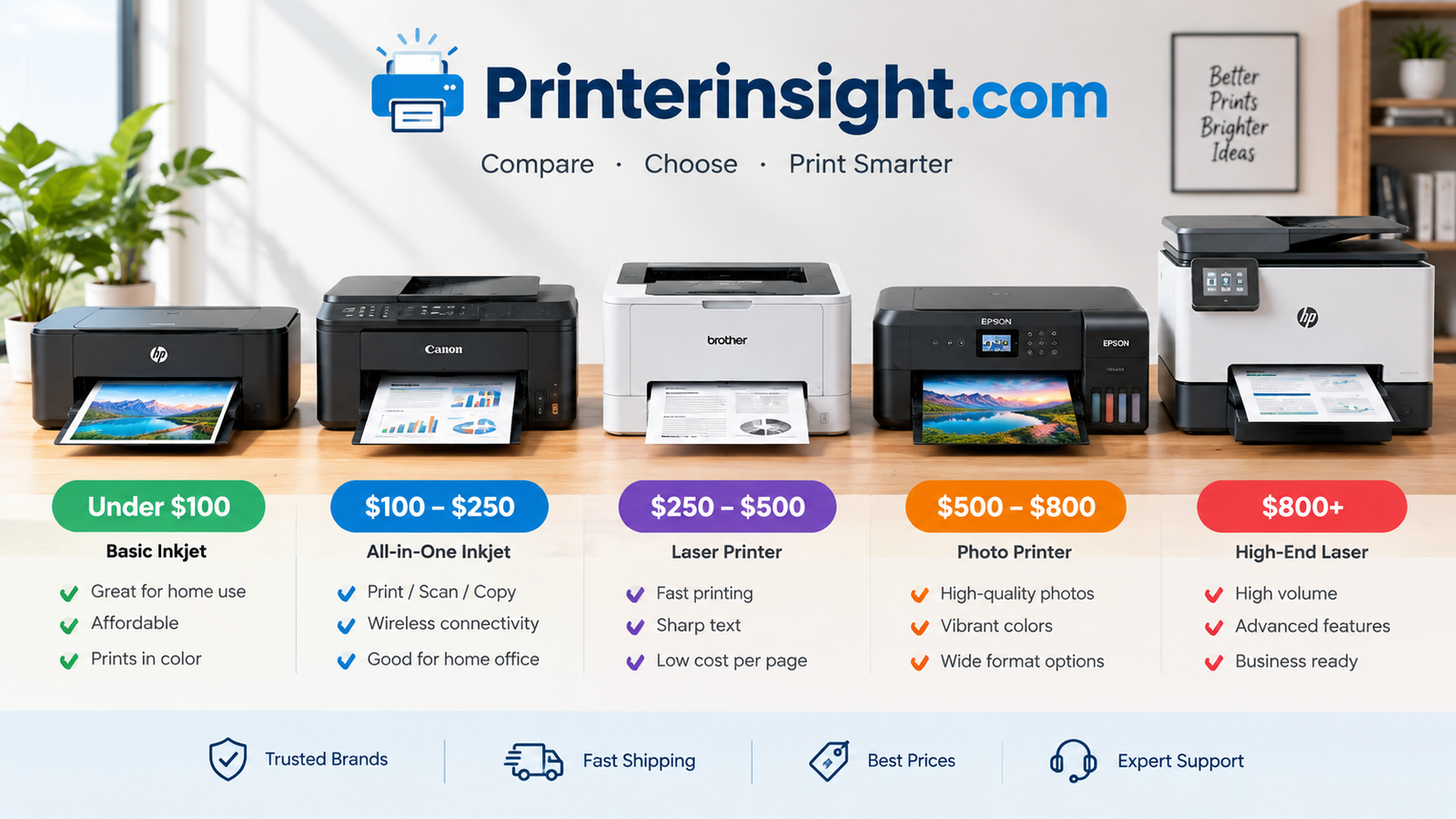
Think of printers as falling into four broad tiers. Each tier trades money for speed, durability, and lower cost per page.
| Tier | Typical Price | Best For | Watch Out For |
|---|---|---|---|
| Budget inkjet | $40–$90 | Occasional printing | Costly cartridges |
| Mid-range inkjet / laser | $100–$250 | Families, students | Feature creep |
| Ink tank | $200–$450 | High-volume color | Higher upfront cost |
| Office-class | $300–$1,000+ | Small business | Size and weight |
Notice how price and running cost move in opposite directions. Spend more upfront and you generally spend less per page later.
Budget Tier: $40 to $90
This is where you find the printers that fit on a bookshelf and print a few pages a week without complaint. They usually offer basic wireless printing, a flatbed scanner on the all-in-one versions, and small paper trays. Speeds are modest, and duplex printing is often manual. These machines suit renters, students with a dorm desk, and anyone who prints a boarding pass or a school form now and then. Just remember that the cartridges shipped in the box are often starter-sized, so you will be buying ink sooner than you expect.
Mid-Range Tier: $100 to $250
The mid-range is where most households should be shopping. You get a noticeable jump in build quality, faster print speeds, automatic double-sided printing, better Wi-Fi reliability, and often an automatic document feeder for scanning multi-page paperwork. Mono lasers and well-equipped inkjet all-in-ones both live here. If you are unsure what you need, this is the safest tier to start your search.
Ink Tank Tier: $200 to $450
Ink tank printers look like ordinary inkjets from the outside, but they use large refillable reservoirs instead of small cartridges. They cost more upfront, then repay you with very low cost per page. They are built for people who print regularly, especially in color, and who are tired of buying cartridges every few weeks.
Office-Class Tier: $300 to $1,000+
Office-class machines add speed, large paper trays, high monthly duty cycles, and network features such as secure printing and advanced scanning. Most home users do not need them. They make sense for small businesses, home offices that print contracts and invoices all day, or anyone who needs sturdy hardware that will not slow down under heavy use.
Where the Real Value Sits
Value rarely lives at either extreme. The cheapest printers tend to be expensive to run, and the top-end office machines offer capability many households will never use. The middle of the range, roughly $120 to $250 for a typical household, tends to strike the best balance between purchase price, features, and long-term cost.
How Much Does an Inkjet Printer Cost?
Inkjets are the most common home printers, mainly because they handle color, photos, and everyday documents in one affordable package. Basic models start near $40. Solid wireless all-in-ones with scanning and automatic duplex printing usually land between $80 and $180.
The trade-off is ink. Standard cartridges run dry quickly, and replacements can cost $25 to $60 a set. If you print rarely, inkjet nozzles can also clog, which is why our guide on how to prevent an inkjet printer from drying out is worth a read.
What You Get at Each Inkjet Price Point
Under $60, expect a compact print-only or basic all-in-one machine with USB and simple Wi-Fi, manual duplex, and a small paper tray. Between $60 and $120, printers usually add better app support, faster speeds, and sometimes borderless photo printing. From $120 to $180, you start to see automatic duplex, a document feeder, larger trays, and more reliable wireless connections. Past $180, inkjets begin to overlap with office models and ink tank machines, and it is worth asking whether you would be better served by one of those instead.
Cartridge Costs Explained
Inkjet ink is sold in either combined color cartridges or separate cartridges for each color. Combined cartridges are cheap to replace, but you throw away the whole thing when one color runs out. Separate cartridges cost more in total but let you replace only what you have used. Higher-capacity XL cartridges cost more per unit yet usually deliver a lower cost per page, so they are often the smarter buy if you print regularly.
Keep in mind that page yields quoted on the box are measured under standardized conditions, usually with about five percent ink coverage. A page full of photos or dark graphics will use far more ink, so real-world results may fall short of the number on the label.
Who Should Buy an Inkjet?
An inkjet suits people who want color, photos, and flexibility without spending a lot on the hardware. It works well for students, for households that print a mix of school assignments and the occasional photo, and for anyone who wants a small, quiet machine. It is a poorer fit if you mostly print black-and-white text in volume, since a laser will be faster and cheaper per page, or if you print so much color that ink costs will dominate your budget.
Common Inkjet Pitfalls
The biggest mistake is buying purely on price and ignoring consumables. The second is buying an inkjet and then leaving it unused for months. Ink dries inside the printhead, and repeated cleaning cycles waste ink and can still leave stubborn clogs. If you know your printing is sporadic, a laser or an ink tank model with pigment-based ink often handles idle periods better.
- Low entry price
- Great color and photos
- Compact designs
- Wide range of models and features
- Expensive cartridges
- Slower text speed
- Nozzles can clog
- Ink cost adds up with regular use
How Much Does a Laser Printer Cost?
Laser printers cost a bit more than the cheapest inkjets, but they reward you with speed, sharp text, and toner that lasts for thousands of pages. A monochrome laser typically costs $100 to $220. Color lasers start around $200 and can exceed $500 for faster, sturdier models.
If most of your printing is black-and-white paperwork, a mono laser is often the smartest purchase. Start with our picks for the best laser printer for home, or read the Brother HL-L2460DW review for a popular budget workhorse.
Mono Laser Pricing
Entry-level mono lasers sit around $100 to $150 and generally offer a single function: print. They are fast, quiet enough for a home office, and remarkably dependable. Step up to roughly $150 to $220 and you can find multifunction models that scan and copy, and some add an automatic document feeder. Because there is no liquid ink to dry out, lasers tolerate long idle periods far better than inkjets, which is a real advantage if you print in bursts.
Color Laser Pricing
Color lasers are pricier and heavier because they carry four toner cartridges and a more complex imaging system. Home-friendly models start around $200, while faster, higher-capacity machines can pass $500. Color laser output looks crisp on charts, flyers, and business documents, but photo quality generally trails a good inkjet. Replacement toner sets can also be costly, so check the cost per page before you commit, not just the printer price.
Toner, Drums and Yields
Toner cartridges cost more than ink cartridges, yet they last much longer. Many mono cartridges are rated for well over a thousand pages, and high-yield versions can go much further. Some laser printers also use a separate drum unit, which wears out after many thousands of pages and must be replaced. Others build the drum into the toner cartridge, which raises the cartridge price but simplifies upkeep. Always check whether a model you are considering uses a separate drum, because it changes the true running cost.
Who Should Buy a Laser Printer?
Laser printers shine for people who print text-heavy documents: students writing papers, remote workers handling contracts and invoices, and households that print forms and shipping labels. They are less ideal if you want vibrant photo prints or you frequently print full-color graphics on a tight budget. In those cases, a photo inkjet or ink tank machine will usually serve you better.
Size and Placement
Lasers tend to be larger and heavier than inkjets, and they give off a little heat while printing. Measure your shelf or desk before buying, and leave a few inches of clearance for airflow and for opening the top cover. This sounds trivial, but it is one of the most common reasons buyers return laser printers.
- Fast, sharp text
- Toner lasts a long time
- Handles idle periods well
- Low cost per page in black-and-white
- Higher upfront price than basic inkjets
- Color models cost more to run
- Larger and heavier
- Photo quality trails inkjets
How Much Does an Ink Tank Printer Cost?
Ink tank printers replace tiny cartridges with refillable reservoirs. Expect to pay $200 to $450 upfront, which stings a little. The payoff is dramatic: a single set of bottles can print thousands of pages, and the cost per page drops to a fraction of a cent.
Curious whether the premium is justified? See are ink tank printers worth it, the best ink tank printer for home, or the head-to-head Epson EcoTank vs HP Smart Tank comparison.
Why Ink Tanks Cost More Upfront
The higher price reflects several things. The printer ships with a generous supply of ink in the box, often enough for a year or two of typical home use, so you are effectively pre-paying for consumables. The hardware also tends to be sturdier, with larger reservoirs, better sealing, and printheads designed for heavier use. Add a full feature set, such as duplex printing, a document feeder, and strong wireless support, and the price makes more sense.
How the Savings Work
Replacement ink for a tank printer usually comes in bottles priced around $10 to $20 each. A full set can cost less than a single cartridge refill for a conventional inkjet, yet it prints several times as many pages. If you print a few hundred pages a month, the savings can add up to the price difference between an ink tank and a budget inkjet within the first year or two. If you print only a few pages a month, the payback period stretches out, and a cheaper machine may still be the better buy.
A Simple Break-Even Example
Imagine you print 150 pages a month, a mix of black-and-white and color. At the roughly 10 cents per page that a cartridge inkjet can cost on average, that is about $15 a month. On an ink tank printer, the same pages might cost around $2 or $3 a month. Even after paying $200 more upfront, you would come out ahead in well under two years. The numbers are illustrative, but they show why ink tanks are so popular with families, students, and home businesses.
Things to Check Before Buying
- Refill process: Look for bottles with keyed nozzles that reduce spills.
- Ink type: Pigment black ink resists smudging on text, while dye inks often look richer on photos.
- Size: Tanks add bulk, so measure your space.
- Warranty: Check what the manufacturer says about third-party ink.
Who Should Skip an Ink Tank Printer?
If you print very rarely, the extra upfront cost may never pay off, and you may be happier with a compact laser or a low-cost inkjet. Ink tank models are also bulkier than some cartridge machines, and they are not the cheapest option for someone who wants a printer for a single semester and plans to move on.
Photo, Portable and Specialty Printer Prices
Specialty machines follow their own pricing logic. Compact photo printers run $70 to $200, dedicated photo inkjets with extra ink colors run $150 to $400, and portable battery-powered models sit around $100 to $250. Label printers are cheaper still, often $40 to $150.
Shoppers with a specific job in mind can check the best printer for photos at home and the best portable printer for travel.
Compact Photo Printers
Small photo printers are designed to print snapshots quickly from a phone. They cost less than full-size photo machines, but the consumables can be pricey, because you often buy paper and ink together in packs. If you print a handful of photos for a scrapbook or event, they are fun and convenient. If you print photos in volume, the cost per print can climb faster than you expect.
Dedicated Photo Inkjets
Photo inkjets add extra ink colors, such as light cyan, light magenta, or gray, to produce smoother gradients and more accurate tones. They cost more, and their inks are not cheap, but the results are a clear step up from a general-purpose printer. Hobbyist photographers, artists selling prints, and families who want wall-worthy photos will find the extra cost worthwhile.
Portable Printers
Portable printers run on a rechargeable battery and are built for travel, fieldwork, and quick jobs away from a desk. Prices of roughly $100 to $250 buy compact machines that can print documents or photos from a phone or laptop. They are slower and often more expensive per page than home printers, so treat them as a convenience tool rather than a primary machine.
Label and Sticker Printers
Label printers use thermal technology, so there is no ink or toner to replace. You pay for rolls of labels instead. Prices from about $40 to $150 cover everything from basic shipping label printers to more versatile models for crafts, filing, and small shops. If you ship packages regularly or sell online, a dedicated label printer can quickly pay for itself in saved ink and time.
Choosing Between Specialty and General-Purpose
If you print photos only occasionally, a good general-purpose printer or an ink tank model is usually enough. Buy a dedicated photo printer when print quality is the main reason you own a printer. Buy a portable or label printer when your printing needs are specific and repetitive, and a general machine would handle them poorly.
Ink vs Toner: The Running Cost Gap
Over the life of a printer, consumables usually cost more than the machine itself. Ink cartridges are cheap to make but pricey to buy; toner costs more per unit but yields far more pages. Ink tanks beat both on cost per page.
| Type | Approx. Cost per Page (Black) | Approx. Cost per Page (Color) |
|---|---|---|
| Standard cartridge inkjet | 4–8¢ | 10–20¢ |
| Laser (toner) | 2–4¢ | 8–15¢ |
| Ink tank | <1¢ | 1–3¢ |
Figures are rough averages and vary by model. For a deeper look, read the cost of printer ink vs toner and why printer ink is so expensive.
How to Calculate Cost per Page
The formula is simple. Divide the price of a cartridge or bottle by the number of pages it is rated to print. A $30 cartridge rated for 300 pages costs 10 cents per page. A $60 toner cartridge rated for 2,000 pages costs 3 cents per page. Rated yields are measured under standard test conditions, so your real-world numbers may be higher if you print dense graphics, but the formula gives you a fair way to compare models side by side.
A Two-Year Cost Comparison
To see how purchase price and running cost interact, consider two illustrative households. One prints about 30 pages a month, the other about 150. The table below adds the printer price to the estimated cost of printing over 24 months, using mid-range cost per page figures from above. The mono laser example assumes black-and-white pages only.
| Printer Type | Upfront Price | Two-Year Total at 30 Pages/Month | Two-Year Total at 150 Pages/Month |
|---|---|---|---|
| Budget inkjet (mixed pages) | $50 | About $119 | About $396 |
| Mono laser (black-and-white only) | $130 | About $152 | About $238 |
| Ink tank (mixed pages) | $250 | About $263 | About $315 |
The pattern is the important part. At low volume, the cheap inkjet wins on total cost. At higher volume, the ink tank and the laser pull ahead, and the budget inkjet becomes the most expensive option despite its low sticker price. These are estimates, not guarantees, but the logic holds across most models.
Original, Compatible and Refilled Supplies
Original manufacturer cartridges are the most reliable, but they cost the most. Compatible cartridges from third parties can be considerably cheaper, and many people use them without trouble. Quality varies, though, and some printers use firmware that rejects non-original cartridges or warns you about them. Refilled cartridges add another option, with similar trade-offs. If you go this route, buy from reputable sellers and check warranty terms first.
Ink Subscriptions
Many manufacturers offer subscription plans in which you pay a monthly fee based on the number of pages you print, and ink is shipped automatically. For low-to-moderate volume, they can be cheaper than buying cartridges individually and they eliminate the panic of running out mid-project. The downside is that some plans require you to keep paying to keep printing, and cancelling can disable ink you have already received. Read the terms carefully, and compare the plan against your actual monthly page count.
Price by Brand: HP, Canon, Epson and Brother
Each major brand has a pricing personality. HP offers wide choice from cheap inkjets to premium office machines. Canon is strong in photo quality. Epson leads the ink tank category with EcoTank. Brother is famous for durable, affordable lasers.
- HP: roughly $70–$500; see best HP printer for home use.
- Canon: roughly $60–$400; see Canon PIXMA vs HP Envy.
- Epson: roughly $100–$500; read the Epson EcoTank review.
- Brother: roughly $100–$350; see best Brother printer for home and Brother vs HP.
HP: The Widest Range
HP sells printers at nearly every price point, from compact inkjets for light use to robust office machines. Its Smart Tank line covers the ink tank category, and its subscription ink service is one of the best known. The wide selection is a strength, but it also means you need to compare models carefully, because two HP printers with similar names can differ a lot in features and running cost.
Canon: Photo Strength
Canon has a long reputation for photo quality, and its PIXMA inkjets are popular with families and hobbyists. Its MegaTank line competes in the refillable category. Canon printers often offer strong color reproduction for the price, though cartridge costs on the cheaper models can add up if you print regularly.
Epson: The Ink Tank Pioneer
Epson made the refillable model mainstream with its EcoTank series, and it remains a top choice for people who want low running costs. Prices start higher than typical inkjets, yet the included ink and the low cost per page appeal to frequent printers. Epson also sells WorkForce office inkjets and photo-focused models for enthusiasts.
Brother: Reliable Lasers
Brother is best known for dependable, reasonably priced laser printers. Its mono lasers are popular in home offices, and many models have earned a reputation for lasting years with modest maintenance. If your printing is mostly text and you value a machine that simply works, Brother is a strong place to start.
Choosing a Brand Wisely
Brand loyalty matters less than fit. Instead of asking which brand is best, ask which model matches your volume, your paper types, and your budget. Then check the cost per page, warranty terms, and how the manufacturer handles third-party supplies. A well-matched printer from any of these four brands will beat a poorly matched one from the brand you like most.
Hidden Costs Most Buyers Forget
Beyond ink and toner, a few extras quietly add up. Paper is the obvious one, but also consider replacement drums, maintenance kits, extended warranties, subscription ink programs, and cables if your printer lacks solid Wi-Fi.
- Starter cartridges: often only half-full, so budget for a replacement soon.
- Wasted ink: cleaning cycles burn ink; see how to clean printer heads.
- Time and repairs: upkeep matters, as covered in home printer maintenance tips.
- Storage: spare supplies last longer if you know how to store printer cartridges.
Paper Costs
A ream of standard copy paper is cheap, but the cost grows quickly if you print often. Photo paper, cardstock, and glossy or specialty stock can cost several times more per sheet. If you print photos or crafts, include paper in your budget, and check which paper sizes and weights your printer supports before you buy.
Cartridge Chips and Firmware
Some printers use chips or firmware to monitor cartridges, and certain models may refuse cartridges that are not original or that have been refilled. Others may lock out printing when ink is low even though some remains. These behaviors are not universal, but they are worth researching, especially if you plan to use lower-cost supplies.
Power, Noise and Space
Printers use little electricity compared with most appliances, but standby power adds up over years. Lasers can also be noisy and warm. If your printer sits in a bedroom or a shared apartment, check reviews for noise levels, and remember that any printer needs space around it for paper trays and covers.
Extended Warranties and Repairs
Extended warranties on printers are often poor value. Many budget printers cost less than a repair would, so replacing the machine is usually more sensible. For more expensive office models, a service plan can be worthwhile, particularly if downtime would cost you money. Read what the plan covers, and ask whether it includes on-site service or requires you to ship the machine away.
Connectivity and Software
Wireless setup is usually straightforward, but some printers require an account or an app to work fully, and occasional software updates can create quirks. Check that your operating system is supported, and be aware that older printers can lose driver support over time. A printer that works flawlessly today may be harder to use in five years if the manufacturer stops updating its software.
Disposal and Recycling
Used cartridges and toner should not go in the trash if you can avoid it. Many manufacturers and office supply stores offer recycling programs, and some even provide prepaid return labels. It is a small step, yet it keeps plastic and residue out of landfills and sometimes earns store credit.
How Much Should You Spend for Your Situation?
The right budget depends on how much you print, what you print, and how long you plan to keep the machine. The table below offers a starting point, and the notes that follow explain the reasoning behind each suggestion.
| Use Case | Suggested Budget | Best Type |
|---|---|---|
| Student | $60–$150 | Mono laser or basic inkjet |
| Home office | $120–$300 | All-in-one laser or ink tank |
| Family / kids’ projects | $150–$350 | Ink tank |
| Photos and crafts | $150–$400 | Photo inkjet |
| Small business | $250–$700 | Color laser or office inkjet |
Students
Students usually print essays, reading packets, and the occasional poster. A compact mono laser handles text beautifully and tolerates long gaps between print jobs, which is handy when assignments arrive in waves. If you need color for presentations or lab reports, a basic wireless inkjet is fine, but consider how often you will print and what refills will cost across a semester. Buying secondhand or a last-generation model can stretch a tight budget.
Home Office
People working from home tend to print contracts, invoices, shipping documents, and reference material, and they scan paperwork often. A multifunction laser or an ink tank all-in-one with an automatic document feeder and duplex printing is a strong choice. Reliability matters here, since a printer that jams during a deadline is expensive in time and stress.
Families and Kids’ Projects
Families print homework, worksheets, coloring pages, tickets, and school forms, often in color and often in bursts. Volume can be surprisingly high, particularly when children are involved. An ink tank printer is a smart fit because refills are cheap and nobody has to worry about wasting a page on a drawing or a science project.
Photos and Crafts
If you make cards, scrapbooks, stickers, or prints, color quality and paper handling matter more than speed. A photo-focused inkjet or a capable ink tank model with good borderless printing suits this work. Budget extra for quality paper, and confirm that the printer supports the sizes and thicknesses you plan to use.
Small Businesses
Small businesses benefit from speed, large paper trays, and strong duty cycles. A color laser or an office-class inkjet is usually appropriate, and it may be worth paying more for reliability, network features, and service support. Add up the cost of consumables carefully, since a business printer that prints thousands of pages a month will spend far more on supplies than on hardware.
Explore matching guides: best printer for students, best printer for home office, and best printer for small business.
Smart Ways to Pay Less
You do not need to overpay. Buy during major sales events, look at last-generation models with nearly identical specs, and compare cost per page rather than sticker price. Check whether the manufacturer’s ink subscription suits your volume, and consider a home printer with the cheapest ink if you print often. Compact models can also save money and space, as in best compact home printers.
Be cautious with bundled “free ink” offers and unusually cheap third-party cartridges, which can void warranties or print poorly.
Time Your Purchase
Printer prices fall noticeably during big shopping events such as back-to-school season, Black Friday, and other major sales periods. New models usually arrive on a yearly cycle, and previous versions often see discounts as retailers clear stock. If you are not in a rush, waiting a few weeks can save a meaningful amount.
Consider Last-Generation Models
Manufacturers often release incremental updates that change little more than the model number or a minor feature. A previous-year model with nearly identical specs can cost noticeably less. Compare the spec sheets side by side, and confirm the older model still receives driver and software support.
Match Capacity to Your Real Needs
Paying for features you will not use is one of the easiest ways to overspend. Fax, large document feeders, and wide-format printing are useful to some people and pointless to others. List what you truly need before you shop, and ignore the rest, however tempting the marketing may be.
Print Smarter
Small habits reduce running costs. Use draft or economy mode for internal documents, print in black-and-white when color is not needed, and preview documents to avoid wasting pages. Print something at least every week or two if you own an inkjet, which helps keep the printhead from drying out. Store spare cartridges in a cool, dry place, and replace them only when the printer actually asks.
Check for Rebates and Recycling Credits
Manufacturers and retailers sometimes offer cartridge recycling credits, loyalty rewards, or mail-in rebates. They are easy to overlook, yet they can offset the price of supplies. Also check whether your workplace or school offers discounts on office equipment for employees or students.
Final Checklist Before You Buy
- Estimate pages per month and whether they are color or black-and-white.
- Calculate two-year cost: purchase price plus consumables.
- Confirm wireless support; if setup worries you, see how to connect a printer to Wi-Fi.
- Check compatibility with your devices, such as Mac-friendly printers or Chromebook printers.
- Decide which extras you truly need: scanner, duplex, ADF, or fax.
Walking Through the Checklist
Start with your page count, because everything else follows from it. If you print fewer than about 30 pages a month, a low-cost machine is likely enough. If you print more than 100 pages a month, running costs will probably outweigh the purchase price, and a laser or ink tank model deserves serious consideration. Be honest about color, too. Many people assume they need color when nearly everything they print is black-and-white.
Next, run the two-year cost math, using the cost-per-page ranges earlier in this guide. Even a rough calculation will reveal which candidates are truly cheap and which only look cheap. Then confirm the practical details: wireless support, compatibility with your phone or computer, and whether the printer fits the space you have. Finally, decide which extras matter. An automatic document feeder is a genuine time saver if you scan multi-page paperwork, and automatic duplex printing saves paper, but a fax modem is rarely necessary today.
Red Flags to Avoid
- A price that seems too good to be true with no clear information on ink costs.
- Cartridges that are hard to find or vary widely in price between sellers.
- Reviews that repeatedly mention connectivity problems or frequent jams.
- Manufacturer policies that make it difficult to use alternative supplies if that matters to you.
Before You Click Buy
Read recent customer reviews, not just the star rating. Look for patterns, such as repeated complaints about setup or ink use, rather than isolated negative comments. Check the return policy, so you can send the printer back if it disappoints. Finally, take a moment to confirm what is included in the box, because starter cartridges and cables are not always supplied.
Frequently Asked Questions
How much is a good printer for home use?
Most households do well spending $120 to $250 for a wireless all-in-one with affordable refills. At that price you can expect automatic duplex printing, dependable Wi-Fi, and a scanner, plus enough build quality to last several years of regular use.
What is the cheapest printer I can buy?
Basic inkjets start around $40, but their ink often costs more over time than a mid-priced model. If you print very little, a cheap machine is a reasonable choice. If you print regularly, the savings on the sticker price are usually erased by cartridge costs.
Is a laser printer more expensive than inkjet?
Upfront, slightly. Over time, mono lasers are usually cheaper per page, and their toner lasts much longer than a typical ink cartridge. Color lasers cost more to buy and to run, so they suit office documents better than photo printing.
Are ink tank printers worth the higher price?
For frequent printers, yes. Cost per page is far lower, so the premium pays back within a year or two. If you print only a few pages a month, the payback takes much longer, and a cheaper machine may serve you better.
How much does printer ink cost?
Standard cartridge sets typically run $25 to $60, while ink tank bottles cost roughly $10 to $20 each but last far longer. High-capacity cartridges cost more up front but usually lower your cost per page.
How much does a color laser printer cost?
Expect $200 to $500 for home models and more for high-volume office machines. Toner sets can be expensive, so check the cost per page before buying.
How much is a photo printer?
Compact models start near $70, while enthusiast photo printers can exceed $400. Remember to factor in the cost of photo paper and specialty ink, which can add up quickly.
Is it cheaper to print at home or at a print shop?
At low volume, a shop can win. Once you print regularly, a home printer with cheap consumables costs less. Photos are a special case, since a print shop or online service may still beat a home printer on cost for occasional large orders.
Do printers get cheaper over time?
Older models drop in price when replacements arrive, and sales events offer the deepest discounts. Buying last year’s model is one of the simplest ways to save without giving up much in performance.
How long does a printer last?
Many last three to seven years with basic care, and lasers tend to outlive budget inkjets. Regular use, clean paper, and occasional maintenance all help extend a printer’s life.
How much is a business printer?
Most small-business printers cost $250 to $700, depending on speed, duty cycle, and paper handling. Higher-volume models can exceed $1,000, particularly if they include finishing options or large trays.
What paper size do printers use?
Most home printers handle standard letter or A4; details are in what is the size of printer paper. Many also support envelopes, photo sizes, and thicker card stock, but check the specifications for exact limits.
Should I buy a printer with a scanner?
For most people, yes. An all-in-one costs only a little more than a print-only model and can scan, copy, and digitize documents. It is especially useful for home offices, students, and anyone who deals with paperwork.
Is wireless printing worth paying for?
Almost certainly. Wi-Fi printing lets you print from a phone, tablet, or laptop without cables, and nearly every printer above the very cheapest tier includes it. Just confirm that the printer supports your devices and operating system.
Can I use third-party ink or toner?
Often you can, and it can save money. Quality and compatibility vary, and some manufacturers may restrict or discourage non-original supplies. Check your warranty and buy from reputable sellers.
How often should I use a printer to keep it healthy?
Printing something at least every week or two helps prevent inkjet printheads from drying out. Lasers and ink tank models tolerate idle time better, but occasional use is still a good habit.
What is the best printer type for occasional use?
A compact mono laser is a strong choice if you print mostly text, because toner does not dry out. If you need color occasionally, a basic inkjet is fine, although you may face clogged nozzles if it sits unused for long.
Should I buy a used or refurbished printer?
It can be a good way to save, especially for office lasers. Check the condition, warranty, and whether replacement supplies are still available. Avoid very old models that may no longer receive driver updates.
Conclusion: Spend Where It Counts
A printer can cost as little as $40 or as much as $1,000, but the smartest buyers focus on total cost of ownership. For light use, a budget inkjet or mono laser is plenty. For regular color printing, an ink tank model saves real money. Match the machine to your habits, and you will avoid both overspending and the frustration of pricey refills.
Before you buy, estimate how much you actually print, work out the two-year cost, and check the features that matter to you. Compare cost per page as carefully as you compare sticker prices, and remember that the best printer is not the cheapest or the most expensive one, but the one that fits how you work, learn, and create. With those steps done, you can shop with confidence and pay a fair price for a printer you will be glad to own.